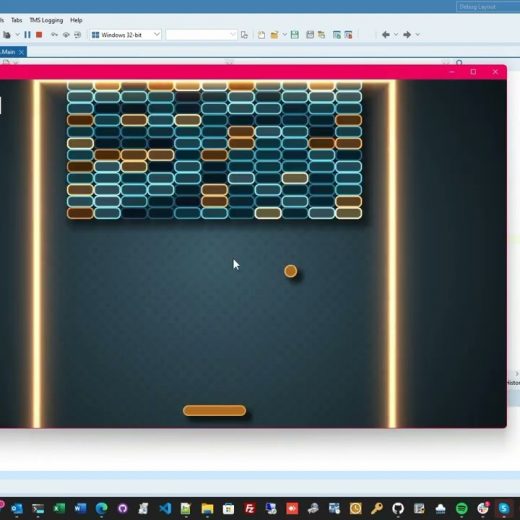
Picking the best User Interface framework for any windows application development is important and is beneficial for both developer and end-user. There is also a great number of third-party libraries in Delphi that you can use to level up your VCL or FMX apps and make them more visually appealing. Skia is probably one of the most powerful open-source 2D graphics libraries available today that provides a comprehensive 2D API that can be used across mobile, server, and desktop models to render images. We can also recall how Ian Barker managed to build a replica of the Star Trek data dashboard interface (LCARS) using the Skia4Delphi components. What else Skia4Delphi can do? Skia4Delphi is a fast-moving project under very active development and the possibilities of creating amazing interfaces using its powerful library are seemingly limitless. In this video which is an excerpt from the recently concluded Skia4Delphi webinar, we will get to see a demo showing what exactly Skia4Delphi is capable of. In this demo, we’ll see an interactive game similar to the classic Breakout game from the 80s. The sample comes with a simple form that contains TSKAnimatedPaintBox, one of the main components of Skia4Delphi. What makes it even more impressive is that the app only involves a few lines of codes. To top it all off, this Brick Game is a FireMonkey project! This means that this application can instantly work with multiple platforms such as Windows, macOS, Android, and iOS. To learn more about this amazing project that is done in Delphi using the Skia4Delphi library, feel free to watch the video below.
Data is the biggest asset for any business. It can help enterprises better understand their customers. It also improves their advertising campaigns and personalizes their content. However, you cannot access these benefits without proper analytics and reporting tools. While raw data has a lot of potential, a business needs data analytics and reporting too. This article will cover why analytics and reporting tools are essential. We will also see how businesses can use these to improve their performances. But before that, let’s understand the difference between data analytics, reporting, and picturing. What is the difference between data Analytics and reporting tools for visualization? Data analytics refers to examining data sets to conclude the information they contain. It is a technique that enables a business to take raw data to extract valuable insights from it. Data visualization is a term used to represent data through typical graphics. It uses charts, plots, animations, and infographics to represent data. These visuals display information that communicates complex data affairs. It also shows data-driven insights that are easy to grasp. Data reporting is the process of collecting and formatting raw data. It also includes translating it into a clear format to assess the ongoing performance. This data can then be used to answer basic questions about the state of a business. Why analytics and reporting tools for visualizations are essential for businesses What are data analytics? Data analytics is generally used to help companies better understand their customers. It also helps in personalizing content and creating content strategies. With analytics, businesses evaluate their ad campaigns and develop products. Generally, businesses use data analytics to boost performance and improve their worth. The data can include historical or new information businesses get for a particular initiative. The sublime example of data analytics is segmentation. It is used to help segment audiences by different demographic groups and analyze attitudes and trends. The businesses can then produce more specific, accurate, and just snapshots of public opinion. What do we mean by data visualizations? Data visuals are essential for businesses that want to communicate information clearly and efficiently. It is an advanced step in data analysis and data science. As per the report of Vitaly Friedman (2008), business groups use data visuals. They use it as an essential component of assertive connection. Visuals make research and data analysis effective and quicker. It does so by combining user-friendly and pleasing features. The best example of data picturing is making an institution’s budget. Budget numbers that are otherwise obscure and tough can be made simple and digestible with data visuals. This can then be delivered to the members to estimate the budget better. Why is data reporting important? Data reporting is essential when measuring the progress of every area of a business group. It informs professional decisions and day-to-day matters at any company. A data report is also essential to prioritize business tasks. It tells where a company should spend most of its time and resources and what needs more attention. The prime example of data reporting is business intelligence (BI) in healthcare. With its help, physicians can save lives by providing more effective and efficient patient care. Once you know why data analytics, reporting, and visuals are essential for business. Let’s understand how companies can improve their processes using analytics and […]
From this article, you will learn the difference between working with databases via the ADO technology and the FireDAC library. Using the right database technology is often a critical part of designing your apps, particularly for Windows application development where there is a very rich array of database choices, not all of which may be hosted on a Windows server. ADO (ActiveX Data Objects) is an app programming interface developed by Microsoft and based on the component technology ActiveX. ADO allows providing data from different sources (relational databases, text files, etc.) in an object-oriented format. FireDAC is a universal data access library that is intended for developing apps for different devices that should be connected to corporate databases. Thanks to a universal and highly-effective architecture, FireDAC ensures high-speed direct native access from Delphi and C++Builder to InterBase, SQLite, MySQL, SQL Server, Oracle, PostgreSQL, DB2, SQL Anywhere, Advantage DB, Firebird, Access, Informix, etc. It’s important to understand that FireDAC is a library. At the same time, ADO is a global technology that ensures access not only to databases but also to texts, documents, tables, and others. In this article, we will consider the connection to MS Access and SQLite databases using both technologies, conduct data sampling and display them on the grid. How to set up a connection to MS Access databases using ADO? To get connected to the MS Access database we need to add a TADOConnection component to the form and tune it. For setting the connection we can move to the ConnectionString property in the object inspector and press the button with three dots “…” or make a double-click on the component. We will see a form where it will be required to choose an option Use Connection String and press a Build button. In the next form, it is necessary to choose Microsoft Jet 4.0 OLE DB Provider and press Next >> We will get to the next tab “Connection”. Here we need to indicate the path to the database file and click OK. Then we need to click OK once again in the window where you can see our Connection String We have only one step left. In the Object Inspector window, it is necessary to switch the LoginPrompt property to False so that after connecting to the database we won’t get a window for inserting login and password. Setting the ADO connection to active If everything is set correctly, we are able to add the Connected property to True and our component will connect to the database. But we won’t do that. The best practice is to get connected to a database during the program launch. For doing that, we can make a double-click on the form and open a code editor where we will see a procedure for a form creation event and add there one code line as you can see in the screenshot below. Then we need to add a TADOQuery component to the form and make all the settings. First of all, we need to set the Connection property. In order to do it, from the dropdown list we need to choose ADOConnection1 which has been set at the previous steps. Now in the SQL property, we will set a question for data sampling. After that let’s go back to the […]
You are familiar with FreeAndNil(), but do you use it? How often? Are you using it right? As with most things in software development, it is a complicated topic. So let’s see what the experts have to say. We are going to debate the details in a friendly discussion with some of your favorite MVPs. Webinar details: This blog post will include the replay, slides, and more after the webinar. The Survey Says… When you register for the webinar we’ve included a short survey to see where you stand on the issue. During the webinar we will compare the general consensus with that of our MVP panel of experts. The following MVPs have weighed in on the topic, register today to see what they have to say! Dalija Prasnikar Frank Lauter Uwe Raabe Paul TOTH Radek Cervinka Olaf Monien Dr. Holger Flick Patrick Prémartin Boian Mitov Matthew Vesperman Vinicius Sanchez Darian Miller Juliomar Marchetti Erik van Bilsen Allen Bauer Nick Hodges
Thanks to the best low code platforms, it is now possible to develop applications with less effort. These won’t let you burn your budget, wait for days/ months, or hire a number of engineers. Low-code platforms help firms optimize their software development process. They provide various easy visual tools. According to Gartner, 65 percent of application development projects will use low-code development by 2024.[1] The importance of applications in our daily lives is certainly unprecedented. They are crucial in both personal and professional life. Low-code platforms are a beneficial investment for many corporate users. Businesses that want to grow must find new ways to increase their production. Investing in low-code platforms could be a more current approach to this problem. What are low code platforms and what are the benefits? A low code platform allows business users to develop applications without writing code. This makes it easier to create custom applications that meet specific business needs. Low code platforms have become increasingly popular in the last few years. These platforms are useful for companies that have limited knowledge of coding. Also, for companies who don’t have the resources to hire teams of developers to build applications from scratch. Lowering the barrier to entry The biggest benefit of low code is that it lowers the barrier for entry-level software development even further. There’s no need for developers to write code. Anyone with basic skills in user interface design can create software on a low code platform. This means that businesses can build an application without having full-time developers on staff. Increased speed and agility Low code allows organizations to move faster than before. They allow less-expereinced users to create software directly from their business requirements. So, instead of designing and developing, organizations can quickly move from prototype through testing. This often happens within days or weeks instead of months. More reliable and scalable Low code platforms deliver more reliable applications. They allow users to create applications that are easy to use, easy to change, and easy to maintain. The apps created with low code platforms are easy to scale compared to ones created with traditional programming languages like Java or C++. Greater resilience and control Data is stored in the application while using standard programming languages like Java or C++. It’s still saved externally in a database or cloud storage provider like Amazon S3 or Google Cloud Storage using a low code platform. This means you may keep your data private if necessary (for example, if it contains sensitive personal information) while maintaining complete control over who has access to it. Five examples of the best low code platforms Each low code platform has a distinct approach. This raises the question, do you have to choose one, or are there multiple platforms that you can select from? Here are the top 5 low code platforms that you can choose. 1. RAD Studio RAD Studio is a software development suite. It enables developers to create software for Windows, macOS, iOS, Android, and Linux. Development environment The RAD Studio development environment is easy to use. It provides all the tools to develop cross-platform applications. It includes a code editor, Integrated Development Environment (IDE), database tools, web server, database connectivity, reporting tools, etc. You can build desktop apps with native controls by using C++ […]
Skia4Delphi is one of the most useful open-source 2D graphics libraries and windows app development tools that can supercharge your FireMonkey and VCL apps’ user interface. One of the notable advantages of using this library is that it gives you the ability to combine or merge different animations with transparency that certainly adds that “wow factor” to your apps. In this video, we will get to know more about the quick and easy process of adding your favorite Lottie Animations and Telegram Stickers using the TelegramStickerBrowser project that is written in Delphi with the Skia4Delphi library. How to Download Stickers from Lottie and Telegram Lottie is a JSON Based Animation format that can easily add high-quality animation to any native app. TSkLottieAnimation is one of Skia4Delphi’s main components that allows users to easily overlay animations on top of each other. We can also recall Ian Barker managed to simulate a Star Trek-inspired data dashboard using these components. Lottie is an iOS, Android, and React Native library that renders After Effects animations in real time, allowing apps to use animations as easily as they use static images. They are also notably small files that work on any device and can scale up or down without pixelation. Aside from Lottie Animations, you can also download Stickers from Telegram, a popular messaging platform. To do so, simply browse the stickers you want using the Sticker Downloader Bot in Telegram. Copy the sticker to the clipboard and paste it into the chat box. This will provide you with a link to download which you can easily load to Delphi via the TelegramStickerBrowser component. How to Use TelegramStickerBrowser TelegramStickerBrowser, as the term clearly suggests, is a desktop browser for Telegram stickers (TGS) and Lottie (JSON) animation files. This uses the Skia4Delphi library that provides you access to a great number of free and high-quality animations. The TelegramStickerBrowser includes a small selection of colorful and HD stickers from LottieFiles but you can also download additional stickers from Telegram via the StickerDownload bot. Mckeeth will also demonstrate how to export these stickers from After Effects. If you want to learn more about this fascinating project that can supercharge your app’s interface, feel free to watch the video below.
As a fast and easy alternative to traditional software development, an open source low code platform is fast becoming the hot topic. By 2026, the open source software and services market is expected to reach a whopping $50B. This incredible expansion and growth is thanks largely due to the prediction that 75% of large enterprises are expected to use at least 4 low-code development tools. Let’s unpack that assertion a little here along with some background information on what open source is and how low code platforms factor into these estimates of accelerated uptake into low code or no code development solutions. What is anopen source low code platform? Since the buzz of low code platforms is everywhere, chances are you are familiar with the word. What exactly is it? Here is the definition “A low code platform is used to imply visual interfaces with basic logic like drag and drop with little to no coding in a platform” Why is it called an open source low platform? Because the source code is free and easily available to download, deploy and edit by the end user where it deems fit. In simple words, an end user can view, copy, learn, alter or share the code. They are used for scalability in building applications and processes. The platform may vary by requirements so if you want to get started here is the beginner’s guide you must check out! What are the pros of open source low code platform? 1. Flexibility Flexibility is a crucial quality of open source software that supports this approach to, software deployment. The end-user can have ultimate modification possibilities based on developer resources and requirements without any hassle or fear of the company’s terms and conditions being broken. 2. Reliability For open-source software, the user relies on the corporation to update, patch, and enhance the codebase, as well as the community. Updates and patches can be maintained and supported by the community. 3. Control and fast transformation Organizations are better positioned to adapt and respond to rapidly changing business situations because to these low-code features so that for their own deployment, the end-user can alter and control the application’s basic code. Companies with the resources to do so can use this to create a product that is truly suited to given requirements. 4. Higher Productivity What used to take months now takes days, if not minutes now, thanks to low-code development. Which allows more apps to be produced in as little time as possible. Time is no longer an impediment to true innovation all because of low-code development. 5. Open Community The code can be peer-reviewed and maintained by participants in an open source community having passionate programmers and coders. This is indicative of the open source development community’s collaborative and helpful nature such as (Wikipedia, GitHub, etc). 6. Low cost With the ability to build more apps in less time, decreases in cost have been observed. Using low-code tools, the average organization avoids hiring two IT developers. Over the course of three years, the applications designed generated around $4.4 million in enhanced corporate value. – (Forrester) Expectation vs Reality – What is the Gap? Low-code means not having any code As the name suggests, is kind of true. It requires at least a little coding depending on some […]
There is a fascinating conversation between Neo and the Oracle in The Matrix Reloaded movie. Neo asks the oracle that if she already knows, how can he make a choice? She cleverly replies because you have already made your choice. You only came to me to try to understand why? Thus, it is strange that we often pick things emotionally and then logically persuade ourselves that we have chosen the best option. As a result, we come to comparison not to find the best option but only to convince, rationalize, or understand our own decision. We are prone to make the same mistake while choosing the best native app builder for development. It is easy to choose between good and evil but choosing between good and better is always challenging. Choosing the best one is always a difficult task because we must consider many things. For example, say there are three Native App Builders on the shelf. A is free but least productive, B is an excellent value for money, and C is overhyped. If we choose anything other than B, that will be poor and against our interests. Also, we will be misusing our financial vote, depriving a great company of developing more excellent products for us. Thus, we need extensive research to finalize a development tool. Fortunately, a new whitepaper helps us by evaluating three Windows application development frameworks, and you can download it for free now. What have we not learned from the DOTCOM bubble? Due to several reasons, it is easy for companies with deep pockets to exaggerate things in the software industry. Firstly, because it is software, one cannot SEE or correctly measure the end product. Secondly, its long-term consequences might become evident only after several years, and thirdly, many decision-makers do not have a total grasp of tech. Thus, they turn towards heuristics and guesstimates. This situation makes a perfect ground for snake oil marketers to join the party and profit from other people’s losses. It happened on an immense scale during the DOTCOM bubble, but it is constantly happening on different levels in the software industry. Carefully reading this Whitepaper might save you from investing in a poor tool. What might they be hiding from you? Why is a software production system designed in the way it is? There are technical and historical reasons, but there might also be some control reasons. Many tools are designed with such a mindset that the more users invest in the system, the stronger the owner company becomes. Thus, individual users lose power and control in the long run, and the parent company gets stronger and stronger, just like social media. Fortunately, it is easy to spot such practices. The more proprietary files you have to ship with the end product, the closed the system is, and the developer will have less control over the product in the long run. What are your criteria for choosing the best native app builder? Many people search for the best free app builder, while others look for the best app builder without coding. Some prefer the fame of the tool, and some like its history. These choices might not be comprehensive. We need specific criteria covering all aspects of the software development life cycle. Our Whitepaper includes all necessary points […]
Technology up-gradation has boosted developers’ requirements to compete in the market. For advanced features and high-performance, multi platform app tools are becoming a necessity as it has become common now for users to have a variety of devices on which they consume content and perform daily functions. By 2021, the demand for a multi platform app had surpassed $7.9 Billion and there is no sign of that slowing any time soon. Not only this, cross platform apps are vital for rich features and high-performing applications which encompass hardware like GPS and gyroscope sensors, the ability to track or trace user, as well as remain connected while traveling. So, if you are wondering which tools to use for making cross-platform apps, continue reading. This article will see what cross-platform development is and the best tools to build a multi platform app. What is a multi platform app? A multi platform app development framework is ideal for saving time and accurate execution. As the name suggests, cross-programming develops apps that can run on multiple platforms such as desktop and mobile, instead of building different apps for single, ‘vertical’ platforms. For example, by choosing the right multi platform technology an Android app developer would no longer have to worry about building a separate app for iPhones or iPads. Instead, the developer can create a multi platform app which enables the app’s code to run on both Android and iOS without almost no changes. What are the 5 Best tools to build multi platform apps? The list of multi platform apps can be long, but we will only include the five best tools in the business. 1. RAD Studio Today, app development extends beyond the device. It creates the need to build connected apps that give real-time communication across all devices. RAD Studio’s Multi-Device Application Platform does this best. RAD Studio’s multi-device app platform delivers truly connected applications that support real-time communication. It also gives access to enterprise data and cloud services. All these technologies are included in the RAD Studio XE5 enterprise and professional versions. One of the main advantages of RAD Studio’s multi-device app platform is the rapid connectivity of apps to enterprise databases. Additionally, RAD Studio gives access to cloud-based RESTful web services and BaaS providers. RAD Studio comes with FireMonkey FMX framework and FireDAC data access. The FireMoneky FMX framework is an app development and runtime platform. With this, you can develop apps faster using visual components. Also, you don’t have to maintain separate development projects to deliver your app natively for multiple device form factors on Windows, Mac OS X, iOS, and Andriod. RAD Studio’s FireDAC gives high-speed database connectivity for MS SQL Server, InterBase, DB2, Oracle, Sybase, MySQL, Firebird, SQLite, and PostgreSQL. With RAD, you can mobilize your enterprise faster and wiser. 2. React Native In the list of best cross-platform development tools, React Native holds the second spot. It is a JavaScript-based framework. Web developers can build mobile apps with React Native easily and quickly. It has many development resources, including APIs and UI Libraries. These resources help enhance app-building projects. It also provides support with an extensive community to React Native developers. Some of its main features include enhanced performance, native-like UI, hot reload, easy-to-use styling schema, and popular JavaScript-based development. All these features make React […]
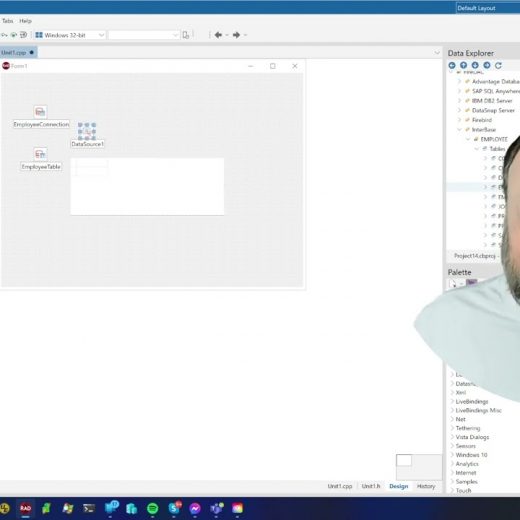
Following the video where Jim McKeeth demonstrated how to create a simple Database Application using FireDAC and Interbase in C++ Builder is a follow-up demo. This time, he will show us how to create a VCL application using the traditional bindings and data-aware components. Visual Component Library or simply VCL has always been part of native windows development specifically for developing user interfaces for Microsoft applications. Unlike FireMonkey which is designed for building multi-device cross-platform apps, VCL only supports Windows-based development. However, the framework still comes with a huge library of visual components and a robust collection of 3rd party components. Native Windows development with data-aware components Similar to FireMonkey, VCL also supports LiveBindings but it also comes with traditional bindings which will be used as an example for this short demo. It generally follows the same procedure as the previous demo. To get started, open the Windows VCL Application – C++ Builder in RAD Studio. Once launched, drag all the necessary components in the form. For this example, InterBase sample components are being used. Similar to the previous demo, users can freely edit the Query Editor or better yet add Field Editor for convenience. This time, McKeeth will be using a TDBGrid, a Data-Aware component. Delphi’s data-aware components are components that normally reside on a Standard palette tab but have been modified to display and manipulate the content of data in a dataset (table or query). These components know how to talk to a data source (a connection between a dataset and data-aware control). You also have the option to add the Navigation Bar. To learn more about how to easily create VCL Application using Data Aware components in Delphi, feel free to watch the demo below.
Invormațiile pe cale Dvs le introduceți în prezentul formular nu se păstrează online, dar se vor transmite direct la destinație. Mai multe informații găsiți în Politica Noastră de Confidentialitate
We use cookies to ensure that we give you the best experience on our website. If you continue to use this site we will assume that you are happy with it.