Delphi

What Is A Low Code Application Platform? An Overview

The idea of a low code application platform has become a trend in recent years. By 2024, Gartner projects that low code will comprise more than 65% of app development activity. The need to offer digital solutions for COVID-19 has increased this trend. It’s vital to understand the notion of low code. A low code platform is a development environment. It allows non-technical users to create applications. These apps can be deployed on the cloud. Low code platforms use visual programming languages. They are typically compatible with multiple devices. Also, they are featured to work with operating systems. With a little research, you can easily find a perfect low-code application platform for you that suits your needs.  What is a low code application platform? The low code application platform is a method of designing and developing software. They are specifically used to design software with no coding. Low code application platforms enable enterprises to create unique solutions. For these unique solutions, they provide cutting-edge features. These features are tailored to certain business models. These platforms provide easy visual builders, ready-to-use code snippets, and form & report templates. They also have built-in connectors. These are used to accelerate development. Also, they expand the potential to innovate to a wider audience. Users can also get right to work on their apps. These platforms automate common coding tasks. These common coding tasks include framework creation, data modeling, and user interface development. What are the benefits of using a low code application platform? Here are some advantages of low-code development. A low code application platform is often easier to use The platforms provide drag-and-drop interfaces and visual editors. They allow non-technical business users to create apps quickly. Business users can design screens using the platform’s visual editing tools. They can easily connect them with data sources, business rules, and other functionalities via connectors. This makes it possible to develop complete custom applications. Also, there’s no need to write any code as well in these low code application platforms.  A low code application platform can promote increased development agility Low-code platforms can help companies accelerate application development. With them, they can create custom applications quickly. Also, teams can work together better. Thus, they can work on the same app in real-time. A low code application platform allows you to create interfaces with Drag-and-Drop Drag-and-drop usage is available on every established low-code platform. It is one of the most significant and beneficial elements. It facilitates the development process.  It assists both citizen hobbyist and professional developers. The time to market can be much quicker with a low code application platform Low code platforms allow businesses to create applications. These apps can be deployed directly and quickly. This means that businesses can get their products and services to market faster. This is important in today’s fast-moving environment. Lower usage cost Low code platforms are cheaper than traditional software development. They do not require developers to write code manually. Low code platforms are also easy to use. Less experienced IT experts can operate them without compromising processor security. Increased productivity with low code application platforms – little or no code means less work and more efficiency Because low code platforms are so intuitive, you can build your entire application without writing any code. This means that you don’t […]

Read More

5 Easy Things To Learn Today About C++ Software

Hello Developers, C++ is one of the oldest and stronger programming language. It has many functions and methods to manipulate strings and doing string operations as fast as possible in your C++ software. These options and different string types allow you to develop low memory usage and faster applications in all sorts of situations. Today we will continue to look at some more string and wide string operations available in modern C++. We will learn to obtain string capacity and length. We will also learn how to compare strings. Iterators are another modern feature of C++ and we will learn how to use how to use then with Wide Strings. One of the important things is reading and writing text files. Also, we take a look at how to use wide strings in file I/O operations. Finally, we learn to use Form Properties of C++ Builder, Delphi and RAD Studio. Head to LearnCPlusPlus.org to learn all about how to create C++ software LearnCPlusPlus.org is packed full of great articles for professionals and beginners alike. The posts vary from articles suitable for people who are just starting to learn C++ – basics like string handling, pointers, loops, and all those fundamental building blocks of this rich and powerful programming language – to much more in-depth and advanced subjects like artificial neural networks and AI, along with the math behind it. Our focus is on the C++ language, particularly modern C++, and will work with almost any environment and IDE software you can choose although, of course, we believe RAD Studio C++ Builder is the best option! If you are new to RAD Studio, we think these posts may help you as much as a rapid introduction to programming in C++, all the way to the most robust, modern, and latest techniques for those more experienced with the language. For those who are perhaps wanting to expand their knowledge with the most up-to-date features, routines, and methodologies this is a great little boost (pun intended) to your C++ knowledge. The new RAD Studio 11, C++ Builder 11, Delphi 11 are released with great new features and we are developing and testing new examples for you with the latest RADS 11 that means.LearnCPlusPlus.org examples are working well with the latest C++ Builder. You can see more of our C++ posts on this blog by clicking the following dynamic search link: https://blogs.embarcadero.com/?s=C%2B%2B Here are today’s selections: How can we use C++ Builder in the most modern and efficient ways? These posts are designed to give you more information and to be easy to understand the modern and professional ways that we use in C++. Here are the topics, This Is How String Capacity And Lengths Work In A C++ App How To Make A Comparison Between Strings In A C++ App How To Use Wide String Iterators In Modern C++ Software The Modern Way To Read Formatted Wide Strings In A C++ App How To Use Form Properties In C++ Cross Platform Apps What kind of C++ software questions are we answering? These are the questions that we answer in this collection: How can I use the string capacity and length methods in a C++ app? What kind of methods I can use to get size of a std::string? How can I use the empty() method with strings? How to get length() of a std::string? How can I use size() property of […]

Read More

What Are Cross Platform Programming Languages?

Building cross-platform software is a challenging process. You need to consider many critical aspects for the successful development of the product. Choosing the best cross platform programming languages for development is at the top of that list. This article aims to aid your language selection by discussing cross platform programming languages, their evolution, features, and pros, and cons. A cross platform programming language is a programming language that enables developers to develop apps for various platforms using a single codebase. These apps can run seamlessly on multiple platforms without significant changes. Java, React Native, Flutter, Ionic, Sencha, and Xamarin are some popular cross platform programming languages and frameworks. How did the evolution of cross-platform programming languages happen? Cross-platform programming languages are not something novel. Cross-platform development has been around for more than two decades now. However, each language has evolved distinctly, adapting to various architectures and offering more features. First, C was considered a truly cross platform programming language in the early 70s. It was well-suited for system programming. Furthermore, C was capable of reusing the same source code across entirely different architectures for developing kernels and device drivers. However, it required some minor modifications to the code. After C, some other cross platform programming languages such as C++ and Delphi emerged to enlarge the field of cross-platform development further. C++ as a cross platform programming language C++ is also one of the initial cross-platform languages, even though it couldn’t shift into the world of the web and mobile. C++ is best suited for developing software like operating systems, database engines, game engines, compilers, and servers. At the same time, C++ is a great choice as a cross-platform language. You need to have sound knowledge and familiarity with the ecosystem to develop apps faster using it. Read this article to learn about the best IDE for the C++ newbie. The C++ builder by Embarcadero is packed with a set of robust libraries to boost productivity and deliver amazing user experience. Delphi is one of the most versatile cross platform programming languages Delphi is a strongly typed, event-driven, cross platform programming language with an extensive supportive tools and frameworks ecosystem. It also features a wide range of web and database libraries for the rapid development of apps that work on various platforms such as web, mobile, and internet-enabled devices. Delphi enables you to build a native app. A native app is an application designed to work on a specific device and its OS, utilizing that device’s device-specific software and hardware. These native apps can tap into specific resources, enabling them to easily access several services on a device like an accelerometer, microphone, and push notifications. The latest Delphi 11.1 release of Embarcadero helps you build native apps 5x Faster with a single codebase. Try Delphi 11.1 For Free Why do we need cross platform programming languages? Developing cross-platform software requires coding in a way that removes all the dependencies from a particular platform. To accomplish that, you have to use a programming language that supports you. That is where cross-platform programming languages come into play. The majority of popular programming languages support developing cross-platform software. However, some programming languages work better by supporting many platforms or offering solid abstraction layers to manage the differences between platforms transparently. Embarcadero offers a wide range of products such as RAD Studio, Delphi, and C++ Builder for developing […]

Read More

The Parallel Debugger plugin is now available for RAD Studio 11!

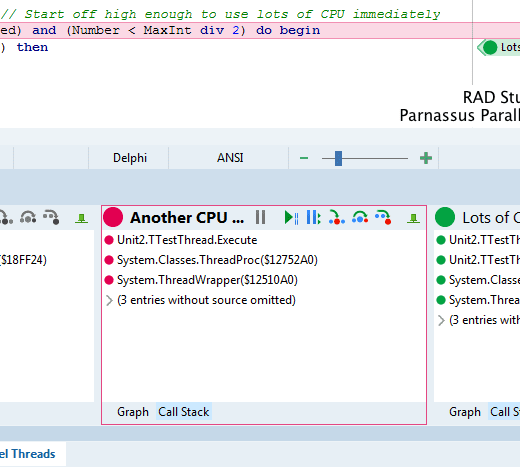
The Parallel Debugger plugin, originally from Parnassus, is now available in GetIt for RAD Studio 11.x (ie 11.0 and 11.1.) This follows up making Bookmarks and Navigator available a few weeks ago. The Parallel Debugger is an addon that lets you see what’s going on in all threads in your app at once. A traditional debugger in the IDE shows only one thread, one call stack, and so forth. The plugin shows you all call stacks for all threads next to each other (ie visually parallel matching that they are running in parallel), adds markup in the editor showing where each thread is executing, color-codes threads, lets you run, step or trace into on a per-thread basis, and more. Read the original announcement blog post to see the full set of features! Screenshot showing some of the Parallel Debugger features: parallel call stacks, coloured threads, extra editor markup, per-thread run/pause/step/trace, etc To install, go to the Tools menu in the IDE, GetIt Package Manager, and select the IDE Plugins section in the category selector on the left. You’ll see it listed: select it and click Install. The Parallel Debugger selected in GetIt. Note there are many other IDE addons in the same category too! The Debugger plugin does stress the various debuggers, because each of them is doing so much more (roughly linearly increased by the number of threads in your app.) It works best on Windows, and we don’t recommend using it for remote debugging, such as for macOS. It adds a new top-level menu called Thread, and in that is a submenu ‘Feature Level’. Keep that on ‘CPU Only’ when you don’t want the Parallel Debugger heavily involved. Then turn it back on when you need to do some debugging in parallel! We hope you find this useful, and helps you debug and understand your app’s parallel actions.

Read More

What Is Low Code And Why Do We Need Low Code App Development

In this technology era, the growth of digital services and evolving consumer needs have made companies seek faster ways for digital transformation. Low Code is an excellent solution adopted by companies worldwide to boost their digitalization. Yet, what is low code and what is a low code programming language? In this article, let’s find out what it is exactly. We’ll also discuss why we need Low Code, Pros and cons of Low Code, and some best Low Code platforms you can find in the market. What is low code? Low Code is a modern approach to software development that emphasizes little to no coding. It allows faster delivery of software with less manual coding. Furthermore, you don’t need extensive knowledge of programming languages to build apps with the Low Code approach. A low code application platform is a bunch of tools that facilitate low code development. It enables building applications visually with the help of modeling and a GUI. One key feature of low code platforms is their drag-and-drop layout builder. According to Gartner, more than 65% of software development projects will use low code approach by 2024. The pressure to produce digital solutions to cope with Covid 19 pandemic has further increased the adoption of this approach. Why do we need low code app development? The low code approach simplifies the development of sophisticated business apps. It allows you to easily build complete software rich with modern interfaces, integrations, and logic without writing thousands of complex code lines. The following are some major benefits you can gain through this low code application platform approach. Increased productivity – Since low code development speeds up application delivery, a project once took a few months now only takes a few days. Thus, low code has removed the time barrier from software development, paving the way for real innovation. Reduced Costs – The ability to deliver more apps in less time undoubtedly reduces the costs. However, it’s not the only driver of this cost savings. Low code also eliminates the need for more developers, cutting down hiring costs. Besides, Low Code platforms make everyone in an organization more productive without being limited to IT people. Improved business agility – In this rapidly evolving technology landscape, businesses must effectively adapt and respond to changing market conditions and potential opportunities. Building apps using traditional development approaches to cope with these needs can be tedious. Low code development tools aid the rapid development of systems that are capable of meeting numerous requirements. Enhanced customer experience – The impacts of low code development travel beyond the IT companies who are using it. The consequences of speedy development lead to better customer satisfaction. For instance, Low Code allows development companies to adapt to evolving market conditions and customer needs quickly. Best Low Code Platforms Businesses with the need to scale should search for effective ways to maximize their productivity. Investing in one of the best low code platforms might be a great solution to this endeavor. They are basically app builder software that includes intuitive and visual tools for users to build apps rapidly with less effort. PowerApps, Retool, Quixey, Creatio, GeneXus, Zoho Creator, Appian, and Mendix are some popular Low Code app development platforms. What Are The Pros Of Low Code Development? Mitigation of shadow IT – […]

Read More

How To Supercharge Your User Interface With Skia4Delphi

Skia is a very popular open-source 2D graphics library that provides common APIs that work across a variety of hardware and software platforms. It is interesting to note that is sponsored and managed by Google but it is available for use by anyone. In fact, it serves as the graphics engine for many web browsers today including Google Chrome, Chrome OS, Android, Mozilla Firefox, and Flutter to name a few.  The product has been around since 2005 and it has become part of most windows application development. The same thing goes with VCL and FireMonkey cross platform apps. Thanks to the Barbosa brothers from Brazil, the brilliant minds behind the Skia4Delphi library (with the encouragement of Embarcadero’s Ian Barker and Jim McKeeth). They were also hailed as 2021 Delphi Award winners for their impressive work. What you should know about Skia4Delphi Skia4Delphi is a cross-platform 2D graphics API for Delphi platforms based on Google’s Skia Graphics Library. It is a free-to-access library that provides major components/controls like TSkLottieAnimation, TSkPaintBox, and TSkSvg. In this webinar, we will take a deep dive to explore this useful library and discover how this can supercharge the user interface of your apps. The webinar will also discuss why it is more beneficial to use Vector graphics (SVG) than JPEG and PNG image formats. SVG and Lottie Animations make it easy for the designer to create smooth and high-resolution user interface templates. The webinar will also provide us with some cool demos including some visually stunning Shaders and how this language (SkSL) can effectively level up your interface with its beautiful 3D animations. One of the cool things about the Skia Shader Language is it works across all platforms, and it doesn’t require OpenGL or any special drivers to be installed on the platform. Some of the demos in this webinar will also show what exactly Skia4Delphi is capable of.  These samples include an interactive Brick game, a Star Trek data dashboard replica, and many other mobile demos showcasing Skia4Delphi’s full potential. We will also be introduced to Telegram Sticker Browser, a project that helps users browse Lottie animations and Telegram stickers more efficiently. To know more about the amazing Skia4Delphi library and how this can turbocharge your VCL and FMX apps, feel free to watch the Skia4Delphi webinar below. It is also interesting to note that Embarcadero Technologies is currently organizing a SKIA For Delphi Contest encouraging everyone to make their own GUI application using the Skia4Delphi features.

Read More

Everything You Need To Know About An IDE For Coding

Programmers write code on different operating systems like Windows, Linux, and Mac OS. Each OS has a dedicated IDE, but there’s a good selection of IDE tools out there when you’re searching for an IDE for coding. These include tools for writing, building and testing the code. Using an IDE gathers together a number of development tools under a single framework, application, or service that allows users to pinpoint coding errors to simplify application development. Let’s take a moment to examine what an IDE is and what it can do for developers. What is an IDE? The acronym IDE stands for Integrated Development Environment and facilitates the development of many applications. For example, a Windows IDE offers one central interface consisting of all the tools necessary for developers to create and deploy applications which are designed for the Windows operating system. These tools encompass the following four features: Code editorThe primary purpose behind designing code editors is to write and edit source code. These editors are also like text editors, but designers utilize code editors to simplify and enhance the process of writing and editing code. This is especially beneficial for developers as the coding phase becomes easier. CompilerWindows compiler helps transform the original code, written in human-readable form, into an executable machine-readable format. DebuggerDebuggers examine code and find errors in the way functions are executed. These help developers test and understand the flow of application programs. Code examination eliminates errors, so your program performs how you want it to. AutomationThese tools allow users to develop procedures within a program, making it easier to automate tasks and save time. Key features of the IDE for coding Some IDEs also come with the following three features: Class browserClass browser is used to reference the properties of an object-oriented class hierarchy. Object browserObject browser is used to examine object instances in a running application command. Class hierarchy diagramThe diagrams help programmers to visualize the structure of OOP code. How to make the right choice for IDE for coding? The choice you make is highly dependent on your needs as a developer. There’s nothing like an IDE which is perfect in every way for every person. The needs you may have when developing a specific application may change depending upon what you hope to achieve. However, below are a few pointers that you should consider before choosing an IDE that best meets your needs: The costEven though most of the IDEs are free, many of the addons may not be. Most of the paid IDEs come with premium features and support. When opting for an IDE like Delphi, it’s crucial to remember to choose according to the Windows app development requirements. Ease of useIDEs consisting of a considerable number of libraries and packages often can become complex and harder to use. This, however, is highly dependent on the implementation of these libraries. Server connectionAnother crucial aspect of choosing IDEs is to check if you can deploy your code to the server from your IDE. Why do developers use IDEs? IDEs help make programming less cumbersome by allowing users to program new applications quickly. This is because multiple utilities don’t need to be manually configured and integrated during the initial setup process. Also, by becoming familiar with a single integrated environment, developers do not […]

Read More

Check Out This Fun Brick Game Written In Delphi With Skia4Delphi

Picking the best User Interface framework for any windows application development is important and is beneficial for both developer and end-user. There is also a great number of third-party libraries in Delphi that you can use to level up your VCL or FMX apps and make them more visually appealing. Skia is probably one of the most powerful open-source 2D graphics libraries available today that provides a comprehensive 2D API that can be used across mobile, server, and desktop models to render images. We can also recall how Ian Barker managed to build a replica of the Star Trek data dashboard interface (LCARS) using the Skia4Delphi components. What else Skia4Delphi can do? Skia4Delphi is a fast-moving project under very active development and the possibilities of creating amazing interfaces using its powerful library are seemingly limitless. In this video which is an excerpt from the recently concluded Skia4Delphi webinar, we will get to see a demo showing what exactly Skia4Delphi is capable of. In this demo, we’ll see an interactive game similar to the classic Breakout game from the 80s. The sample comes with a simple form that contains TSKAnimatedPaintBox, one of the main components of Skia4Delphi. What makes it even more impressive is that the app only involves a few lines of codes. To top it all off, this Brick Game is a FireMonkey project! This means that this application can instantly work with multiple platforms such as Windows, macOS, Android, and iOS. To learn more about this amazing project that is done in Delphi using the Skia4Delphi library, feel free to watch the video below.

Read More

Why You Should Think About Analytics And Reporting Tools

Data is the biggest asset for any business. It can help enterprises better understand their customers. It also improves their advertising campaigns and personalizes their content. However, you cannot access these benefits without proper analytics and reporting tools. While raw data has a lot of potential, a business needs data analytics and reporting too. This article will cover why analytics and reporting tools are essential. We will also see how businesses can use these to improve their performances. But before that, let’s understand the difference between data analytics, reporting, and picturing. What is the difference between data Analytics and reporting tools for visualization? Data analytics refers to examining data sets to conclude the information they contain. It is a technique that enables a business to take raw data to extract valuable insights from it.  Data visualization is a term used to represent data through typical graphics. It uses charts, plots, animations, and infographics to represent data. These visuals display information that communicates complex data affairs. It also shows data-driven insights that are easy to grasp.  Data reporting is the process of collecting and formatting raw data. It also includes translating it into a clear format to assess the ongoing performance. This data can then be used to answer basic questions about the state of a business.  Why analytics and reporting tools for visualizations are essential for businesses What are data analytics?  Data analytics is generally used to help companies better understand their customers. It also helps in personalizing content and creating content strategies. With analytics, businesses evaluate their ad campaigns and develop products. Generally, businesses use data analytics to boost performance and improve their worth. The data can include historical or new information businesses get for a particular initiative.  The sublime example of data analytics is segmentation. It is used to help segment audiences by different demographic groups and analyze attitudes and trends. The businesses can then produce more specific, accurate, and just snapshots of public opinion.  What do we mean by data visualizations? Data visuals are essential for businesses that want to communicate information clearly and efficiently. It is an advanced step in data analysis and data science. As per the report of Vitaly Friedman (2008), business groups use data visuals. They use it as an essential component of assertive connection. Visuals make research and data analysis effective and quicker. It does so by combining user-friendly and pleasing features.  The best example of data picturing is making an institution’s budget. Budget numbers that are otherwise obscure and tough can be made simple and digestible with data visuals. This can then be delivered to the members to estimate the budget better.  Why is data reporting important? Data reporting is essential when measuring the progress of every area of a business group. It informs professional decisions and day-to-day matters at any company. A data report is also essential to prioritize business tasks. It tells where a company should spend most of its time and resources and what needs more attention.  The prime example of data reporting is business intelligence (BI) in healthcare. With its help, physicians can save lives by providing more effective and efficient patient care.  Once you know why data analytics, reporting, and visuals are essential for business. Let’s understand how companies can improve their processes using analytics and […]

Read More

This Is How To Use ADO And FireDAC With Databases

From this article, you will learn the difference between working with databases via the ADO technology and the FireDAC library. Using the right database technology is often a critical part of designing your apps, particularly for Windows application development where there is a very rich array of database choices, not all of which may be hosted on a Windows server. ADO (ActiveX Data Objects) is an app programming interface developed by Microsoft and based on the component technology ActiveX. ADO allows providing data from different sources (relational databases, text files, etc.) in an object-oriented format.  FireDAC is a universal data access library that is intended for developing apps for different devices that should be connected to corporate databases. Thanks to a universal and highly-effective architecture, FireDAC ensures high-speed direct native access from Delphi and C++Builder to InterBase, SQLite, MySQL, SQL Server, Oracle, PostgreSQL, DB2, SQL Anywhere, Advantage DB, Firebird, Access, Informix, etc. It’s important to understand that FireDAC is a library. At the same time, ADO is a global technology that ensures access not only to databases but also to texts, documents, tables, and others. In this article, we will consider the connection to MS Access and SQLite databases using both technologies, conduct data sampling and display them on the grid. How to set up a connection to MS Access databases using ADO? To get connected to the MS Access database we need to add a TADOConnection component to the form and tune it. For setting the connection we can move to the ConnectionString property in the object inspector and press the button with three dots “…” or make a double-click on the component. We will see a form where it will be required to choose an option Use Connection String and press a Build button. In the next form, it is necessary to choose Microsoft Jet 4.0 OLE DB Provider and press Next >> We will get to the next tab “Connection”. Here we need to indicate the path to the database file and click OK. Then we need to click OK once again in the window where you can see our Connection String We have only one step left. In the Object Inspector window, it is necessary to switch the LoginPrompt property to False so that after connecting to the database we won’t get a window for inserting login and password. Setting the ADO connection to active If everything is set correctly, we are able to add the Connected property to True and our component will connect to the database. But we won’t do that. The best practice is to get connected to a database during the program launch. For doing that, we can make a double-click on the form and open a code editor where we will see a procedure for a form creation event and add there one code line as you can see in the screenshot below. Then we need to add a TADOQuery component to the form and make all the settings. First of all, we need to set the Connection property. In order to do it, from the dropdown list we need to choose ADOConnection1 which has been set at the previous steps. Now in the SQL property, we will set a question for data sampling. After that let’s go back to the […]

Read More