VCL

FNC Physics Components in TMS Analytics & Physics 3.3

TMS Analytics & Physics library is a set of classes that provide functionality for building powerful math and engineering applications with Delphi IDE. In the new version 3.3 of the library, we introduced special FNC physics components to take advantage of Delphi’s rapid application development. In this article, we’ll consider the base concepts of the FNC physics components and provide information on how to work with units of measurement.  Let’s consider the following FNC physics components: TFNCUnitProvider – creates a physics environment for the application; contains information about registered physics entities and provides units of measurement to other physics components. TFNCUnitConverter – provides properties and functionality to convert physical values measured in two different units. To begin an FNC physics application we first need to put a TFNCUnitProvider component on the form. The component has the following published properties: Quantities (TQuantityCollection) – a collection of registered physical quantities. Prefixes (TPrefixCollection) – a collection of registered prefixes that can be used to create units with multiplier factors (like kilo-, milli-, and so on). Units (TUnitCollection) – a collection of registered units of measurement that can be used to create complicated derived units. When you put a TFNCUnitProvider on the form in design-time, it automatically finds all registered quantities, prefixes, and units. The collections of these items are not editable, they only provide information about available physical entities. When an item is selected in a collection, its properties are shown in the Object Inspector. In the picture below, you can see a collection of physical quantities:   Any quantity has the following properties: Name (string) – the name of the quantity. Symbol (string) – a common symbol for the quantity designation. Dimension (string) – physical dimension of the quantity. As an example, we showed the ‘Area’ quantity. Its physical dimension is ‘L^2’ – squared length. More information about physical dimensions can be found in the documentation for the library. Analogously, you can view information about all registered unit prefixes, as shown in the picture below.   A prefix provides the following properties: Name (string) – the name of the prefix. Symbol (string) – symbol, identifying the prefix in composite units. Value (real) – the multiplier factor of the prefix. And finally, you can view all available units of measurements.   Any unit provides the following properties: Name (string) – the name of the unit. Symbol (string) – the symbol of the unit that is used to identify this unit for conversion algorithm and other manipulations. Dimension (string) – physical dimension of the unit. The unit provider component supplies the physical entities to other components, for example, to the TFNCUnitConverter. This component is intended to convert physical values measured in two different units and has the following properties: Provider (TFNCUnitProvider) – a unit provider. Unit1 (TUnitProperty) – the first unit of measurement for conversion. Unit2 (TUnitProperty) – the second unit of measurement for conversion. Value1 (real) – the first value, measured in the first unit of measurement. Value2 (real) – the second value, measured in the second unit of measurement. Valid (boolean) – read-only value defining if all input items are valid for conversion. Error (string) – read-only text of an error that occurred during conversion. IntervalConversion (boolean) – defines if making the interval conversion or not. First of all, you need to […]

Read More

PDF generation with complex graphics in Delphi

Intro TMS FNC Core is the core foundation of FNC. It offers a solid structure for the other FNC component sets such as TMS FNC UI Pack and TMS FNC Maps. In the past, we have demonstrated the capabilities of TMS FNC Core in various ways. Below are a couple of links to blog posts about functionality available in TMS FNC Core. A browser, JSON persistence, printing, SVG support and many more. Today I want to focus on another “hidden gem”: PDF generation and in particular focusing on drawing complex graphics. Basic drawing  Before going to complex drawing statements, we need to take a look at the basics. Generating a PDF starts by specifying a file name, adding the first page, and then the PDF context is ready to be accessed via the Graphics property. In the sample below, we draw a simple rectangle by setting the properties of the fill & stroke and by calling p.Graphics.DrawRectangle. uses   FMX.TMSFNCPDFLib, FMX.TMSFNCGraphicsTypes; procedure TPDFGenerationForm.GeneratePDF; var   p: TTMSFNCPDFLib; begin   p := TTMSFNCPDFLib.Create;   try     p.BeginDocument(‘MyPDF.pdf’);     p.NewPage;     p.Graphics.Fill.Color := gcYellowgreen;     p.Graphics.Stroke.Color := gcGreen;     p.Graphics.Stroke.Width := 4;     p.Graphics.DrawRectangle(RectF(100, 100, 300, 300));     p.EndDocument(True);   finally     p.Free;   end; end; This generates the following PDF The basic ITMSFNCCustomPDFGraphicsLib interface (p.Graphics property) exposes a lot of basic drawing calls to draw shapes constructed out of simple primitives or more complex paths. On top of that, it’s possible to export images as well. Using these calls gives you the flexibility to enhance your PDF with vector sharp graphics. The way this needs to be done is by calling each draw statement in a specific order. See this sample below to draw a bezier curve. uses   FMX.TMSFNCPDFLib, FMX.TMSFNCGraphicsTypes, FMX.TMSFNCPDFCoreLibBase; procedure TPDFGenerationForm.GeneratePDF; var   p: TTMSFNCPDFLib; begin   p := TTMSFNCPDFLib.Create;   try     p.BeginDocument(‘MyPDF.pdf’);     p.NewPage; p.Graphics.Stroke.Color := gcDarkseagreen; p.Graphics.Stroke.Width := 3; p.Graphics.Stroke.Kind := gskSolid; p.Graphics.DrawPathBegin; p.Graphics.DrawPathMoveToPoint(PointF(350, 40)); p.Graphics.DrawPathAddCurveToPoint(PointF(310, 130), PointF(445, 50), PointF(398, 115)); p.Graphics.DrawPathEnd(dmPathStroke); p.Graphics.Stroke.Width := 0.5; p.Graphics.Stroke.Color := gcBlack; p.Graphics.Fill.Color := gcNull; p.Graphics.Fill.Kind := gfkSolid; p.Graphics.DrawLine(PointF(350, 40), PointF(310, 130)); p.Graphics.DrawLine(PointF(445, 50), PointF(398, 115)); p.Graphics.DrawRectangle(RectF(442.5, 47.5, 447.5, 52.5)); p.Graphics.DrawRectangle(RectF(395.5, 50 + 62.5, 400.5, 50 + 67.5)); p.Graphics.DrawRectangle(RectF(347.5, 50 – 12.5, 352.5, 50 – 7.5)); p.Graphics.DrawRectangle(RectF(307.5, 127.5, 312.5, 132.5));     p.EndDocument(True);   finally     p.Free;   end; end; The result of the above code is a bezier curve with lines and handles mimicking interaction. Mapping FNC Core graphics onto PDF graphics After the initial release, we had some requests on exporting FNC components to PDF. The PDF graphics layer was too limited to export components to PDF, therefore we have created the TTMSFNCGraphicsPDFEngine class, which decends from TTMSFNCGraphics, the core class for all FNC cross-platform drawing. On top of the default PDF graphics, the TTMSFNCGraphicsPDFEngine gives you complex paths, matrix transforms as well as various flexible image drawing options. Together with SVG support we can then load the SVG as a resource and draw the information as vector graphics inside the PDF. Internally, the SVG is parsed, elements are transformed to FNC graphics paths and with that information the PDF graphics engine draws renders the SVG onto the PDF canvas, via the earlier mentioned drawing calls. All in a couple of lines. uses   FMX.TMSFNCPDFLib, FMX.TMSFNCGraphicsTypes,   FMX.TMSFNCGraphicsPDFEngine, FMX.TMSFNCTypes; procedure TPDFGenerationForm.GeneratePDF; var   p: TTMSFNCPDFLib;   g: TTMSFNCGraphicsPDFEngine;   bmp: TTMSFNCBitmap; begin […]

Read More

GraphQL for Delphi, our new full GraphQL-spec compliant library launch webinar

Next tuesday, Feb 8 at 5h00 UTC 18h00 CET, we have a new webinar you will not want to miss! Our experts & Embarcadero MVPs Wagner Landgraf and Roman Yankovsky will introduce a brand new product GraphQL for Delphi to you. This webinar gives you the opportunity to learn what GraphQL is, what you can use it for and then show how to use it from Delphi using the full GraphQL-spec complaint library “GraphQL for Delphi” including some live examples. You will learn how you can apply GrapQL to create highly flexible API servers with a minimum effort where the client can choose on how to optimize its communication with the server.  During the webinar, the GraphQL for Delphi product will be officially launched and will become available in both a free edition for non-commercial use and a normal licensed version. Attendees will also be entitled to an introductory discount coupon for purchasing the normal licensed version.   Register now! Register here to ensure your seat for the webinar on February 8 from 5PM to 6PM UTC (18h00 – 19h00 CET)

Read More

Runtime memory profiling and more for Delphi with the new TMS MemInsight

We are very excited to announce a new product TMS MemInsight in the TMS family that results out of the collaboration with long-time Delphi expert Stefan Meisner and the TMS team. Stefan has a deep knowledge of Delphi technical internals to monitor memory allocation, getting call-stack information, exception handling, challenges with multi-threaded development and much more. Together with our focus on bringing easy to use component-based and as low-code as possible solutions and tools, we strongly believe that not only for TMS MemInsight but also future product ideas, we can continue to bring more value to you and come to the 1 + 1 = 11  winning formula. TMS MemInsight v1.0 Whereas most memory allocation tracking tools are static, that is producing a report on application close or upon application crash, the difference with TMS MemInsight is that it is a dynamic memory allocation profiling tool that is used at run-time. This means that also while your application is running without issues, you can monitor where there are possibly performance issues due to consuming huge amounts of memory.  With TMS MemInsight, you can continuously inspect memory allocation during run-time and get information on classes for which memory is allocated and get the class info, call stack, thread, property inspection, memory dump etc… of everything. With a statistics view, it is easy to see where the majority of allocated application memory is going to.  When you run the tool in debug mode with a map file, it is able to directly bring you to the position in the source code in the Delphi IDE of where memory was allocated. TMS MemInsight also allows to provide additional information, most importantly the call stack, when exceptions occur. This allows you to understand better where exceptions come from and remedy these. Getting started To get started with TMS MemInsight is as easy as dropping the TTMSMemInsightProfiler component on the form. With this component on the main form of the application, it is default configured to immediately show the profiler tool when you start your application. Or you can also choose to start the profiler only from code when you need it. You can control at component level or in code, what monitoring tools are active and live. There is not much more to do to get a new deep view on the internals of your application! Discover it also for yourself in this video: What’s next We have plenty of ideas of possible future directions of not only the TMS MemInsight tool but also new complimentary tools. But of course, as always, it is your wishes and requests for specific functionality that steer our development priorities. We look forward to hear from you what enhancements can be done in TMS MemInsight to make your development even easier and what other development tools you further wish. Contact us by email or leave a comment here. 

Read More

Directions & Geocoding with GeoApify in TMS FNC Maps

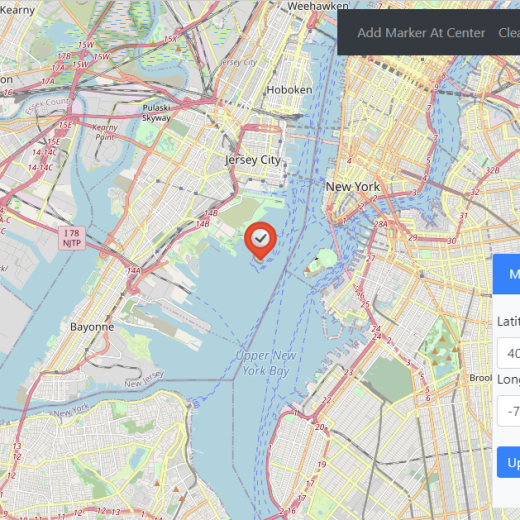
TMS FNC Maps v2.4 adds support for a new geocoding and directions service in addition to the existing supported directions services from Azure, Bing, Google, Here, MapBox and OpenRouteService. GeoApify The GeoApify API service provides geocoding, reverse geocoding and directions. This service can be used in combination with all supported mapping services in TMS FNC Maps. Specifically in combination with the OpenLayers mapping service this is a worthwhile free alternative to comparable services. Geocoding A geocoding request converts a text address to a geographic latitude & longitude coordinate. The coordinate can then be used to display a location on the map. With the following code we are going to look up the location of “Baker Street, London” and display it on the center of the map with a marker and a title that contains the address.Note that this example uses the asynchronous method with a callback. procedure TForm1.Button1Click(Sender: TObject); var Item: TTMSFNCGeocodingItem; begin TMSFNCGeocoding1.APIKey := ‘abc123’; TMSFNCGeocoding1.Service := gsGeoApify; TMSFNCGeocoding1.GetGeocoding(‘Baker Street, London’, procedure(const ARequest: TTMSFNCGeocodingRequest; const ARequestResult: TTMSFNCCloudBaseRequestResult) begin if (ARequestResult.Success) and (ARequest.Items.Count > 0) then begin Item := ARequest.Items[0]; TMSFNCMaps1.BeginUpdate; TMSFNCMaps1.SetCenterCoordinate(Item.Coordinate.ToRec); TMSFNCMaps1.AddMarker(Item.Coordinate.ToRec, Item.Address); TMSFNCMaps1.EndUpdate; end; end ); end; Reverse Geocoding A reverse geocoding request converts a latitude & longitude coordinate to a text address. The text address can then be used to display an address associated with a location on the map. With the following code we are going to track a click on the map, retrieve the address for that location and display it on the map with a marker and a title that contains the address Note that this example uses the synchronous method that provides an immediate result without a callback. procedure TForm1.TMSFNCMaps1MapClick(Sender: TObject; AEventData: TTMSFNCMapsEventData); var Address: string; begin TMSFNCGeocoding1.APIKey := ‘abc123’; TMSFNCGeocoding1.Service := gsOpenRouteService; Address := TMSFNCGeocoding1.GetReverseGeocodingSync(AEventData.Coordinate.ToRec); TMSFNCMaps1.BeginUpdate; TMSFNCMaps1.SetCenterCoordinate(AEventData.Coordinate.ToRec); TMSFNCMaps1.AddMarker(AEventData.Coordinate.ToRec, Address); TMSFNCMaps1.EndUpdate; end; Directions A directions request provides step by step directions between a start and end location. The directions data can then be used to display a route on the map. Additional options can be configured for the directions request, including: waypoints, alternative routes and language. With the following code we are going to retrieve driving directions between New York and Philadelphia. On the map, a marker is displayed at both the start and end location, a polyline displays the route and a label displays the distance and duration of the route.In the TListBox on the step by step directions are displayed for each step in the route directions.Note that this example uses the asynchronous method with a callback. procedure TForm1.Button1Click(Sender: TObject); var cStart, cEnd: TTMSFNCMapsCoordinateRec; begin cStart.Latitude := 40.68295; cStart.Longitude := -73.9708; cEnd.Latitude := 39.990821; cEnd.Longitude := -75.168428; TMSFNCDirections1.APIKey := ‘abc123’; TMSFNCDirections1.Service := dsGeoApify; TMSFNCDirections1.GetDirections(cStart, cEnd, procedure(const ARequest: TTMSFNCDirectionsRequest; const ARequestResult: TTMSFNCCloudBaseRequestResult) var it: TTMSFNCDirectionsItem; I: Integer; p: TTMSFNCOpenLayersPolyline; Hours, Minutes: string; begin TMSFNCOpenLayers1.ClearPolylines; ListBox1.Clear; if ARequestResult.Success then begin if ARequest.Items.Count > 0 then begin TMSFNCOpenLayers1.BeginUpdate; it := ARequest.Items[0]; TMSFNCOpenLayers1.AddMarker(it.Legs[0].StartLocation.ToRec, ‘New York’, DEFAULTWAYPOINTMARKER); TMSFNCOpenLayers1.AddMarker(it.Legs[0].EndLocation.ToRec, ‘Philadelphia’, DEFAULTENDMARKER); Hours := IntToStr(Round(it.Duration / 60) div 60); Minutes := IntToStr(Round(it.Duration / 60) mod 60); p := TTMSFNCOpenLayersPolyline(TMSFNCOpenLayers1.AddPolyline(it.Coordinates.ToArray)); p.StrokeColor := gcBlue; p.StrokeOpacity := 0.5; p.StrokeWidth := 5; p.&Label.Text := FloatToStr(Round(it.Distance / 1000)) + ‘ km, ‘ + Hours + ‘ h ‘ + Minutes + ‘ min’; TMSFNCOpenLayers1.ZoomToBounds(it.Coordinates.Bounds.ToRec); TMSFNCOpenLayers1.EndUpdate; ListBox1.Clear; for I := 0 to it.Steps.Count – 1 do begin ListBox1.Items.Add(it.Steps[I].Instructions) end; end; end; end ); end; Available Now The TMS FNC Maps v2.4 update is available now for Delphi & Visual Studio Code (with TMS WEB Core). You can download the latest version and start using the new features right […]

Read More

FNC WX Docx: Generating Word documents made easy!

In need of an intuitive way to generate Docx files with Delphi without having to install Microsoft® Word? TMS has you covered! With the latest release of TMS FNC WX Pack, we’ve added the new TTMSFNCWXDocx component which lets you generate Docx files on all platforms.  We’ve added a lot of functionality to offer maximum flexibility and allow you to customize the document requirements.  You can add:  formatted text tables images table of contents headers footers bookmarks links page numbering Everything you’ll need to build your documents. It’s even possible to export the document structure to a JSON template. A template that can easily be modified and used to perform actions like mail merging. Creating a document The creation of the document is intuitive. you can work with predefined methods and properties to customize your document. You can see how to create a document in this video: Building a template Building a template is as simple as adding the fields you want to edit later and just set the ID of that field. You can later use this ID to search the document for the desired field. Using a template After creating a template you can use following code to generate an invoice. This is a code snippet from the advanced demo. This code loops over a dataset and creates for every customer their invoices.  Customers.First; while not Customers.Eof do begin id := Customers.FieldByName(‘CustNo’).AsInteger; AsText(TMSFNCWXDocx1.FindByID(‘CustNo’) as TTMSFNCWXDocxChild).Text := IntToStr(id); AsText(TMSFNCWXDocx1.FindByID(‘Contact’) as TTMSFNCWXDocxChild).Text := Customers.FieldByName(‘Contact’).AsString; AsText(TMSFNCWXDocx1.FindByID(‘Company’) as TTMSFNCWXDocxChild).Text := Customers.FieldByName(‘Company’).AsString; AsText(TMSFNCWXDocx1.FindByID(‘Phone’) as TTMSFNCWXDocxChild).Text :=Customers.FieldByName(‘Phone’).AsString; AsText(TMSFNCWXDocx1.FindByID(‘FAX’) as TTMSFNCWXDocxChild).Text := Customers.FieldByName(‘FAX’).AsString; AsText(TMSFNCWXDocx1.FindByID(‘Addr1’) as TTMSFNCWXDocxChild).Text := Customers.FieldByName(‘Addr1’).AsString; AsText(TMSFNCWXDocx1.FindByID(‘Addr2’) as TTMSFNCWXDocxChild).Text := Customers.FieldByName(‘Addr2’).AsString; AsText(TMSFNCWXDocx1.FindByID(‘Zip’) as TTMSFNCWXDocxChild).Text := Customers.FieldByName(‘Zip’).AsString; AsText(TMSFNCWXDocx1.FindByID(‘City’) as TTMSFNCWXDocxChild).Text := Customers.FieldByName(‘City’).AsString; AsText(TMSFNCWXDocx1.FindByID(‘Country’) as TTMSFNCWXDocxChild).Text := Customers.FieldByName(‘Country’).AsString; t := AsTable(TMSFNCWXDocx1.FindByID(‘Items’) as TTMSFNCWXDocxChild); toPay := 0; orders.Filtered := False; Orders.Filter := ‘CustNo = ‘ + IntToStr(id); Orders.Filtered := true; Orders.First; t.Rows.Clear; while not Orders.Eof do begin tr := t.AddRow; tc := tr.AddCell; p := tc.AddParagraph; p.AddText(Orders.FieldByName(‘ItemNo’).AsString); tc := tr.AddCell; p := tc.AddParagraph; p.AddText(Orders.FieldByName(‘Description’).AsString); tc := tr.AddCell; p := tc.AddParagraph; p.AddText(Orders.FieldByName(‘ItemsTotal’).AsString); tc := tr.AddCell; p := tc.AddParagraph; p.AddText(Orders.FieldByName(‘ItemPrice’).AsString); tc := tr.AddCell; p := tc.AddParagraph; p.AddText(Orders.FieldByName(‘ItemTotalPrice’).AsString); toPay := toPay + Orders.FieldByName(‘ItemTotalPrice’).AsFloat; Orders.Next; end; AsText(TMSFNCWXDocx1.FindByID(‘TotalToPay’) as TTMSFNCWXDocxChild).Text := FloatToStr(toPay); TMSFNCWXDocx1.GetDocxAsFile(TPath.Combine(pth,’Invoice’ + IntToStr(id) + ‘.docx’)); Customers.Next; end; This will generate the following document on the right from the template on the left. Available Today! The TTMSFNCWXDocx component is available in the latest update, available today. So go ahead and download the latest version of the TMS FNC WX Pack. The TMS FNC WX Pack is part of the FNC family, so as a reminder, below is an overview of what FNC has to offer. TMS FNC Components can be used simultaneously on these frameworks TMS FNC Components can be used simultaneously on these operating systems/browsers TMS FNC Controls can be used simultaneously on these IDEs

Read More

New free webinar: Getting started with a VCL Grid workhorse in Delphi apps

In this free webinar on January 27 from 4PM to 5PM UTC, hosted at https://www.tmswebacademy.com, meet TAdvStringGrid, a feature packed grid workhorse for Delphi VCL applications.With little to no code, this grid allows to import/export data in various formats sort filter print or generate a PDF file group hide rows and/or columns render mini HTML formatted text in cells add various graphics types in cells edit with various inplace editors visualize data in various ways perform drag & drop with other controls or applications, merge cells perform calculations much more… This is mostly YOUR webinar, as your host Bruno Fierens, CTO at tmssoftware.com will prepare the content based on your the topics you send in as well as questions asked live during the webinar. Make sure to send topic suggestions for the VCL Grid to be covered to info@tmssoftware.com and make sure to attend the webinar live so you can interact live!This webinar is aimed at developers new to the VCL grid or with intermediate knowledge about it.  Register now! Sign up for this webinar today and make sure to attend live on January 27 from 4PM to 5PM UTC (17h00 – 18h00 CET)

Read More

Advanced Curve Fitting with FNC Math Components

New version 3.2 of TMS Analytics & Physics library introduced FNC components for creating math applications with minimal code writing. The previous article described how to implement curve fitting. In this article, we’ll continue the theme and explain some advanced features for function approximation. Generally, we use some standard basis functions for curve fitting: Fourier basis (sine and cosine functions), polynomials, exponent functions, and so on. In rare cases, we need specific basis functions to approximate the data. The TMS FNC math components provide a straightforward way to create a basis with any set of functions. Moreover, we can develop and test the basis right in design time. The component for creating a basis with a set of user-defined functions is TFNCLinearBasis1D. The component provides the following published properties: Variable (TVariableProperty) – provides the name of the variable for the basis functions. Coefficient (TVariableProperty) – provides the name of the coefficient for the fitting problem. Order (integer) – number of basis functions for approximation (read-only). Expression (string) – math expression of the constructed function (read-only). Parameters (TParameterCollection) – a set of parameters for parametric basis functions. Functions (TParameterCollection) – a set of functions to construct the basis. The two last properties provide the functionality to construct an arbitrary basis. With the Parameters property, you can add named values into the math environment and then use them to parametrize the set of basis functions. The Functions property allows to add, edit, and delete functions via standard Delphi collection editors. The collection contains items of TFormulaProperty type. When you add an item to the collection you can edit it with the Object Inspector as shown in the picture below.  The class TFormulaPropery has several properties and a built-in mechanism to check the function for correctness. If you input a math expression that is not valid in the current context, the Error property will indicate what is wrong in the formula. An example is shown in the following picture. For our example, we created the collection with three basis functions: ‘1’, ‘log{2}(x/A)’ (logarithm to the base 2), and ‘P{3 2}(x/A)’ (associated Legendre polynomial of 3-rd degree and 2-nd order). Then, following the instructions described in the previous article, we added a data source, an approximated function, and a plotter to draw the function on the FNC chart. The final resulting FMX form at design time is shown in the picture below. The main advantage of using the FNC math components is that you can select appropriate basis functions without running the application. At design time you can change parameter values and math expressions of basis functions. The changes will immediately affect the approximated function and you can see as the fitted curve looks on the FNC chart. Also, you can verify that the approximation succeeded by looking at the properties of the approximated function, as shown in the following picture. Another feature of the FNC math components is that they work with symbolic data representation. Although the approximation uses discrete data as input, the result is a symbolic expression of the curve. So, we can use this expression for some advanced analysis. For example, we can evaluate the derivative of the function.      The TFNCApproxFunction1D is a descendant of the TFNCBaseFunction1D class. Thus, we can use the same approach, as described in this […]

Read More

Looking back at 2021, an inspiration for what 2022 can be

The daily chore easily makes one forget the milestones reached and the goals ahead.  As such, it is good, with the start of the New Year, to look back of what has been achieved in the past year and set the goals for the new year. First of all, let me wish you a great new year 2022! I made a habit of wishing friends & relatives “to maximize the number of happy days in the new year“. Good health, success, good relationships, interesting work, achievements, luck, new experiences all contribute to happiness. So, when you can maximize the number of happy days in 2022, it is very likely you’ll be blessed with a mix of these things! At the same time, only in utopia, every day will be filled with happiness, so it also helps being prepared for some less successful days. 2021 Looking back at our milestones & achievements in 2021 actually positively surprised me. Even when we often get the impression that on a daily basis, we sometimes spend a lot of time fighting all kinds of little or big technical issues and have the impression we only move forward in baby steps, when looking at it in the scope of a full year, it appears a lot has been done. A summary Release of TMS Web Academy In the beginning of 2021, we launched our new platform TMS Web Academy, which is an online platform for bringing webinars to you where you can learn everything about our products. Since its launch, we already organized about 20 webinars that were free to attend. If you missed these, the replays are here. Of course, we continue along this path with new webinars for 2022 we’ll shortly present. TMS Web Academy proved to be a welcomed replacement for live events we could not hold due to covid-19 as well as a way to reach more developers world-wide. Launch of TMS Miletus  Miletus is our technology that enables you to create cross-platform desktop applications created with a single code-base and using web technology. Not only did we achieve to bring application generation for Windows, Linux and macOS from just your Delphi IDE running on Windows, we added to that also the Raspberry Pi OS target and we also added support in TMS WEB Core for Visual Studio Code. With Visual Studio Code, you can generate these types of applications directly from your favorite Windows, macOS or Linux machine.  Launch of TMS FNC WX Pack A completely new product saw the light in 2022, the TMS FNC WX Pack. TMS FNC WX Pack offers functionality that is hard to find or not existing for Delphi developers based on existing and proven web technology libraries. This includes so far a WYSIWYG HTML editor, an OCR tool, QR & barcode generation & detection, JSON data formatter,… and more is coming for 2022. High DPI to TMS FNC UI Pack With the release of Delphi 11 running in high DPI on Windows, it was critical to also bring full high DPI support in TMS FNC UI Pack. TMS FNC UI Pack is our universal (cross-platform/cross-framework) UI control bundle for VCL/FMX/LCL and TMS WEB Core. Our FNC UI controls were already looking crisp in FireMonkey apps, but now they also do in VCL high DPI […]

Read More