RAD Studio Sydney + Sencha ExtJS PRO Contactați-ne pentru informații suplimentare: vanzari@d-data.ro Achiziționați RAD Studio și primiți gratuit o licență Ext JS Pro pentru web development. Oferta valabilă la achiziția oricărei din ediții RAD Studio 10.4 Sydney – Professional, Enterprise, sau Architect. Creați aplicații WEB funcționale multiplatforme pentru desktop, tablete sau smartphone-uri. Profitați de funcționalitățile avansate ale Sencha Ext JS Pro atunci când achiziționați RAD Studio. RAD Studio Vă sprijină pe parcursul întregului ciclu de dezvoltare a aplicațiilor Dvs – oferind instrumente pentru design și pentru dezvoltarea single source-code, care poate fi compilată în aplicații pentru diferite platforme: Windows, Andoid, iOS, modile, Linux etc. Sencha Ext JS este cel mai amplu framework JavaScript pentru crearea de aplicații web și mobile cu un volum mare de date, cross-platform și pentru orice dispozitiv modern. Ext JS include peste 115 componente UI pre-integrate și testate de înaltă performanță. Solicitare Ofertă Completați formularul de mai jos pentru o ofertă personalizată. Terms & Conditions: Oferta valabilă în perioada 14 Octombrie 2020 – 30 Noiembrie 2020. Oferta disponibilă doar la achiziția RAD Studio 10.4 Sydney (All Editions). Tipuri de licențe incluse în promoție – ESD, Network Named, Concurrent. Academic licenses și maintenance renewals,nu fac parte din aceasta ofertă. Embarcadero își rezervă dreptul de a modifica, anula sau amâna oricând prezenta ofertă Prezenta ofertă nu este aplicabilă daca contravine legislației locale. Se pot aplica restricții adiționale. Cum beneficiați de ofertă: Solicitați o ofertă partenerului local Embarcadero și plasați comanda înainte de data de încheiere a promoției.
Embarcadero Subscription will help Your team to focus on most important things – increase efficiency and Reduce development time and get to market faster with RAD Studio, Delphi, or C++Builder. Design. Code. Compile. Deploy. RAD Studio Update for Embarcadero Subscription benefits continues to expand. In addition to multiple FREE components and tools available to Update Subscription customers, we want to highlight several exciting features for September related to the 10.4 / 10.4.1 releases. Custom HighDPI ready VCL Windows Styles In 10.4, we significantly extended the VCL Styles architecture to support High DPI and 4K monitors. All UI controls on the VCL form are now automatically scaled for the proper resolution of the monitor the form is displayed on. Each UI element can be selected from a library of multi-scale versions and scaled to any DPI, resulting in crisp UI elements on all monitors. The following 13 custom VCL styles have been updated to fully support High DPI with your VCL applications: Calypso Stellar Wedgewood Light Material Oxford Blue Puerto Rico Material Patterns Blue Windows 10 Modern Malibu Windows 10 Modern Blue Whale Windows 10 Modern Clear Day Windows 10 Modern Black Pearl Flat UI Light Lucky Point Zircon Parallel Debugger Today’s applications don’t just run on one thread – they’re spread over the main UI thread and multiple parallel threads all inter-operating. Yet most IDEs are built around interacting with one thread at a time when debugging, or have debugging controls that aren’t even aware that more threads might exist at all. Debugging thread interactions can be hard, really hard… and we have the solution: a new parallel extension to RAD Studio designed for understanding and controlling what your multi-threaded application is doing. Visualize thread call stacks in parallel. See multiple threads indicated inline in the code editor. Control execution on a per-thread basis. And more! This exciting new extension is coming soon exclusively for Update Subscription customers using RAD Studio 10.4.1. TwineCompile: speed up C++ builds C++ can be slow to compile, for all C++ IDEs – and TwineCompile is the answer. This amazing C++Builder extension parallelizes C++ builds, speeding them up by the number of cores in your machine – making your project build in half, a quarter, or even less time. This add-on is one of the best productivity extensions available for C++ development. Depending on your application size, it’s possible to save an hour or more per day – a huge time saver for your entire development team! There are three short, two-minute videos introducing TwineCompile and how to use it: probably the best six minutes you could spend today improving things for your C++ team. You can get TwineCompile now for C++Builder with your Update Subscription — including for Professional edition customers! Updated FMX Linux We also recently updated the FMXLinux package for Delphi in GetIt. The latest version has full support for 10.4.1 and includes a number of quality improvements.
Following the beta testing period and some blog post-pre-announcing some of the key features, on 27 Mai 2020 Embarcadero officially released RAD Studio 10.4 Sydney, which includes Delphi 10.4 Sydney. My Top Three Features There are many new features in the product. For Delphi developers the key are: The first cut of Code Insight based on Language Server Protocol. This is a huge step for the product, a new foundation for the future of the “IntelliSense” capabilities. From this foundation, we’ll continue to improve and expand in the future. Top feature is completion within words — rather than starting with what you type. Nice side effects, much better red squiggles. The introduction of custom managed records. Records in Delphi are extremely powerful and handy (with methods and operators overloading) now custom initialization and finalization add more power The extensive enhancements on VCL, with support for High DPI Styles and new platform support with TEdgeBrowser control, among many other features (Per Controls styling, TTitleBar, Virtual Image component, updated API declarations…). FMX and RTL and many other areas got improvement, but the work on VCL has been really extensive for this release There is way more in the product, this is just my personal take of the top 3 areas we worked on. Extensive bug fixing is another key element of Delphi 10.4 Sydney, with one of the highest numbers of public reported bug fixed in a release. And the return of a very nice classic Delphi Greek helmet logo! Noteworthy Links The official RAD Studio 10.4 announcement by Sarina is at https://community.idera.com/developer-tools/b/blog/posts/rad-studio-10-4-now-available-learn-more Direct download of the online installer from the new download portal: https://my.embarcadero.com/#downloadDetail/692 The YouTube What’s New video: https://www.youtube.com/watch?v=cRWWzd_yaig&feature=youtu.be The 10.4 Demos on GitHub at: https://github.com/Embarcadero/RADStudio10.4Demos What’s new web page: https://www.embarcadero.com/products/rad-studio/whats-new-in-10-4-sydney What’s new docwiki page: http://docwiki.embarcadero.com/RADStudio/Sydney/en/What%27s_New Minor features and list of fixed issues: http://docwiki.embarcadero.com/RADStudio/Sydney/en/New_features_and_customer_reported_issues_fixed_in_RAD_Studio_10.4 Official press release: https://www.businesswire.com/news/home/20200526005263/en/RAD-Studio-10.4-Accelerates-Native-Windows-Development (I’m even quoted in it!) Interested in a trial? https://www.embarcadero.com/products/rad-studio/start-for-free Feature matrix (PDF): https://www.embarcadero.com/docs/rad-studio-feature-matrix.pdf
Let’s say for example that you want to create a heart rate monitor app. You’ll need information about the heart rate GATT profile to connect to and collect data from the bluetooth enabled HR monitor device. GATT profiles are high level definitions that define how to use standard services in your applications. The heart rate GATT profile is used for fitness or health applications. The server device with a heart rate sensor exposes the standard heart rate service so that the Bluetooth LE client discovers the service and starts collecting data, for example the bpm (beats per minute). The GATT profile is the combination of service + characteristics. You could research all of these specifications on your own, or you could skip ahead by using our prebuilt IoT heart rate sensor component. IoT Solution with RAD Studio 10.4, we not only provide Bluetooth components out of the box, but also offer over 50 prebuilt IoT device components for many popular devices, ranging from home automation, to fitness gadgets, medical devices, environmental sensors and more. They are downloadable via the GetIt Package Manager in RAD Studio 10.4 Sydney (Tools > GetIt Package Manager) and include both BLE and Z-Wave components. For example, you can quickly build your own fitness application using either the generic ThingConnect heart rate service component or a device specific IoT component. We provide ready-to-use sample apps for each of the IoT components in GetIt. The IoT framework for Bluetooth LE based devices uses TBluetoothDeviceDiscoveryManager to manage the connection with an IoT device as a general Bluetooth LE based connection mechanism and wraps each device as a component. For instance, the TWahooTICKRHeartRateMonitor component wraps the Wahoo TICKR Heart Rate Monitor. The TBluetoothDeviceDiscoveryManager component provides the basic mechanism for connecting to Bluetooth LE based devices. In the TBluetoothDeviceDiscoveryManager component, you can define timeout and a number of re-tries to connect for these devices. To build a ThingConnect application, you need the following components: The TBluetoothDeviceDiscoveryManager component is used to set up the connection with the device. The corresponding ThingConnect device component is used to retrieve the services and the characteristics data from the device. Using the TPolarHeartRateMonitor component, it’s easy to connect to the Polar H7 heart rate sensor, and start monitoring the Heart Rate service, including subscribing to HR measurement data updates, and retrieving the building sensor location. You can find a step-by-step tutorial on how to build your own heart rate tracking application using RAD Studio here. IoT Solution With RAD Studio 10.4, we provide fully customizable user interface templates. Using one of the FireMonkey UI templates provides a great starting point for building a visually stunning fitness application. Shown: FireMonkey UI template – Home Screen 3, available in GetIt.
InterBase is a powerful, zero-administration, small footprint database engine that can power your server and even run on your mobile devices as an embedded database. InterBase 2020 Update 1 added a number of new features, including tablespaces support for InterBase server, new OS platform support for embedded versions, enhanced performance monitoring, SQL optimizations and more. Today Embarcadero is releasing InterBase 2020 Update 1, which adds the following features: Linux support for InterBase 2020 Server and Developer Editions Tablespaces support for the OnlineDump technology Updated IBConsole support for Backup, Dump, and Restore operations of databases that use tablespaces Performances improvements and fixes for defects reported by customers Here are some additional links: https://www.embarcadero.com/products/interbase/version-history http://docwiki.embarcadero.com/InterBase/2020/en/Main_Page http://docwiki.embarcadero.com/InterBase/2020/en/What%27s_New_in_InterBase_2020_Update_1 The installers for different platforms are available for download on the following trial and developer edition download pages: https://www.embarcadero.com/products/interbase/start-for-free https://www.embarcadero.com/products/interbase/developer/free-download This release continues to extend the power of InterBase 2020, along with continuing to focus on its reliability and stability. Moreover, RAD Studio developers already have an InterBase developer edition license and also the ability to distributing IBLite or IBToGo with their mobile applications, depending if they are on the Professional or Enterprise edition SQL Optimizations Transform inequality operators and not operators to their opposite representation for index based retrieval. Inequality operators, such as <, <=, !=, <>, >, >= can be transformed and optimized. For e.g. Conditions of the form “NOT A>0” can now get transformed to “A <= 0” by the SQL optimizer to use index retrieval for better performance. Security Enhancements InterBase 2020 uses OpenSSL 1.0.2s across all platforms to avail recent vulnerability fixes from OpenSSL project. IBConsole Improvements InterBase 2020 comes with an enhanced IBConsole GUI for Windows. It supports the latest feature set including Tablespaces and Data Dictionary modifications and includes enhanced support for InterBase’s patented Change Views functionality. InterBase 64-bit Edition now includes a 64-bit native IBConsole application, that will allow larger datasets to be retrieved in the query window. Phased Delivery InterBase 2020 embedded versions and InterBase Server Edition for Windows are immediately available. Server editions for Linux and macOS will follow shortly.
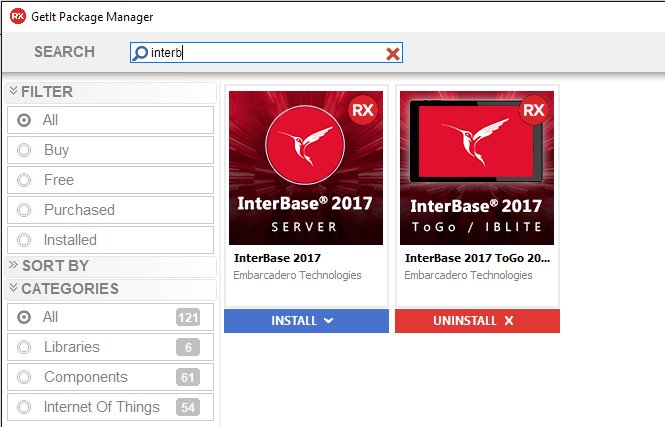
Most, if not all, of your applications will connect to some database backend. For Delphi and C++Builder users, most have either used it previously or have heard of it. InterBase is a zero admin, small footprint database engine that offers enterprise grade database capabilities like granular transparent database encryption, powerful access control, point-in-time recovery and patented data change tracking. It’s the database running across a range of industries, from POS systems to medical laboratories and CRM to railway systems. In fact, even RAD Server uses an InterBase database for the storage of user information, user groups, analytics, registered devices, version information, registered Edge Modules, push notification messages and more. So why not see if it can further your development efforts. What’s to lose? It’s included in your RAD Studio license. How do I use InterBase for RAD Development? All versions of RAD Studio/Delphi/C++Builder come with support for InterBase 2020 databases. InterBase 2020 is installed with RAD Studio in the following directory: C:\Program Files (x86)\Embarcadero\Studio\20.0\InterBase2020 Installing and Starting the InterBase Server In the additional options of the web installer for RAD Studio, check and install the InterBase Developer Edition and InterBase Express Components. InterBase 2020 Developer Edition is installed with RAD Studio, Delphi or C++Builder and is in the RAD Studio integrated license. Choose Start | Programs | Embarcadero InterBase 2020 | 64-bit/32-bit instance = gds_db | InterBase Server Manager [instance = gds_db] On the InterBase 2020 64 Server Manager, start the InterBase server if it is not running Connecting to InterBase Connecting to the server and database will require entering the host, port, database user and password. InterBase databases are defaulted to the port 3050 or 3051 and provide the default system administrator user, SYSDBA (not case-sensitive) with a password of masterkey (all lowercase). Note: It is recommended that you change the SYSDBA password for improved security. IBConsole IBConsole is a simple, yet powerful and complete system for managing InterBase servers and databases. IBConsole lets you look into the details of the database structure, query the data, backup and restore the database, and perform any other admin tasks. For more on what IBConsole can do, click here Command Line isql tool The command-line isql is a utility for processing SQL data definition (DDL) and data manipulation (DML) statements from interactive input or from a source file. It enables you to create and view metadata, add and modify data, grant user permissions, test queries, and perform database administration tasks. For more on invoking isql, click here. Developing Database Applications Delphi includes many components for accessing databases and representing the information they contain. They are typically grouped by their access mechanism. The two recommended data access components are: FireDAC FireDAC is the set of standard data-access and data-aware visual components for developing with various database systems including InterBase. FireDAC is designed to deal with real-world high load applications and enables the developer to concentrate on developing the application, not on the complexities of database interaction InterBase Express InterBase Express components or IBX, is a set of custom data aware components and controls that allow you to connect to and access data from InterBase servers and databases. Applications built using IBX components should work better and faster (even if only marginally), giving you more control over the specific features of the server. The components are broken down into two sections, the IBX Dataset components and Administrative Components. Using IBLite and InterBase […]
GetIt Package Manager Enhancements Coming in RAD Studio 10.4 RAD Studio has a light weight package manager, a mechanism for downloading additional product features, add-on libraries and components, demos, VCL and FMX styles and more. Some of the content is provided by Embarcadero, but a lot comes from our community of developers and third-party vendors. Now in the coming 10.4 release of Delphi and C++Builder, the GetIt Package manager is going to see significant changes in 10.4. The key addition is that now each entry has an associated release date, technically a timestamp. This is the foundation of different features: the ability of sorting the list of entries by date, seeing the most recent ones on top for each entry you have already installed, the indication that an updated version is available the ability to list all installed entries that have an update available Updated Filters In terms of UI change, the Filter section of the GetIt dialog UI will be modified: We are removing older, inactive filters (like Free and Paid) and keeping 2 options offering 2 new ones: All for all entries Installed for the packages installed on the current system Subscription only is a new filter for exclusive content published by Embarcadero and limited to customers with an active update subscription license Updates lists packages installed on the current system and for which a new release is available (that is a package with a newer timestamp than the installed version timestamp) This is the updates filter in action: Another change is in the Sort By section of the GetIt Dialog box, which is going to have a new option to sort packages by release date (or timestamp). GetIt Entries UI The UI of the individual entry in the GetIt dialog will also be modified to indicate the specific date the package was published and (eventually) the date you installed that package. Depending on the status, the entry UI includes new buttons for the action(s) — there are now more actions available, including Updating a package. Here you can see the standard UI for an entry and the same after the package has been installed and an update has been made available: Notice that the two dates indicated in the last image are the release date of the last update and the release date of the one currently installed (the timestamp of the installed item, not the date it was installed). RAD Studio Patches Another key feature we are enabling in 10.4 is the ability to use GetIt to distribute patches, with a specific way to alert customers that a patch is available. We’ve added a new section to the Welcome page to indicate when a patch is available and you have not installed it: Once installed, that indication will disappear. Combined to this Welcome page hint, we’ll have a new category in the GetIt package manager for patches. But this is not the only related change. We have technically introduced a deferred installation mode, so that a patch requiring to update files used by the RAD Studio IDE itself can be installed by a separate process once you close RAD Studio (or as you restart it). This will account for the installation of more complex patches, that require you to close RAD Studio first. Additional GetIt Features Beside the features […]
What is a Custom Managed Record in Delphi? Records in Delphi can have fields of any data type. When a record has plain (non-managed) fields, like numeric or other enumerated values there isn’t much to do for the compiler. Creating and disposing the record consists of allocating memory or getting rid of the memory location. (Notice that by default Delphi does not zero-initialize records.) If a record has a field of a type managed by the compiler (like a string or an interface), the compiler needs to inject extra code to manage the initialization or finalization. A string, for example, is reference counted so when the record goes out of scope the string inside the record needs to have its reference count decreased, which might lead to de-allocating the memory for the string. Therefore, when you are using such a managed record in a section of the code, the compiler automatically adds a try-finally block around that code, and makes sure the data is cleared even in case of an exception. This has been the case for a long time. In other words, managed records have been part of the Delphi language. Records with Initialize and Finalize Operators Now in Delphi 10.4 record type supports custom initialization and finalization, beyond the default operations the compiler does for managed records. You can declare a record with custom initialization and finalization code regardless of the data type of its fields, and you can write such custom initialization and finalization code. This is achieved by adding specific, new operators to the record type (you can have one without the other if you want).Below is a simple code snippet: type TMyRecord = record Value: Integer; class operator Initialize (out Dest: TMyRecord); class operator Finalize(var Dest: TMyRecord); end; You need to write the code for the two class methods, of course, for example logging their execution or initializing the record value — here we are also logging a reference to memory location, to see which record is performing each individual operation: class operator TMyRecord.Initialize (out Dest: TMyRecord); begin Dest.Value := 10; Log(‘created’ + IntToHex (Integer(Pointer(@Dest))))); end; class operator TMyRecord.Finalize(var Dest: TMyRecord); begin Log(‘destroyed’ + IntToHex (Integer(Pointer(@Dest))))); end; The huge difference between this construction mechanism and what was previously available for records is the automatic invocation. If you write something like the code below, you can invoke both the initializer and the finalizer, and end up with a try-finally block generated by the compiler for your managed record instance. procedure LocalVarTest; var my1: TMyRecord; begin Log (my1.Value.ToString); end; With this code you’ll get a log like: created 0019F2A8 10 destroyed 0019F2A8 Another scenario is the use of inline variables, like in: begin var t: TMyRecord; Log(t.Value.ToString); which gets you the same sequence in the log. The Assign Operator The := assignment flatly copies all of the data of the record fields. While this is a reasonable default, when you have custom data fields and custom initialization you might want to change this behavior. This is why for Custom Managed Records you can also define an assignment operator. The new operator is invoked with the := syntax, but defined as Assign: class operator Assign (var Dest: TMyRecord; const [ref] Src: TMyRecord); The operator definition must follow very precise rules, including having the first parameter as a reference […]
In the past, the VCL library allowed a developer to select one style (or no style) for the entire application. Starting with RAD Studio 10.4 VCL library will allow you to use multiple VCL styles at the same time in different forms of your applications, or even different controls of the same form. You can also mixed styles of elements (controls and form) and elements using the Windows default platform theme. This feature is controlled by a new StyleName property for the TControl class. This property takes as value the name of one of the styles active for the application and applies the style to the given control. If the property is empty, the parent control style is used: so if you set the property for a form, all controls in the form take the form style by default. A Quick Demo As the name implies, per-control styling allows a developer to apply different styles for controls and forms in the same application. To start, you need to add multiple styles to an application, and you can use all of them. This feature works only if one of the VCL Styles is active. First, add multiple styles to an app (hint, in RAD Studio 10.4 VCL you can use the new high-dpi styles, that’s for another blog post): Now set different styles names for different controls in a form, like in the following DFM file (I kept only key relevant properties here): object Form2: TForm2 StyleName = ‘Sky’ object Panel1: TPanel StyleName = ‘Light’ object Button1: TButton… object Button3: TButton StyleName = ‘Sky’ end end object Button2: TButton StyleName = ‘Windows’ end object Button4: TButton StyleName = ‘Luna’ end object Button5: TButton StyleName = ‘Aqua Graphite’ endend Notice that Button1 takes the hosting panel style, while Button2 resets the style to the form one. Finally, ‘Windows’ is a special purpose value, as described below. With this code, here is the UI of a form with 5 buttons using 5 different styles: A Few Rules for RAD Studio 10.4 VCL There are different approaches you can use to to adjust the style of the different forms and controls of a VCL application: 1. Adjust style list in project options (but you can also load styles at runtime). 2. Use the TControl.StyleName property to define the specific style for each control or each form. The StyleName value must be one of the names of the styles in the project options. A control can use the StyleName defined for its parent control, so you can set the StyleName property of a form to have specific style used by all controls on it. Additional cases: By default, TControl.StyleName is empty and control uses a default style. You can set StyleName as ‘Windows’ to disable applying any style for control or form. If you set a style name that is not among the loaded VCL styles, then the control will use default style. 3. You can define a specific style also for common dialogs. Use the property TStyleManager.DialogsStyleName for that. By default, it is empty and common dialogs use the default style of the application. 4. You can define the application style as ‘Windows’. This means that if some control or form has an empty StyleName property, then it will always use ‘Windows’ style and VCL Style will be always […]
Embarcadero RAD Studio 10.4 Sydney este cea mai recentă ediție a soluțiilor noastre cu funcționalități noi avansate care Vă vor ajuta mult în procesul de dezvoltare, testare și implemntare a aplicațiilor moderne și în limitele bugetului alocat. Deoarece sunteți client și membru al comunității de dezvoltatori, am lansat special pentru Dvs o ofertă promoțională pentru soluțiile RAD Studio, Delphi, and C++Builder. Embarcadero RAD Studio 10.4 Sydney include o mulțime de funcționalități și înbunătățiri în cele trei produse principale ale noastre (RAD Studio, Delphi și C ++ Builder), oferind VCL pentru aplicațiile Windows 10, FireMonkey pentru dezvoltarea Delphi pentru mai multe tipuri de dispozitive, îmbunătățiri ale productivității dezvoltatorilor la IDE și multe altele! Nu putem împărtăși până când toate detaliile, dar … Solicitați oferta promo: Acum este momentul potrivit pentru a face upgrade la Embarcadero RAD Studio 10.4! Vă gândiți la modernizarea soluțiilor existente? Platformele de programare continuă să se dezvolte. Tehnologiile la fel nu stau pe loc și permanent se dezvoltă. Aplicațiile Dvs create în trecut mai funcționează, dar cum vor sta în perioadele următoare? Sunteți pregătit pentru viitor? Nu vă lăsați depășit de noile tehnologii c! Lansăm oferta de pre-sales pentru RAD Studio 10.4! Actualizați-vă soluțiile existente sau procurați licențe noi acum la pret special și ve-ți primi ediția 10.4 imediat cum va fi lansată plus orice altă versiune nouă, lansată pe parcursul unui an! Noul Code Insight din Delphi 10.4 rezolvă o mulțime de probleme și face din utilizarea IDE o experiență mult mai plăcută și mai receptivă și pentru dvs. Nu mai vorbim de rezultatele suplimentare, care pot fi extrem de utile. Este planificată și continuarea lucrului pentru a merge mai departe prin obiectivele scrise mai sus. Cu toate acestea, în 10.4, noi și testatorii noștri beta am descoperit că este un plus excelent la IDE. În plus, am adăugat chiar două funcții noi: permițându-vă să explorați codul dvs. prin completarea codului și folosind Code Insight, inclusiv completarea codului și alte funcții Code Insight în timp ce depanați. RAD Studio The ultimate IDE with features both C++ and Delphi developers love: code, debug, test and fast design for cross-platform mobile and desktop deployment. Delphi IDE Trusted for over 24 years, our modern Delphi is the preferred choice of Object Pascal developers worldwide for creating cool apps across devices. C++ Builder IDE The most productive C++ development toolkit, including powerful IDE and frameworks for UI, connectivity, and much more. Build C++ applications 10x faster with less code.
Invormațiile pe cale Dvs le introduceți în prezentul formular nu se păstrează online, dar se vor transmite direct la destinație. Mai multe informații găsiți în Politica Noastră de Confidentialitate
We use cookies to ensure that we give you the best experience on our website. If you continue to use this site we will assume that you are happy with it.