Delphi

The High-Performance Future Of AI Is REST APIs

Businesses mostly prefer artificial intelligence solutions that are customized as per their needs and serve exactly the same purpose that they want to achieve. In such situations, that require a significant level of customization, desktop apps are still an ideal choice of adoption for fast-paced businesses.  Desktop apps are powerful execution tools that can natively run on your local machine to provide holistic application navigation and utilization experiences. With the advancement of modern web technologies, the desktop application development paradigm also experienced a major drift in terms of implementation. Technologies such as JavaScript and Python have inspired the hybrid implementation of desktop apps. We already know from the Delphi vs. WPF vs. Electron for Windows Desktops Whitepaper that products such as RAD Studio (Delphi and C++ Builder) provide a seamless desktop application utilization experience by enabling native code that is fast, high performant, and memory efficient. Using the potential of REST APIs, you can easily integrate artificial intelligence into your already built desktop apps with Delphi and C++.  In this blog post, we’ll look at how we can use REST APIs to create tremendous Delphi and C++ desktop apps that provide customized artificial intelligence solutions for our own use case.  What are the benefits of using REST APIs for AI? The primary motivation behind designing AI solutions is to study data and predict meaningful insights out of the data. In today’s world, where businesses are producing loads and loads of data, AI serves its best purpose by providing various kinds of predictive outcomes for the companies.  The fact of the matter is, everyone wants to use AI for the larger betterment and benefit, but not everyone has the capacity and capability to design the artificial intelligence solutions in-house by themselves. Be it infrastructural constraints, hardware limitations, lack of human resources, or tight organizational budget, if you cannot afford to set it up then it does not at all mean that you cannot even consume it. The REST APIs and the concept of AI as a service are the changemakers in this entire intelligent automation lifecycle.  The people and ventures who have the required resources provide AI using the REST service. To you, as the end-consumer of their AI resource, it does not matter how they handle the internal complications and functionalities to process machine learning models. You only provide your data points to the third-party service and ask it to do the hard work on your behalf and just return the final output for you to use further. All the hardware, infrastructural, and optimization stuff is efficiently handled by the API service internally.  How does RAD Studio help in creating stunning high-performance AI desktop apps? Now that we know how REST APIs make it really easy to use the power of artificial intelligence, here comes the point where we choose RAD Studio to create impressive desktop apps that make intelligent decisions for their users. Due to Delphi and C++ Builder in RAD Studio, the developed desktop apps have high performance, decreased memory usage, and an overall optimized application utilization experience.  Since RAD Studio provides Delphi runtime and C++ builder, it is tremendously difficult to design and develop AI components with this technology stack and ecosystem. Apart from that, there is no need to recreate the wheel and write ML scripts from scratch […]

Read More

How To Create Your Own Components For The FastReport Dialog

When creating a report, it is important not only to make a nice printable form that will display the data the user needs but also a convenient pre-print dialog, where the user can set the parameters to generate the report. The FastReport preprint dialog already contains a number of components, for example, Label, Edit, Button, Memo. But sometimes this is not enough and you have to create your own dialog components for FastReport. In fact, they are analogs of usual Delphi components that can be used in FastReport dialog forms. This article will talk about creating this component. For more information, we recommend reading the FastScript documentation and the FastReport VCL manuals for developers and software specialists. To display data from the database, this article uses the DBGridEh component from the EhLib VCL library L, which will be integrated into the FastReport dialog. Delphi 10.4.2 was used as a development environment, but everything described below will be suitable for any other Delphi starting from version 7 (adjusted for the version). Let’s create a new package (dpk) and name it frxDBGridEh27. Add to it a new file frxDBGridEhControl.pas, which will serve as the basis for our grid. We will declare a component in this file for registration in Delphi: TfrxDBGridEhDialogControl = class(TComponent); TfrxDBGridEhDialogControl = class(TComponent); We begin to describe the TfrxDBGridEh component, which will be created from the base dialog class TfrxDialogControl. In fact, we will re-declare the properties of the base DBGridEh component into a component to use in FastReport. You can re-declare not all properties, methods, event handlers, but only those that are needed for work. In the private section, I recommend paying special attention to the following: private FDBGridEh :TDBGridEh; // The base component, the properties of which we will set and methods of which we will call FDataSource :TDataSource; // Interface between grid and data source in FastReport // Variables that will store the name of the event handlers FOnGetCellParams :TfrxGetCellParamsEvent; FOnGetBtnParams :TfrxGetBtnParamsEvent; FOnTitleBtnClick :TfrxTitleClickEvent; FOnDrawColumnCell :TfrxDrawColumnCellEvent; FOnColEnter :TfrxColEnterEvent; FOnCellClick :TfrxCellClickEvent; FOnColWidthsChanged :TfrxNotifyEvent; // These system procedures are needed to save and restore grid columns to the fr3 report template. procedure ReadData(Reader: TReader); procedure WriteData(Writer: TWriter); // These three methods are needed to be able to connect a basic data source of the TfrxDBDataset (FastReport) or TDataSet (Delphi) type to the grid. function GetDataSet: TDataSet; procedure SetDataSet(const Value: TDataSet); procedure SetDataSetName(const Value: String); // This is the event handler code procedure DoGetCellParams(Sender: TObject; Column: TColumnEh; AFont: TFont; var Background: TColor; State: TGridDrawState); procedure DoTitleBtnClick(Sender: TObject; ACol: Integer; Column: TColumnEh); procedure DoGetBtnParams(Sender: TObject; Column: TColumnEh; AFont: TFont; var Background: TColor; var SortMarker: TSortMarkerEh; IsDown: Boolean); procedure DoDrawColumnCell(Sender: TObject; const Rect: TRect; DataCol: Integer; Column: TColumnEh; State: TGridDrawState); procedure DoColEnter(Sender: TObject); procedure DoCellClick(Column: TColumnEh); procedure DoColWidthsChanged(Sender: TObject); 1 2 3 4 5 6 7 8 9 10 11 12 13 14 15 16 17 18 19 20 21 22 23 24 25 26 27 28 29 30 private   FDBGridEh      :TDBGridEh;   // The base component, the properties of which we will set and methods of which we will call   FDataSource    :TDataSource; // Interface between grid and data source in FastReport     // Variables that will store the name of the event handlers   FOnGetCellParams    :TfrxGetCellParamsEvent;   FOnGetBtnParams     :TfrxGetBtnParamsEvent;   FOnTitleBtnClick    :TfrxTitleClickEvent;   FOnDrawColumnCell   :TfrxDrawColumnCellEvent;   FOnColEnter         :TfrxColEnterEvent;   FOnCellClick        :TfrxCellClickEvent;   FOnColWidthsChanged :TfrxNotifyEvent;     // These system procedures are needed to save […]

Read More

Delphi in the Galileo Project in Brazil

The first class formed by Tech4Me’s Galileo Project also ended their journey with knowledge in Delphi. What is Project Galileo? The Galileo Project is a Tech4Me initiative that aims to transform the lives of young people from simpler backgrounds through technological education. The proposal is that in 6 months these young people can have the necessary knowledge to enter the job market in a position of junior programmers. Participation of Embarcadero and its Academic Program The first class formed by the Galileo Project had 36 hours of additional content focused on the Delphi language with RAD Studio 10.4.2 Sydney . It took 6 weeks, with 2 weekly meetings per week using the Embarcadero tool in its latest version. This is thanks to Embarcadero’s Academic Program that provided full licensing for students who were able to enjoy all the features of RAD Studio Enterprise. Idea embraced by the Delphi Community The instructors of the Delphi module taught to this first group of graduates of the Galileo Project were already well-known and renowned members, with great performance in the Delphi community. Fernando Rizzato, Kelver Merlotti, Landerson Gomes and Marcos Moreira joined the presented Project and participated donating their time and teaching the content to the students. Employability on the rise As the market has a great demand for IT professionals, the proposal becomes even more convincing when, even before the course is concluded, students begin to be recruited. And so it was. The Alterdata Software , whose president Ladmir Carvalho is also a founding partner of Tech4Me, recruited some young people and they are already working in the company, which is located in the city of Teresopolis – RJ. Ladmir Carvalho and young people recruited from the Galileo Project Thanks I would like to take this post to thank the Tech4Me Team for their support. Cristian, Carol, Bruna …thanks so much for all your support. Ladmir thank you for the memory and for the invitation. Thank you Fernando, Kelver and Marcos for embracing this idea, Embarcadero for the freedom it gave us to participate and contribute something so rewarding. And also a special thanks to these stars located by Galileo, who from now on are new colleagues in the IT field. The original post in Portuguese is available on my website through the link: https://www.landersongomes.com.br/embarcadero/delphi/delphi-no-projeto-galileo. Until the next opportunity.

Read More

Everything You Need To Build A WSL GUI Tool Today

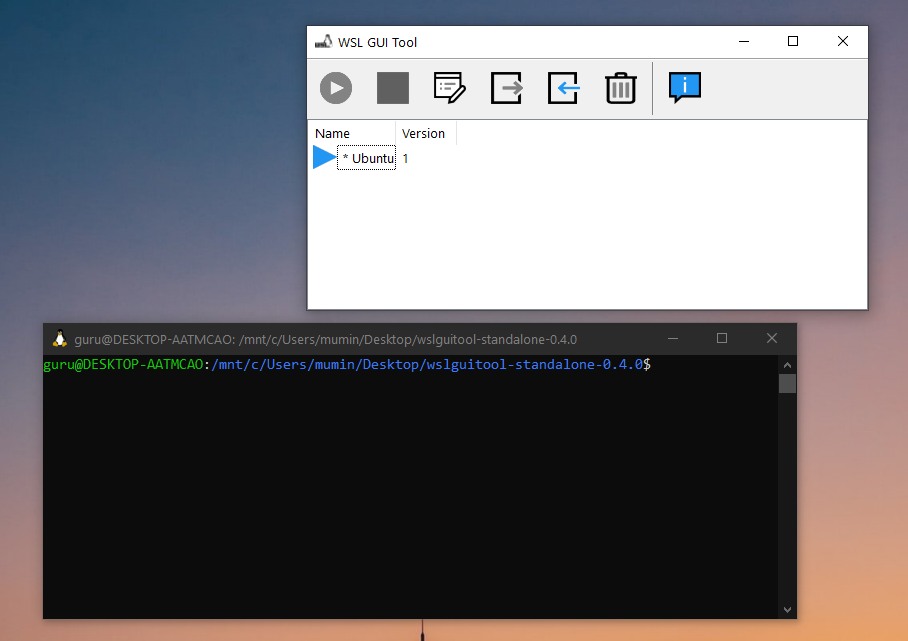
The Windows Subsystem for Linux allows developers to run a GNU/Linux environment including command-line tools, most of the utilities, and applications directly on their Windows computers. It has become extremely popular and RAD Studio Delphi is able to create Linux applications which run directly on both WSL and full Linux computers. Several WSL distributions are available via the Microsoft Store (Ubuntu, Kali, Fedora, Debian, OpenSUSE) WSL is currently focused for the command-line use but with extensions and programs you can install GUI and connect through remote desktop control utilities. Windows 11 allows Windows users to run full GUI Linux apps via WSL2 which is an updated version of the original WSL. RAD Studio also works with WSL2 and using FMX Linux you can create FULL GUI applications for Linux. WSL is faster and more lightweight on computer resources than a virtual machine. You can execute Linux binaries from Windows and Windows executables from Linux In the recent WSL2 updates, we can see there is a huge increase in file system performance and full system call compatibility for a better experience. You can find how to install WSL on Windows in this official documentation. How can I manage WSL (Windows Subsystem for Linux) with a graphical application? WSL GUI Tool – is an open-source tool built with Object Pascal, Delphi, that manages installed Linux distributions easily with a user interface. The WSL GUI Tool allows you to manage WSL features with GUI & offers these functions: Start & Stop a distribution. Rename distribution. Change flag of distribution from the original WSL version to the new improved WSL2. Edit environment variables. Moreover, you can explore the source code and learn about how to do these all stuff with Delphi which is great! Where can I download the WSL GUI tool? If you would like to just try out the portable executable select the Release section in GitHub and download it. Where can I learn more about using RAD Studio Delphi with Window’s WSL and Linux? The best place is the Windows 10 Modernize Webinar Series. You can learn how to target Windows 10’s Windows Subsystem for Linux with RAD Studio Delphi in this great video from Jim McKeeth: Where can I download the Delphi Object Pascal source code for the WSL GUI Tool? You can go to the following link for the official WSL GUI tool here: https://github.com/emeric-martineau/wsl-gui-tool Why not download a free trial of RAD Studio today and try the code out for yourself?

Read More

5 Ways To Improve Your Code: What You Need To Know

Over time, software development has experienced significant changes in the approach to design as well as how those designs are implemented. As the market evolved, the software industry also had to adapt to it for a better digital experience for the customers. Delphi and RAD Studio are constantly evolving, with each new version building on success to add new features and functionality to address those advances in technology, to keep pace with new approaches in UX and UI as well as to work with modern hardware and the SDKs or APIs that drive them. While RAD Studio offers a great many built-in features, one of the strongest aspects of Delphi is the low-code approach to coding by using components – both those that come with RAD Studio, but also those available from the rich ecosystem of third-party suppliers. In this blog post, we’ll explore some of the exciting and of those third party tools which can help you improve your Delphi code. How can I detect issues in Delphi source code in the development phase? It is really important for a developer to catch potential issues in the source code earlier in the development phase so that the end-to-end deployment cycle can be executed smoothly and without delays.  RAD Studio 11 automatically highlights errors in the code explorer view of the structure window FixInsight is a smart code analysis tool for Delphi developers that detects issues in Delphi source code. It performs a static code analysis to help developers find potential bugs and errors earlier in the development phase. FixInsight also provides developers with a list of warnings when the issues are found. Not only that, but FixInsight’s smart engine also checks the Delphi code for coding convention compliance.  Source: TMS Software How can I save development time by autoformatting the code? In order to follow the best coding designs and conventions, it is extremely important to format the code properly so that it looks neat for anyone who is viewing the code.  GExperts is a very comprehensive and popular free set of tools that are built to increase the productivity of Delphi and C++ Builder developers by adding several useful features to the IDE including code formatting. It is open-source software that includes DelForExp tool that primarily acts as a code formatter to help you improve your Delphi code. This is an alternative to the built-in code formatter provided by RAD Studio. RAD Studio also includes a code formatter if you press CTRL + D Another really great GExperts feature related to code formatting is an “align” editor helper which can align your code so that identifiers are neatly laid out in columns in an alternative to tabs or spaces like so: Not all developers like code aligned this way but many prefer it and think it offers greater clarity, particularly to blocks of code with assignments in them. Can I easily manage Delphi dependencies without writing dedicated scripts? Dependency management is one of the integral parts of any production-ready source code, and if not handled properly, it can lead the application to run into issues.  To avoid this in your Delphi applications, it is advisable to use dedicated dependency management tools that take care of packages while you focus and invest your time in producing the right output that your […]

Read More

What Is It Like To Be A Developer Dalija Prasnikar?

Hello. This article is part of a series where we speak with professional software developers, ask them what it’s like to write code for a living, and perhaps gain a few insights into the software development industry along the way. In our interview chair today we have the simply marvelous Dalija Prasnikar. Dalija is based in the wonderfully historic and picturesque city of Zageb in Croatia. You’ll hear more in a moment about Dalija’s development background but she also is an accomplished photographer as well as a respected author of some great coding books too. You can tell she’s a proper coder – she’s the only one so far to have returned her answers using MarkDown! Dalija, thanks for agreeing to take part in the interviews! Thank you 🙂 What would be your brief evening news summary of who you are and what you do? Software Developer, Consultant, Book Author, Embarcadero MVP. Crashing other people’s software and writing my own since ’85. Which Embarcadero product(s) do you use a) the most b) regularly? Delphi, of course. How and/or why did you become a developer? When I was a kid, I wanted to be an astronaut. I was really into space, astronomy, science… and anything related to them. When I was about nine, the first Sci-Fi series I remember watching was Blake’s 7. And my favorite character there was Kerr Avon. A highly intelligent, sarcastic, computer genius. At the very beginning of the series, he said “Who controls the computer, controls the ship,” and this was the crucial moment when “I want to be an astronaut” evolved into “I want to control the computers.” Of course, in real life, being a developer and knowing what I know now, controlling the computers and the ship is really an illusion. More often, it is the other way around. That is also why I never fully trust anything tech-related. Do you think you will ever stop being a developer? If so, what would be next? I could probably be a farmer… but I would be a farmer that writes code as a hobby. [Me too! We should both speak to fellow developer Alister Christie – he lives on a lifestyle block – IanB] What made you start using Delphi/C++ Builder? I learned Turbo Pascal in high school, and it quickly become my favorite language. It could do everything C could do, and it was much faster – not only for writing code, but for compiling, too. I started my career as an IT journalist at BYTE Croatia (a McGraw-Hill licensee), and the Editor of MIPS Computer magazine. With the rise of the Internet and online publishing in the ’90s, I moved to web development. I was using Java and JavaScript before I started to use Delphi. Coming from Turbo Pascal, which I had also been using all along for writing various utilities and web page generators, Delphi was a natural choice for developing Windows applications. Dalija, in full-on MVP mode! What are you currently working on? As you know, I have already written two Delphi books: Delphi Memory Management and Delphi Event-based and Asynchronous Programming. I like writing books. It is an opportunity to share knowledge, but also an opportunity to learn. No matter how much you know about some topic, there are always […]

Read More

Watch the RAD Studio 11 Alexandria What’s New Webinar Replay

Last week we saw the release of RAD Studio 11 Alexandria and the what’s new webinar. The turn out for all three sessions was amazing! Just in case you missed it, or want to review, here is the replay. It is over 3 hours long as it include a recording of the live Q&A sessions at the end (the text log of the questions is below the video too). Just like the RAD Studio IDE, the video is available in 4K. Q&A Log Question: Every time someone makes a ‘this one goes up to 11’ Spinal Tap joke they have to buy everyone on the team a donut. 😉 A: Oh, donuts for everyone! Question: good afternoon from Germany. A: Good morning from Idaho! Glad you could join us! Question: Hi from Belgium A: Hi Question: Greetings everyone from Perth AU. A: wow, Perth. I’ve been there, but not recently. I’d love to go back. /Jim,Hello from a fellow Aussie! Question: good afternoon from Paris A: Hello! Question: Good Morning from Mexico!! A: Thanks for joining us! Question: Hi from the beautiful island of Cyprus!! A: Hello! Question: Good afternoon everybody, greetings from Brazil A: Hello! Question: good morning from Utah A: Utah! We are neighbors! Do you know Eric? Question: Hi from Algeria A: Thanks for joining us! Question: Greetings from Germany A: So many great developers in Germany! Thanks for joining. Question: Good morning from Port Dover Canada on the north shore of Lake Erie. A: Hi to all Question: Greetings from Belgium. A: Hi to all Question: Good afternoon from The Netherlands A: Hello! Question: So… good afternoon also from Italy! A: Hello! Question: goof afternoon from Brazil A: Yay Brazil! I love Brazil. Last year was the first year I didn’t visit Brazil since joining Embarcadero 8 years ago. /Jim Question: good morning from Mexico A: Hello! Question: Good afternoon from Germany ! A: Hello! Question: Hello from the Netherlands A: Hello! Question: Hi from Slovenia! 🙂 A: Hello! I (David here) visited Slovenia in August, it was lovely Question: Hi Guys A: Hi to all Question: Austria is ONLINE A: Welcome! Question: Good afternoon from Finland A: Good afternoon from Estonia! Question: From Brazil A: Hi Question: Good evening from Uzbekistan! A: Hello! Question: good afternoon from the Netherlands A: Hello! Question: HI from Italy! A: Hi to all Question: Hi from Korea A: Hello! Question: Hi from Turkey A: Hello! Question: Hi from Tabasco, Mexico A: Hello! Question: Hi from Switzerland A: Hi to all Question: Hi from Brazil! A: Hi to all Question: Greetings from the south of England! A: Nice. England is on my bucket list of places to visit. /Jim Question: HIi from Portugal A: Hi to all Question: Hello from ISRAEL! A: Hi to all Question: Hi from Bulgaria A: Hello! Question: Hi from Germany (Ahrtal: Bad Neuenahr) A: Hello! Question: Hello from Bucharest! A: Hello! Question: Greetings from Indonesia… A: Hello! Question: Australia here A: Hello from a fellow Aussie,???????? Question: hi from italy A: Hello! Question: Good morning, people!!! A: Hello! Question: Hi from Holland A: Hello! Question: Hello from the Caribbean (Dominican Republic). A: Hello! Question: greetings from mumbai A: Hello! I had the pleasure of visiting Mumbai! Would love to come back again. /Jim Question: hello […]

Read More

This Is How To Modernize Your Apps On Time And Under Budget

We know that technology is progressing at a rapid pace. The software systems built five years ago using the then-modern technologies might not be relevant today due to outdated versions. Every software that aims to scale and provide effective services to its consumers must be open to modernization. Modernization of software systems enhances their longevity and keeps them relevant to the technological age in which they are operating.  This thought process is equally valuable to desktop apps. Application stakeholders have an imperative to recognize the need to modernize desktop software in a timely manner to efficiently continue providing services which remain competitive in the face of competition; embracing new technologies, advancements in techniques and user interface design and even fashions for UX paradigms which wax and wane. In this blog post, we’ll look at how you can modernize your Windows apps on time and that too under your approved budget.  How can I modernize my Delphi app? Embarcadero Technologies published a whitepaper titled “Successfully Modernizing A Popular Windows C++ IDE” that discusses the aspects and strategies used to modernize DevC++ IDE. This migration and up-gradation activity is an extremely important and valuable learning resource for the teams that plan on app migration.  The upgrade of DevC++ IDE was done in two phases. The first phase aimed at making the least possible changes to make the application compile with the newer version of Delphi. After that, the second phase involved changes such as compiler upgrade, Unicode support, and full support for Windows 10 with Embarcadero DevC++ 6.0.  The case study mentions that there were some important third-party upgrades as well. The most important of all were SynEdit, FastMM4, AStyle, and TDM-GCC. The Embarcadero team identified the components to be upgraded and that is indeed one of the essential and crucial steps towards any third-party migration.  The upgrade, as a result, provided a new and modern interface along with a faster and smoother Windows development in C++.  Just like the DevC++ IDE upgrade, you can also follow similar steps to migrate your Delphi application for a smoother and better developer and user experience.  Read the Successfully Modernizing A Popular Windows C++ IDE whitepaper to explore more about the DevC++ IDE upgrade.  What are some of the essential elements for migration and up-gradation? If you are considering modernizing your legacy Delphi desktop application, you might think of the following essential migration and modernization strategies, to begin with.  Why was Unicode important? Prior to the mid 2000s, Unicode was not often considered a technology of enough importance to include in most systems available on the market. With a more widespread adoption and availability of internet connectivity support for character sets which were able to render a broad range of languages became a pressing issue. People wanted their programs to be displaying text in the language they spoke and read rather than English which had become the Internet’s Lingua Franca (an ironic phrase if you think about it). Unicode allowed, for example, Russians to read and use Cyrillic characters or Japanese users to choose to display screens using Kanji should they choose to do so. Unicode support was added to Delphi, C++ Builder, and RAD Studio in 2009. There are multiple resources that help with the migration and upgrading of legacy Delphi applications to a newer […]

Read More

Delphi Best Practices For A New Project In 2021 And Beyond

The goal of this tutorial is to describe the Delphi development ecosystem. It can be helpful for someone coming to Delphi from another programming language. Delphi is really easy to learn – the programming language syntax can be learned in hours. Pascal, from which Delphi’s Object Pascal language has evolved, has long been a very popular language in colleges and education for teaching the basic concepts of software development. Knowing the fundamentals of programming is a crucial part of programming. But there lies a whole ecosystem of terminology and techniques. It is always overwhelming for someone coming from a different background in technology. The other trouble is that there are so many different Delphi components, examples and libraries available and it can be quite daunting to decide which ones are the best for any given purpose. You’re spoilt for choice and sometimes too much choice can bring its own headaches. So to try and ease this small learning curve this article brings together a list of some of the most popular tools, libraries, best practices in Delphi. You may find more interesting demonstrations, tips, and tricks on our blog. How to start Delphi development? The first thing to do is to download Delphi from www.embarcadero.com. You can find the latest Delphi 10.4.2 Community Edition which is free for everyone. Be sure to install Delphi IDE with samples and help files that might come for help sometime in the future. How to work with Delphi programs in another code editor like VS Code? There is an official extension for Embarcadero Delphi in VS Code marketplace which provides you to work with the Delphi code in VS Code smoothly. Note that you need an active license (paid or trial) for Delphi 11 in order to use the DelphiLSP VS Code add-on. It will not work with the community edition. Yo use the DelphiLSP VS Code Add-In you just need to have the latest version of Embarcadero Delphi installed on your machine and generate an LSP config file. How to write readable and maintainable code in Delphi? Embarcadero Delphi compilers ignore any whitespace and allow for a lot of flexibility for writing code. But for the readability and maintainability purpose of the source code, Embarcadero has defined the style guide for Delphi’s Object Pascal. I recommend you to check out and learn how to write beautiful code with Object Pascal – or at least code that others find fits in with the generally accepted layout styling which is important if you work with a team or contribute to an Open Source project. How to format Delphi source code? Every developer writes code in their style. Since the Embarcadero compilers ignore any whitespace in which you can write the same code in hundreds of different ways, this can lead to unreadable source code. We can prevent this by applying default source code formatting or generate our formatting config file. While coding in the Code Editor, you can apply the Format Source context menu command to format the source code. Moreover, you can define your custom formatting style and save it to a config file. Then other team members can also utilize the same formatting style to make the source code maintainable. Check out the official documentation to learn more about this. Does Delphi have a package manager? If you have been […]

Read More

How To Control Windows 11 Rounded Corners In Your App

As I hope you’re aware by now – RAD Studio 11 Alexandria is now available! RAD Studio 11 contains a whole ton of features and it’s launching just ahead of Microsoft’s official release of the beautifully redesigned Windows 11. We wrote about the many great things contained in Windows 11 here on the blog before and how behind that gorgeously aesthetic user interface are a few traps and pitfalls which may be a problem for older legacy apps and hardware. Source: Microsoft One of the most obvious user interface changes is the fact that almost all app windows and many user interface controls will get a rounded corner effect applied to them. The amount of rounding of the application’s forms and things like text boxes, panels and group boxes will vary. Microsoft go into a lot more detail on how it will affect user interface components here in this article. They also have an article, here, which describes how the rounding of the application forms occurs and also how to turn that rounding feature on or off. Microsoft recognizes that some app windows are not going to work very well with rounding applied to the caption bar – for example tool window type application frames which typically have a very narrow height and custom-drawn window icons. Thinking ahead, Windows 11 provides a fairly easy to use Windows API which allows you full control over that rounding behavior – to turn it off, on, or ask Windows 11 to round the windows with a smaller radius. ‘Small’ Windows 11 Rounding Normal Windows 11 rounding The question came up during the RAD Studio 11 launch Q & A whether the Embarcadero team had an example of using that API. David (or Marco, it wasn’t clear) pasted a short example of how to do it in the question window but it was a little hard to read and only a partial example so I’ve taken that answer and built a more complete demo for you to download and play with. Just for fun it also shows Windows notifications using the TNotificationCenter component because if we’re going to be modern we might as well embrace a few of the other cool modern Windows things Delphi makes very easy. 😋 RAD Studio 11 Delphi example rounded corners app running on Windows 11 On versions of Windows before Windows 11 the API call will have no effect and your app Windows will still look the same. On Windows 11 the example app controls the main form Window based on your choices from a radio group. I’ve created a universal unit with a simple call in there – all you need to do is pass it a Window handle and Windows 11 will do your bidding. RAD Studio 11 is High DPI aware – so my screenshots look better now too! The example app is written in the new RAD Studio 11 Alexandria, of course, but it should work on earlier versions of Delphi. To use the code in your own apps simply download the source repository from the GitHub link below and include the “delphi_rounded_corners.pas” unit in your apps and make the procedure call. You can download the full source for the example RAD Studio 11 Delphi example application from here: https://github.com/checkdigits/rounded_corners RAD Studio 11 Alexandria […]

Read More