Modern C++

Three Important Posts About The Features Of C++14

Hello C++ Developers. As I write this post, the summer is over (if you live in the Northern hemisphere), and, in most countries, the new educational year has started, and we wish good luck to all students. If you are a student and want to learn C++, we have a lot of educational posts for you. This week, we continue to explore features from the C++14 standard which is available in C++ Builder. This week, we explain what is constexpr specifier and what are the relaxed constexpr restrictions in C++14. We explain variable templates in C++ and we teach how to use them in modern C++. In another post-pick, we explain what Aggregate Member Initialization is and we give very simple examples for you to try. Our educational LearnCPlusPlus.org site has a broad selection of new and unique posts with examples suitable for everyone from beginners to professionals alike. It is growing well thanks to you, and we have many new readers, thanks to your support! The site features a treasure-trove of posts that are great for learning the features of modern C++ compilers with very simple explanations and examples. RAD Studio’s C++ Builder, Delphi, and their free community editions C++ Builder CE, and Delphi CE are powerful tools for modern application development. Table of Contents Where I can I learn C++ and test these examples with a free C++ compiler? How to use modern C++ with C++ Builder? How to learn modern C++ for free using C++ Builder? Do you want to know some news about C++ Builder 12? Where I can I learn C++ and test these examples with a free C++ compiler? If you don’t know anything about C++ or the C++ Builder IDE, don’t worry, we have a lot of great, easy to understand examples on the LearnCPlusPlus.org website and they’re all completely free. Just visit this site and copy and paste any examples there into a new Console, VCL, or FMX project, depending on the type of post. We keep adding more C and C++ posts with sample code. In today’s round-up of recent posts on LearnCPlusPlus.org, we have new articles with very simple examples that can be used with: The free version of C++ Builder 11 CE Community Edition or a professional version of C++ Builder  or free BCC32C C++ Compiler and BCC32X C++ Compiler or the free Dev-C++ Read the FAQ notes on the CE license and then simply fill out the form to download C++ Builder 11 CE. How to use modern C++ with C++ Builder? In C++, the constexpr specifier is used to declare a function or variable to evaluate the value of at compile time, which speeds up code during runtime. This useful property had some restrictions in C++11, these are relaxed in C++14 and this feature is known as Relaxed Constexpr Restrictions. In the next post, we explain what are the relaxed constexpr restrictions in modern C++. The Aggregate Member Initialization is one of the features of C++. This feature is improved and modernized with C++11, C++14, and C++20. With this feature, objects can initialize an aggregate member from the braced-init list. In the next post, we explain what the aggregate member initialization is and what were the changes to it in modern C++ standards. The template is one of the great features of modern C++. They are simple and very powerful statement in […]

Read More

Useful Features Of Modern C++ That Come With C++14

Hello fellow C++ Developers. This week we continue to explore features from the C++14 standard. One of the features that comes with C++14 is auto return type deduction,. We explain auto return type deduction with very simple examples including lambda and template examples. The Lambda Expression construct is introduced in C++ 11 and further developed in the C++14, C++17, and C++20 standards. In C++14, lambda expressions are improved by the generalized lambda (generic lambda) and we explain how you can use generalized lambda captures in modern C++. Our educational LearnCPlusPlus.org site has a broad selection of new and unique posts with examples suitable for everyone from beginners to professionals alike. It is growing well thanks to you, and we have many new readers, thanks to your support! The site features a plethora of posts that are great for learning the features of modern C++ compilers with very simple explanations and examples. RAD Studio’s C++ Builder, Delphi, and their free community editions C++ Builder CE, and Delphi CE are powerful tools for modern application development. Table of Contents Where I can I learn C++ and test these examples with a free C++ compiler? How to use modern C++ with C++ Builder? How to learn modern C++ for free using C++ Builder? Do you want to know some news about C++ Builder 12? Where I can I learn C++ and test these examples with a free C++ compiler? If you don’t know anything about C++ or the C++ Builder IDE, don’t worry, we have a lot of great, easy to understand examples on the LearnCPlusPlus.org website and they’re all completely free. Just visit this site and copy and paste any examples there into a new Console, VCL, or FMX project, depending on the type of post. We keep adding more C and C++ posts with sample code. In today’s round-up of recent posts on LearnCPlusPlus.org, we have new articles with very simple examples that can be used with: The free version of C++ Builder 11 CE Community Edition or a professional version of C++ Builder  or free BCC32C C++ Compiler and BCC32X C++ Compiler or the free Dev-C++ Read the FAQ notes on the CE license and then simply fill out the form to download C++ Builder 11 CE. How to use modern C++ with C++ Builder? C++11 allowed lambda functions to deduce the return type based on the type of the expression given to the return statement. The C++14 standard provides return type deduction in all functions, templates, and lambdas. C++14 allows return type deduction for functions that are not of the form return expressions. In this post, we explain the auto keyword, what is an auto type deduction, and how we can use it in functions, templates, and lambdas. In the first post, explain what is auto return type deduction. Lambda Expressions allow users to write an inline expression that can be used for short snippets of code in your C++ app which are not going to be reused and don’t require naming. The Lambda Expression construct is introduced in C++ 11 and further developed in the C++14, C++17, and C++20 standards. In C++14, lambda expressions are improved by the generalized lambda (generic lambda) or initialized lambda feature, and in the next post, we remember what lambda is and explain what a generic lambda is, and how we can use it. C++14 standard […]

Read More

Announcing the new updated RAD Server Technical Guide

Back in 2019, David I wrote a fantastic guide to RAD Server that has been very popular in helping developers develop new, and migrate older systems towards a RESTful architecture. There have been a number of updates to RAD Server since the guide was originally launched, including a number of new components that have simplified and made RAD Server even more RAD!  We have also had a lot of feedback over time about using the guide, and we have incorporated a large part of that into the new, heavily revised version. Today we launch the first part of that guide but with a refreshed approach. Now you will find not only the text guide but also source code examples that you can directly download from Github for both Delphi and C++Builder, and also includes a comprehensive video series supporting each chapter.  To download the latest RAD Server Technical Guide for Free, just click the next button: Download guide Once you have downloaded the new guide, you will find in the paper the links for the GitHub repository with all the examples as well as the video series included. The list of the current published chapters is: Chapter 1: What’s RAD Server – IntroductionChapter 2: Using the RAD Wizard to Create a “hello world”Chapter 3: Creating your first CRUD ApplicationChapter 4: REST DebuggerChapter 5: Using FireDAC Batch Move and JSONWriterChapter 6: JSONValue, JSONWriter and JSONBuilderChapter 7: Creating your own customized endpointsChapter 8: Accessing the built-in analyticsChapter 9: Deploying RAD Server (Windows, Linux & Docker)Chapter 10: RAD Server Lite Our plan is to keep this guide updated and release new chapters progressively in the future so stay tuned for upcoming updates. Reduce development time and get to market faster with RAD Studio, Delphi, or C++Builder. Design. Code. Compile. Deploy. Start Free Trial   Upgrade Today    Free Delphi Community Edition   Free C++Builder Community Edition

Read More

Clang v15 compiler support coming to C++Builder 12

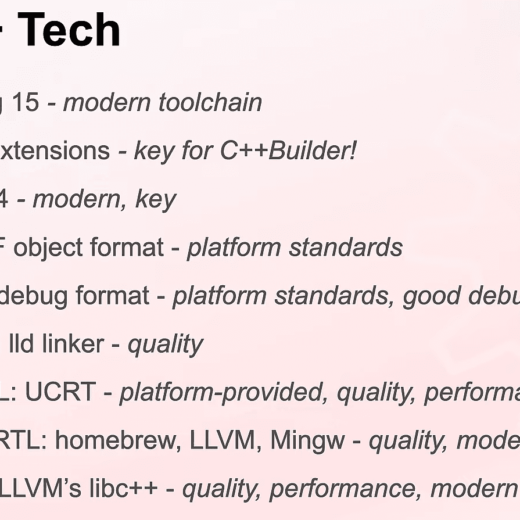
For C++ developers who want to take advantage of new ISO C++ language features in Clang v15 along with the power and productivity of RAD development using C++Builder, stay tuned to the Embarcadero blogs and C++Builder product website for news about the next release of C++Builder. Note: “This blog post is based on a pre-release version of the RAD Studio software and it has been written with specific permission by Embarcadero. No feature is committed until the product GA release.” David Millington, Embarcadero Product Manager, on August 31, 2023 presented a webinar titled “Behind the Build: RAD Studio and C++Builder 12.0” that previewed the upcoming Clang compiler upgrade and integration of Whole Tomato’s Visual Assist into the IDE.  You can watch the replay of the webinar at https://www.youtube.com/watch?v=B0Be_NFmEEE The next release of C++Builder with Clang v15 support will include the following toolchain enhancements: Clang: based on Clang 15, named ‘bcc64x’ C runtime: uses the Universal C Runtime (UCRT) C++ runtime: a new RTL, based on several open source areas STL: libc++ Linker: LLVM lld Debug format: PDB (with IDE support) The toolchain emits COFF object files and uses the Itanium ABI and mangling The default language standard is C++17 and C99 Here are two screen grabs from the August 31, 2023 David Millington webinar: Embarcadero Special Offer: Buy RAD 11.3 today and Apply to join the RAD 12 beta The promotional offer is ending soon (4 days left as of this blog post). Find out additional information at https://www.embarcadero.com/radoffer Keep Up To Date on C++Builder and ISO C++ To keep up to date on using C++Builder and the ISO C++ language you should absolutely bookmark and read everything that Yılmaz Yörü posts on his Embarcadero blog at https://blogs.embarcadero.com/author/yilmazyoru/ Yilmaz also has a great site for learning C++ at https://learncplusplus.org/ Stay tuned to the Embarcadero C++Builder product page for additional information and news.   Reduce development time and get to market faster with RAD Studio, Delphi, or C++Builder. Design. Code. Compile. Deploy. Start Free Trial   Upgrade Today    Free Delphi Community Edition   Free C++Builder Community Edition

Read More

Learn How To Use Integer Literals And The Deprecated Attribute In C++

Hello fellow C++ Developers. Since January we have released many new posts covering the features of the C++11 standard. These features are mostly done, and this week we start on describing C++14 features. We have five more beginners to professional-level topics in modern C++. C++ evolves and refines itself even further with the release of each new C++ standard. C++14 came with a new deprecated attribute feature to allow marking an entity as deprecated – potentially obsolete and best avoided. We explain what deprecated means and how to use the deprecated attribute in C++. In another post, we explain why the gets function was deprecated in C++11 and eventually removed altogether in C++14. We teach integer literals, and binary literals that come with C++14. There is also a great new feature, digit separators that makes it easy to see integer values in coding, and we explain how to use it in different integer types. Our educational LearnCPlusPlus.org site has a whole bunch of new and unique posts with examples suitable for everyone from beginners to professionals alike. It is growing well thanks to you, and we have many new readers, thanks to your support! The site features a plethora of posts that are great for learning the features of modern C++ compilers with very simple explanations and examples. RAD Studio’s C++ Builder, Delphi, and their free community editions C++ Builder CE, and Delphi CE are a real force for modern application development. Table of Contents Where I can I learn C++ and test these examples with a free C++ compiler? How to use modern C++ with C++ Builder? How to learn modern C++ for free using C++ Builder? Do you want to know some news about C++ Builder 12? Where I can I learn C++ and test these examples with a free C++ compiler? If you don’t know anything about C++ or the C++ Builder IDE, don’t worry, we have a lot of great, easy to understand examples on the LearnCPlusPlus.org website and they’re all completely free. Just visit this site and copy and paste any examples there into a new Console, VCL, or FMX project, depending on the type of post. We keep adding more C and C++ posts with sample code. In today’s round-up of recent posts on LearnCPlusPlus.org, we have new articles with very simple examples that can be used with: The free version of C++ Builder 11 CE Community Edition or a professional version of C++ Builder  or free BCC32C C++ Compiler and BCC32X C++ Compiler or the free Dev-C++ Read the FAQ notes on the CE license and then simply fill out the form to download C++ Builder 11 CE. How to use modern C++ with C++ Builder? C++ is very strong in every aspect of modern programming and evolves and refines itself even further with the release of each new C++ standard. While there are many new additions there are some features that are found not useful or ‘dangerous’ in programming, thus the C++ community offers its deprecation in the next released C++ standard and then it is generally removed in the following standard. C++14 came with a new deprecated attribute feature to allow marking an entity as deprecated – potentially obsolete and best avoided. In the first post, we will explain what deprecated means and how can we use the [[deprecated]] and __declspec(deprecated) attributes in modern C++. Modern C++ has a lot of useful functions […]

Read More

5 Important Posts That Professional C++ Developers Should Read

Hello C++ developers, this week we have five more professional and intermediate-level topics in modern C++. Modern C++ has many features to aid multi-thread programming that allow your applications to be faster and more responsive. Since the C++11 standard, the Concurrency Support Library includes built-in support for threads (std::thread) with atomic operations (std::atomic). In the first two post picks today, we explain how to allow atomics use in C++ signal handlers, plus we teach how to use atomic_flag. In another post, we explain how to use propagating exceptions. We also teach what the volatile keyword is and what it does. In the last post pick, we explain the concept of weak compare and exchange in modern C++. RAD Studio’s C++ Builder, Delphi, and their free community editions C++ Builder CE, and Delphi CE are a real force for modern application development. Our educational LearnCPlusPlus.org site has a whole bunch of new and unique posts with examples suitable for everyone from beginners to professionals alike. It is growing well thanks to you, and we have many new readers, thanks to your support! The site features a plethora of posts that are great for learning the features of modern C++ compilers with very simple explanations and examples. Table of Contents Where I can I learn C++ and test these examples with a free C++ compiler? How to use modern C++ with C++ Builder? How to learn modern C++ for free using C++ Builder? Do you want to know some more news about C++ Builder 12? Where I can I learn C++ and test these examples with a free C++ compiler? If you don’t know anything about C++ or the C++ Builder IDE, don’t worry, we have a lot of great examples on the LearnCPlusPlus.org website and they’re all completely free. Just visit this site and copy and paste any examples there into a new Console, VCL, or FMX project, depending on the type of post. We keep adding more C and C++ posts with sample code. In today’s round-up of recent posts on LearnCPlusPlus.org, we have new articles with very simple examples that can be used with: The free version of C++ Builder 11 CE Community Edition or a professional version of C++ Builder  or free BCC32C C++ Compiler and BCC32X C++ Compiler or the free Dev-C++ Read the FAQ notes on the CE license and then simply fill out the form to download C++ Builder 11 CE. How to use modern C++ with C++ Builder? C++11 allows the use of atomics in signal handlers, and with the advent of C++ 17 the signal handler feature was again improved. The std::atomic_flag is an atomic boolean type that is guaranteed to be lock-free and can be used in signal handlers. Moreover, the  header in C++ has an integer type std::sig_atomic_t that can be accessed as an atomic entity even in the presence of asynchronous interrupts made by signals. In our first post ğ,cl, we explain how to use atomic_flag in C++. In C++17, in addition to the std::atomic_flag in ,  the  header has an integer type std::sig_atomic_t that can be accessed as an atomic entity even in the presence of asynchronous interrupts made by signals. In this next post, we explain how to use atomic_flag in C++. The C++11 standard offers the possibility of moving an exception from one thread to another. This type of movement is called propagating exceptions, exception propagation; also known as rethrow exception in multi-threading. To do that, some modifications have been […]

Read More

Create and use Static Library (.Lib) and Dynamic DLLs in C++ Builder

Introduction: This post describes how to create and use Static Library (.Lib) and Dynamic (Run-Time) DLLs in C++ Builder. A library is a collection of pre-compiled code that can be re-used by programs. There are 2 types of libraries: static library and dynamic library. Static Library (.lib) vs Dynamic Library (.dll) A static library (.LIB file) (or archive) contains code that is linked to users’ programs at compile time. The executable file generated keeps its own copy of the library code. A dynamic library (.dll) (or shared library) contains code designed to be shared by multiple programs. The content in the library is loaded to memory at runtime. Each executable does not maintain its replication of the library. What are the differences between static and dynamic libraries? Static libraries (.lib), while reusable in multiple programs, are locked into a program at compile time. Dynamic (.dll), or shared libraries, on the other hand, exist as separate files outside of the executable file. C++ Builder Dynamic Library (.DLL) and Static (.Lib) Library Let’s jump right into creating a C++ Builder Dynamic Library (.DLL) This post is using C++ Builder 11.3 Steps: 1. File | New | Other | C++ Builder | Dynamic Library , select Source type = C++ , check Multi-Threaded, and select Target Framework = No Framework 2. Save the generated project to a new folder:  File | Save Project As | New Folder | CppMyDLL (C:UsersamannarinoDocumentsEmbarcaderoStudioProjectsCppMyDLL).  Rename project to CppMyDLL.cbproj, and rename Unit1.cpp to CppMyDLL.cpp 3. The generated CppMyDLL.cpp file has this code: extern “C” int _libmain(unsigned long reason) The _libmain function is the entry point into the dynamic library. When the dynamic library is loaded, the _libmain function is called. This function usually holds initialization code. 4. To be able to use the DLL and the Client .EXE on any computer (that does not have C++ Builder installed), use:  Project | Options | C++ Linker | Link with Dynamic RTL = False And Packages | RunTime Packages | Link with Run Time Packages = False 5. Build the application (Project | Build). You should get a success Build and Link! 6. Your source code output folder: (C:Users/amannarino/Documents/Embarcadero/Studio/Projects/CppMyDLL/Win32/Debug) should have a CppMyDLL.dll (Dynamic Library) and a CppMyDLL.lib (Static Library). The Static Library (.lib) is automatically generated from the Dynamic Library (,dll). 7. A helpful free utility for seeing the contents of the DLL is Dependency Walker. Dependency Walker is a free utility that scans any 32-bit or 64-bit Windows module (exe, dll, ocx, sys, etc.) and builds a hierarchical tree diagram of all dependent modules. The Download link for Dependency Walker is: https://www.dependencywalker.com/ 8. Next, lets add a function to the CppMyDLL.cpp : double Sum(double a, double b) { return a +b; } Note: DLLs can contain functions that are hidden from the clients, and other functions that are public to the clients. 9. To make this Sum function visible to clients, we add: __declspec(dllexport) like this: double __declspec(dllexport) Sum(double a, double b) { 10. Using Dependency Walker this function SUM shows as @Sum$add To remove the characters @ and the $add (that descibes the function) we add extern “C” to the function, like this: extern “C” double __declspec(dllexport) Sum(double a, double b) { 11. Now, using Dependency Walker, the Sum function shows as: _Sum 12. To remove the […]

Read More

Learn Powerful Multi-threading Operations With C++ Builder

Hello C++ developers, multi-thread operations evolved significantly with the advent of C++11, and this continued with additional improvements in the latest standards to enhance multi-thread operations further. The concurrency support library in modern C++ is designed to solve problems that can arise with multi-thread operations. According to the latest news about the new coming C++ Builder 12.0, there might be a new CLANG 15 Win64 compiler and a new Visual Assist in the IDE. This week we have notes about the presentation of “New coming C++ Builder 12.0” along with new posts about multi-thread operations, atomics, data-race problems and how to solve them, bidirectional fences, as well as strong compare and exchange templates. RAD Studio’s C++ Builder, Delphi, and their free community editions C++ Builder CE, and Delphi CE are a real force for modern application development. LearnCPlusPlus.org web page is another powerful element for learning new skills of modern C++ programming. Our educational LearnCPlusPlus.org site has a whole bunch of new and unique posts with examples suitable for everyone from beginners to professionals alike. It is growing well thanks to you, and we have many new readers, thanks to your support! The site features a plethora of posts that are great for learning the features of modern C++ compilers with very simple explanations and examples. Table of Contents Where I can I learn C++ and test these examples with a free C++ compiler? Do you want to know some more news about C++ Builder 12? How can I use atomic operations in C++ Builder? What are atomic operations in C++ and how can I use them? Where I can I learn C++ and test these examples with a free C++ compiler? If you don’t know anything about C++ or the C++ Builder IDE, don’t worry, we have a lot of great examples on the LearnCPlusPlus.org website and they’re all completely free. Just visit this site and copy and paste any examples there into a new Console, VCL, or FMX project, depending on the type of post. We keep adding more C and C++ posts with sample code. In today’s round-up of recent posts on LearnCPlusPlus.org, we have new articles with very simple examples that can be used with: The free version of C++ Builder 11 CE Community Edition or a professional version of C++ Builder  or free BCC32C C++ Compiler and BCC32X C++ Compiler or the free Dev-C++ Read the FAQ notes on the CE license and then simply fill out the form to download C++ Builder 11 CE. Do you want to know some more news about C++ Builder 12? David Millington, Developer and Product Manager of C++ Builder just released a new video about “Behind the Build: RAD Studio and C++Builder 12.0”. According to David Millington’s post, C++ Builder is aiming to include some amazing features and a lot of performance improvements in operations. C++Builder 12 plans to bring some massive improvements, the enhanced Clang toolchain and Visual Assist integration, substantial improvements across RTL, STL, debugging, and more. Here is the full presentation, Here are a few of my notes, Comes with a special CLANG 15 Win64 compiler – Win64 is a primary OS– New Clang means support for C++20 and a lot of C++23 features– Important to have more compatible standards and amazingly faster– In memory allocation operations, it is 6 to 14% faster than the current CLANG Win64 […]

Read More

Learn Multi-threading with Concurrency Support Library in C++

Hello again, as I write this it’s another blazing hot summer week for me, but we don’t let that get in the way of coding and teaching you on our LearnCPlusPlus.org web page. CPUs and GPUs have evolved year on year to feature a greater number of cores and transistors to give more computational power for today’s servers and computers. With the advent of multiple cores, it is common now for programs to make use of multiple simultaneous threads. Multi-threading is one of the great features of modern C++, allowing you to use the maximum number of cores and threads of your CPUs today. For example, the AMD EPYC 9654 with 96 cores 192 threads, or the Intel Xeon w9-3495X 56 cores 112 threads – unimaginable power for anyone looking for CPUs just a decade ago. That power means you can speed up your operations by 2 to 192 times with multi-core CPUs today or you can improve it by 2 or more parallel CPUs.  In modern C++, multi-thread operations are amazingly evolved since C++11, and still there are new improvements in the latest standards to enhance multi-thread operations further. The Concurrency Support Library is designed to solve problems that arise with multi-thread operations and this week we have some examples of multi-threading in C++. This week, we explain what std::thread is and how can we use it with vectors and functors. In multi-threading, concurrency control is important and there is also mutex mutual exclusion and we explain it with very simple, easy to understand examples. We have two more important post picks about the features that come with C++11. The C++11 standard provides an alternative to std::move, which is std::move_if_noexcept and we have examples about it. Unions are rarely used but are another important data type alternative to structs and classes. The C++11 standard loosens up the restriction regarding members of unions, and in the last post, we explain the unrestricted unions feature that came with C++11. Table of Contents Where can I learn C++ with a free C++ compiler? How to use modern C++ with C++ Builder? How to learn C++ for free using C++ Builder? What is new in C++ Builder CE? What might be next for C++ Builder? Where can I learn C++ with a free C++ compiler? If you don’t know anything about C++ or the C++ Builder IDE, don’t worry, we have a lot of great examples on the LearnCPlusPlus.org website and they’re all completely free. Just visit this site and copy and paste any examples there into a new Console, VCL, or FMX project, depending on the type of post. We keep adding more C and C++ posts with sample code. In today’s round-up of recent posts on LearnCPlusPlus.org, we have new articles with very simple examples that can be used with: The free version of C++ Builder 11 CE Community Edition or a professional version of C++ Builder  or free BCC32C C++ Compiler and BCC32X C++ Compiler or the free Dev-C++ Read the FAQ notes on the CE license and then simply fill out the form to download C++ Builder 11 CE. How to use modern C++ with C++ Builder? In C++, vectors are a modern and very flexible form of array in modern C++. Maybe we can say they are like modern linked lists. We can use vectors with std::thread classes for multi-thread operations. In the next […]

Read More

Explicit Virtual Override And More In Modern C++

Hello everyone, I hope now you, your computer, and your development software are enjoying your summer vacation, or at least you’re happy with your work ???? Over on LearnCPlusPlus.org, we add new C++ posts every day. These are good to learn the features of modern C++ compilers. In this round-up of recent articles, we explain some features of C++11 that tend to tighten the rules, to detect some problems that often arise by the virtual overrides. To achieve this goal, C++11 introduced two new contextual keywords, the final and the override specifiers. In this post we explain, what is the virtual function specifier, what is override specifier, what is the explicit virtual override specifier, and how to use the final and the override specifiers. In addition, we explain how the range-based for loop works in modern C++. We try to explain each topic by giving very simple C++ samples and by using more complete C++ examples to highlight modern way of programming. Table of Contents Where can I learn C++ with a free C++ compiler? How to use modern C++ with C++ Builder? How to learn modern C++ for free using C++ Builder ? What is new in C++ Builder CE? What might be next for C++ Builder? Where can I learn C++ with a free C++ compiler? If you don’t know anything about C++ or the C++ Builder IDE, don’t worry, we have a lot of great examples on the LearnCPlusPlus.org website and they’re all completely free. Just visit this site and copy and paste any examples there into a new Console, VCL, or FMX project, depending on the type of post. We keep adding more C and C++ posts with sample code. In today’s round-up of recent posts on LearnCPlusPlus.org, we have new articles with very simple examples that can be used with: The free version of C++ Builder 11 CE Community Edition or a professional C++ Builder  or free BCC32C C++ Compiler and BCC32X C++ Compiler or the free Dev-C++ Read the FAQ notes on the CE license and then simply fill out the form to download C++ Builder 11 CE. How to use modern C++ with C++ Builder? In modern C++ software, a virtual function is a function in a base class or struct that can be redefined in derived classes or structs. They are member functions whose behavior can be overridden in derived classes. The virtual function specifier is the ‘virtual’ specifier to declare a virtual function in a base class. In the first post, we explain how we can use virtual function specifiers in modern C++.How to learn C++ for free using C++ Builder CE? https://learncplusplus.org/what-is-a-virtual-function-specifier-in-modern-c/ The for loops are one of the great features of C and C++ language that has many options to break, continue, or iterate in a loop. In modern C++, there is a range-based for loop that makes it simple to iterate through a variable type that has members (i.e. strings, lists, arrays, vectors, maps, etc.). The range-based for loop is a feature for the for() loops introduced by the C++11 standard and in the next post, we explain what is range-based for loop. https://learncplusplus.org/what-is-a-range-based-for-loop-in-modern-c/ Modern C++ has many additions compared to the original C++ standard. Regarding virtual overrides, C++11 tends to tighten the rules, to detect some problems that often arise. To achieve this goal C++11 introduces two new contextual keywords, the final and the override specifiers. The override specifier is used to redefine the base class […]

Read More