Delphi

InterBase 2020 Update 1 deja disponibil

InterBase is a powerful, zero-administration, small footprint database engine that can power your server and even run on your mobile devices as an embedded database. InterBase 2020 Update 1 added a number of new features, including tablespaces support for InterBase server, new OS platform support for embedded versions, enhanced performance monitoring, SQL optimizations and more.  Today Embarcadero is releasing InterBase 2020 Update 1, which adds the following features:  Linux support for InterBase 2020 Server and Developer Editions Tablespaces support for the OnlineDump technology Updated IBConsole support for Backup, Dump, and Restore operations of databases that use tablespaces Performances improvements and fixes for defects reported by customers Here are some additional links: https://www.embarcadero.com/products/interbase/version-history http://docwiki.embarcadero.com/InterBase/2020/en/Main_Page http://docwiki.embarcadero.com/InterBase/2020/en/What%27s_New_in_InterBase_2020_Update_1 The installers for different platforms are available for download on the following trial and developer edition download pages: https://www.embarcadero.com/products/interbase/start-for-free https://www.embarcadero.com/products/interbase/developer/free-download This release continues to extend the power of InterBase 2020, along with continuing to focus on its reliability and stability. Moreover, RAD Studio developers already have an InterBase developer edition license and also the ability to distributing IBLite or IBToGo with their mobile applications, depending if they are on the Professional or Enterprise edition SQL Optimizations Transform inequality operators and not operators to their opposite representation for index based retrieval. Inequality operators, such as <, <=, !=, <>, >, >= can be transformed and optimized. For e.g. Conditions of the form “NOT A>0” can now get transformed to “A <= 0” by the SQL optimizer to use index retrieval for better performance. Security Enhancements InterBase 2020 uses OpenSSL 1.0.2s across all platforms to avail recent vulnerability fixes from OpenSSL project. IBConsole Improvements InterBase 2020 comes with an enhanced IBConsole GUI for Windows. It supports the latest feature set including Tablespaces and Data Dictionary modifications and includes enhanced support for InterBase’s patented Change Views functionality. InterBase 64-bit Edition now includes a 64-bit native IBConsole application, that will allow larger datasets to be retrieved in the query window. Phased Delivery InterBase 2020 embedded versions and InterBase Server Edition for Windows are immediately available. Server editions for Linux and macOS will follow shortly.
Read More

Nou în Delphi 10.4: Redesigned Code Insight

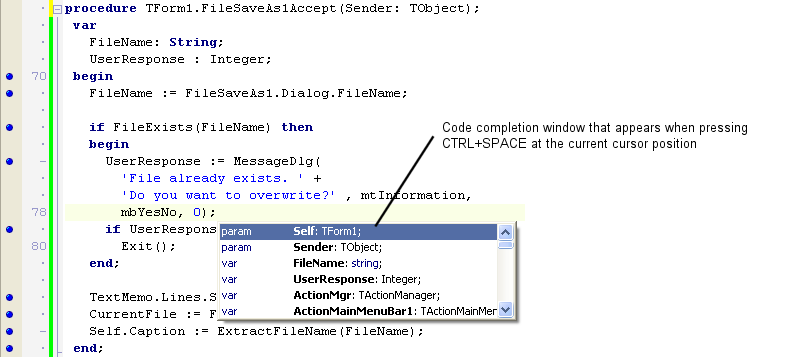
What do we mean by Code Insight? First, some background. If you’re familiar with Code Insight, skip ahead… Code Insight is our name for a set of IDE productivity features in the editor. For the purposes of this blog post, those features are: Code Completion: the dropdown list box that predicts what you want to type. Appears when you type a period (.) after an identifier, or when you press Ctrl+Space. Parameter Completion: the hint that appears showing the parameters for a method, including multiple variations for an overloaded method. Ctrl+Shift+Space inside method braces (). Find Declaration: right-click on an identifier and click Find Declaration, and it will take you to where that method, variable, type etc is defined. You can also hold Control down and move your mouse over the editor, and applicable identifiers will turn into hyperlinks you can click on to find their declaration, which is known as Code Browsing. Tooltip Insight: hover your mouse over a variable or type, and you will be shown information about it. Sometimes this includes XMLDoc, and is known as Help Insight. (We need to clarify names in our doc.) Error Insight: displays errors in your code before you compile. These are otherwise known as ‘red squigglies’, many people’s preferred terminology – the red zigzag lines under your code. Errors are also shown in the Errors node in the Structure view. These features have been available in Delphi for many years. Features like this are a key benefit to you when coding an IDE. Code completion especially saves a lot of typing, and error insight helps you make sure your code is working before you spend time compiling. Classic Code Insight As the language has grown and time has passed, these features have no longer always worked as well as we have wanted. The technology was cutting-edge when it was introduced, but there were definite improvements we could make today. It’s been common to see bug reports about spurious errors (ie errors reported in the editor or in the Structure view when the source code is actually perfectly correct code.) Or that the IDE worked in the main thread, so would not respond to keystrokes while it was working to show the code completion list. (You could only press Escape to cancel.) Sometimes, for gigantic projects, calculating the data for code completion could use a lot of memory in the IDE. In addition, the features were implemented with multiple code parsers: code completion and error insight each had a different understanding of the code. And finally, code insight was disabled while debugging, so if you wrote code while debugging you had no productivity assistance. We did not want this to continue. Our goals for 10.4 have been to: Make Code Insight asynchronous – that is, run on another thread or in another process (or both) so that the IDE is always responsive when you type even if it’s doing work in the background Reduce or even completely remove (you can see where this is going) the potential memory usage for code completion from the IDE Ensure Error Insight always gives correct results – that is, it should give exactly the errors the compiler would, and correct code should show no errors Help us move closer to having a single parser for Delphi source in the IDE, so that there is a ‘single source of truth’ or single understanding […]

Read More

Nou în Delphi 10.4 – Custom Managed Records

What is a Custom Managed Record in Delphi? Records in Delphi can have fields of any data type. When a record has plain (non-managed) fields, like numeric or other enumerated values there isn’t much to do for the compiler. Creating and disposing the record consists of allocating memory or getting rid of the memory location. (Notice that by default Delphi does not zero-initialize records.) If a record has a field of a type managed by the compiler (like a string or an interface), the compiler needs to inject extra code to manage the initialization or finalization. A string, for example, is reference counted so when the record goes out of scope the string inside the record needs to have its reference count decreased, which might lead to de-allocating the memory for the string. Therefore, when you are using such a managed record in a section of the code, the compiler automatically adds a try-finally block around that code, and makes sure the data is cleared even in case of an exception. This has been the case for a long time. In other words, managed records have been part of the Delphi language. Records with Initialize and Finalize Operators  Now in Delphi 10.4 record type supports custom initialization and finalization, beyond the default operations the compiler does for managed records. You can declare a record with custom initialization and finalization code regardless of the data type of its fields, and you can write such custom initialization and finalization code. This is achieved by adding specific, new operators to the record type (you can have one without the other if you want).Below is a simple code snippet: type TMyRecord = record Value: Integer; class operator Initialize (out Dest: TMyRecord); class operator Finalize(var Dest: TMyRecord); end; You need to write the code for the two class methods, of course, for example logging their execution or initializing the record value — here we are also logging a reference to memory location, to see which record is performing each individual operation: class operator TMyRecord.Initialize (out Dest: TMyRecord); begin Dest.Value := 10; Log(‘created’ + IntToHex (Integer(Pointer(@Dest))))); end; class operator TMyRecord.Finalize(var Dest: TMyRecord); begin Log(‘destroyed’ + IntToHex (Integer(Pointer(@Dest))))); end; The huge difference between this construction mechanism and what was previously available for records is the automatic invocation. If you write something like the code below, you can invoke both the initializer and the finalizer, and end up with a try-finally block generated by the compiler for your managed record instance. procedure LocalVarTest; var my1: TMyRecord; begin Log (my1.Value.ToString); end; With this code you’ll get a log like: created 0019F2A8 10 destroyed 0019F2A8 Another scenario is the use of inline variables, like in: begin var t: TMyRecord; Log(t.Value.ToString); which gets you the same sequence in the log.  The Assign Operator The := assignment flatly copies all of the data of the record fields. While this is a reasonable default, when you have custom data fields and custom initialization you might want to change this behavior. This is why for Custom Managed Records you can also define an assignment operator. The new operator is invoked with the := syntax, but defined as Assign: class operator Assign (var Dest: TMyRecord; const [ref] Src: TMyRecord); The operator definition must follow very precise rules, including having the first parameter as a reference […]

Read More

Oferta Pre-Lansare Embarcadero RAD Studio 10.4 !

Embarcadero RAD Studio 10.4 Sydney este cea mai recentă ediție a soluțiilor noastre cu funcționalități noi avansate care Vă vor ajuta mult în procesul de dezvoltare, testare și implemntare a aplicațiilor moderne și în limitele bugetului alocat. Deoarece sunteți client și membru al comunității de dezvoltatori, am lansat special pentru Dvs o ofertă promoțională pentru soluțiile RAD Studio, Delphi, and C++Builder. Embarcadero RAD Studio 10.4 Sydney include o mulțime de funcționalități și înbunătățiri în cele trei produse principale ale noastre (RAD Studio, Delphi și C ++ Builder), oferind VCL pentru aplicațiile Windows 10, FireMonkey pentru dezvoltarea Delphi pentru mai multe tipuri de dispozitive, îmbunătățiri ale productivității dezvoltatorilor la IDE și multe altele! Nu putem împărtăși până când toate detaliile, dar … Solicitați oferta promo: Acum este momentul potrivit pentru a face upgrade la Embarcadero RAD Studio 10.4! Vă gândiți la modernizarea soluțiilor existente? Platformele de programare continuă să se dezvolte. Tehnologiile la fel nu stau pe loc și permanent se dezvoltă. Aplicațiile Dvs create în trecut mai funcționează, dar cum vor sta în perioadele următoare? Sunteți pregătit pentru viitor? Nu vă lăsați depășit de noile tehnologii c! Lansăm oferta de pre-sales pentru RAD Studio 10.4! Actualizați-vă soluțiile existente sau procurați licențe noi acum la pret special și ve-ți primi ediția 10.4 imediat cum va fi lansată plus orice altă versiune nouă, lansată pe parcursul unui an! Noul Code Insight din Delphi 10.4 rezolvă o mulțime de probleme și face din utilizarea IDE o experiență mult mai plăcută și mai receptivă și pentru dvs. Nu mai vorbim de rezultatele suplimentare, care pot fi extrem de utile. Este planificată și continuarea lucrului pentru a merge mai departe prin obiectivele scrise mai sus. Cu toate acestea, în 10.4, noi și testatorii noștri beta am descoperit că este un plus excelent la IDE. În plus, am adăugat chiar două funcții noi: permițându-vă să explorați codul dvs. prin completarea codului și folosind Code Insight, inclusiv completarea codului și alte funcții Code Insight în timp ce depanați. RAD Studio The ultimate IDE with features both C++ and Delphi developers love: code, debug, test and fast design for cross-platform mobile and desktop deployment. Delphi IDE Trusted for over 24 years, our modern Delphi is the preferred choice of Object Pascal developers worldwide for creating cool apps across devices. C++ Builder IDE The most productive C++ development toolkit, including powerful IDE and frameworks for UI, connectivity, and much more. Build C++ applications 10x faster with less code.

Read More

Oferta Embarcadero #remotework

Asigurați-vă cu instrumentele necesareacum cu o reducere de până la 35% prin promoția Embarcadero #remotework Situația actuală cu COVID-19 generează provocări noi pentru dezvoltatorii software. Daca acționăm cu înțelepciune și cu promptitudine, rezultatele pe care le obținem în aceste momente delicate vor rămâne alături de noi și de afacerile noastre mult timp înainte. Pentru a face făță acestor provocări, în afară de echipe de profesioniști, aveți nevoie și de instrumente performante, ce ar putea crește eficiența proceselor de lucru. Este un moment excelent să vă alăturați comunității utilizatorilor IDE RAD Studio, Delphi și C++Builder, soluții moderne și performante, care oferă funcționalități avansate și o creștere semnificativă a vitezei de dezvoltare a aplicațiilor pentru diferite platforme dintr-un singur source-code. Alăturați-vă comunității noastre și profitați de oferta specială și economisiți de la 25% la orice produs Embarcadero: → 25 % reducere  licente noi – Ofertă specială pentru clienții noi care până acum nu dețineau nici o licență Embarcadero. → 30 % reducere – susținem clienții existenți în dorința sa de a extinde numărul de licențe pentru echipele de dezvoltatori. → 35 % reducere – la procurarea licențelor noi de către clienții existenți, care dețin licente cu mentenanță și support expirate. Solicitați oferta Embarcadero #remotework Termeni & Condiții ● Oferta valabilă până pe data de 30 Aprilie 2020 la procurarea:○ Delphi, C++Builder & RAD Studio 10.3 Rio – Pro, Ent & Arch Edition○ Named user, network named and concurrent licenses.● Aceasta ofertă nu este valabilă în cazul achiziției:○ Renewals○ Academic Editions.● Ofertele promoționale nu pot fi cumulate sau combinate● Embarcadero își rezervă dreptul de a modifica, anula sua amâna oricând prezenta ofertă● Prezenta ofertă nu este aplicabilă daca contravine legislației locale.● Se pot aplica restricții adiționale.

Read More

Happy 25th Birthday Delphi!

Delphi, inițial denumit ca CodeGear Delphi și apoi Borland Delphi, a intrat in lumea IT pe 14 februarie 1995 ca cel mai bun instrument de dezvoltare pentru Windows 3.11 (16-bits). Astăzi, nu numai că este încă una din cele mai bune soluții pentru dezvoltarea aplicațiilor Windows de 32 și 64 bits, dar și un IDE utilizat pentru dezvoltarea aplicațiilor și pentru platformele macOS, Android, iOS și Linux. În prezent, IDE Delphi este alegerea unui număr însemnat de dezvoltatori din toată lumea. IDE Delphi poate fi utilizat în proiecte de orice mărime, oferind instrumente necesare pentru o dezvolatre rapidă a aplicațiilor cross-plaform moderne și performante. Delphi în Romania, ca și restul soluțiilor Embarcadero, este promovat de către partenerul oficial, Dimensional Data. În dependență de necesitățile Dvs, Embarcadero Vă pune la dispoziție mai multe ediții: Delphi Professional Delphi Professional is the fastest way to build and update data-rich, hyper-connected, visually engaging applications for Windows, Mac, Mobile, IoT and more using Object Pascal. Quickly and easily update VCL and FMX applications to Windows 10 with the new Windows 10 VCL Controls, Styles, and Universal Windows Platform services components. Delphi Professional includes InterBase Developer edition and IBLite for local and embedded database capabilities. Delphi Enterprise Delphi Enterprise Edition is our most popular edition for building client/server applications for mobile and desktop platforms! Choose Enterprise Edition to create services-based applications, when you need remote database connectivity capabilities, and when you want to create applications for Linux. Build client/server and n-tier connected apps that connect to a wide array of enterprise database and cloud platforms including Microsoft SQL Server, DB2, Oracle, Sybase, InterBase, Amazon and Microsoft Azure. The included InterBase ToGo license adds encrypted, embeddable database capabilities for your application. Delphi Romania Enterprise includes FireDAC, a high performance data access library for developing multi-device applications connected to enterprise databases. Enterprise Edition also includes all Professional Edition capabilities plus a RAD Server single-site deployment license ($5000 value), FireDAC data access libraries, an InterBase ToGo license, and support for creating Linux applications in Delphi. Delphi Architect Embarcadero® Delphi Architect is the superior choice when you need to build and update data-rich, hyper-connected, visually engaging applications for Windows 10, macOS, Linux Server, Android, iOS, IoT and more. Choose the Architect edition for unlimited possibilities. Delphi Architect takes your enterprise and database apps to a new level with the included Aqua Data Studio database modeling and design capabilities. Whether you are working with relational, nosql or cloud databases, your data is easily and quickly accessible with Aqua Data Studio. Build web-enabled and robust enterprise apps using Architect’s included Sencha ExtJS Professional license and the included multi-site RAD Server deployment license. Get more from your embedded database with Architect edition’s included InterBase ToGo license, which offers encryption, no database file limit, and powerful Change Views to keep your applications’ data synced with lower network costs. Delphi Architect edition includes all Enterprise and Professional edition capabilities plus a RAD Server multi-site deployment license, a Sencha ExtJS Professional license, InterBase ToGo license, and advanced data modeling and design.

Read More

Reduceri Aniversare Delphi

La cea de-a 25 aniversare a platformei Delphi, Vă invităm să profitați de un discount de 25% pentru soluțiile Embarcadero RAD Studio, Delphi și C++ Buider de toate edițiile – Professional, Enterprise și Architect. Promoția este valabilă pe parcursul lunii Februarie 2020 și se oferă la achiziția licențelor noi. Solicitați oferte Aniversare Delphi! Vă stăm la dispoziție și pe FB Messenger pentru a clarifica orice întrebare referitor la promoția curentă sau soluțiile Delphi. La întrebări comune răspunde chatbot-ul nostru, iar la întrebări mai specifice – intervin colegii din echipă tehnică. Ediția 10.3.3 Rio este cea mai recentă ediție disponibilă la momentul actual, oferind caracteristici infinite de dezvoltare a aplicațiilor cross-platform cu supportul platformelor ceel mai populare penru momentul actual, care vă ajută să construiți, să testați și să implimentați aplicații moderne rapid și în limita bugetului. Promoție Embarcadero este administrată de către partenerul oficial Embarcadero în România, compania Dimensional Data. Aflați mai multe despre produse în promție! Nu ratați ocazia unică de a profita de discount aniversar Delphi! RAD Studio 10.3 Release 3 builds on the feature set of 10.3, 10.3.1 and 10.3.2 by adding new capabilities throughout the product. Delphi 10.3.3, C++Builder 10.3.3 and RAD Studio 10.3.3 are now available to download for any active Update Subscription customer. With Release 3, developers can target the Google Play Store with 64-bit versions of their FireMonkey Delphi apps, simplify their multi-tier application development and deployment of RAD Server through a pre-built Docker image and build C++ and Delphi applications for iOS 13 and Delphi apps for macOS Catalina. Developers can also access over 70+ data sources with a newly included Enterprise Connector subscription license for Enterprise and Architect edition users.  RAD Studio 10.3 Release 3 also has an extensive quality focus, addressing over 180 customer requests in areas like App Tethering, FireMonkey mobile platforms, C++ compiler and toolchain, IDE responsiveness and more. See below for additional details.  Product trials for 10.3.3 are now available and the updated product builds are live in the online store. Customers on Update Subscription can download and install RAD Studio 10.3.3 today using their existing licenses. An email notification with download links will also be provided to everyone current on subscription.  Key RAD Studio 10.3.2 features include: Delphi Android 64-bit Support iOS 13 and macOS Catalina Support  RAD Server Docker Deployment  Enterprise Connectors in Enterprise & Architect Edition Quality and Performance Improvements  The 10.3.3 release includes around 180 quality improvements, benefiting around 375 different customers.

Read More

La 25 de ani Delphi – TMS Software te premiază!

25 de ani Delphi ! De Ziua Îndragostiților se va sărbători cea de a 25-a aniversare a Delphi. 2020 este un an important pentru toți fanii Delphi! Delphi 1.0 a fost lansat în Februarie 1995 și își sărbătorește 25 de ani în acest an. În 1995 am fost cu toții încântați să scriem primul nostru control VCL UI pentru o aplicație Windows 95 de 16 biți în Delphi 1. 25 de ani mai târziu, Delphi este o soluție complexă care permite construirea aplicațiilor native VCL Win 64 cu support monitoare de înală rezoluție, aplicații FMX cross-platform care rulează pe Windows, macOS, iOS, Android, Linux folosind un back-up TMS Aurelius ORM și / sau un back-back TMS XData REST pentru accesul la baza de date. O diferență globală între 1995 și 2020, dar încă se bazează pe utilizarea componentelor RAD extrem de compatibile și ușor de implement. Sărbătoriți 25 de ani Delphi alături de noi și câștigați premii! TMS Software, pentru a împărtăși pasiunea sa și a sărbători, în luna Februarie avem o provocare specială pentru fanii Delphi și TMS components. Faceți un screeshot a celui mai tare proiect pe care l-ați creat cu Delphi folosind componente TMS.  Partajați aceasta imagine cu un comentariu despre modul de utilizare a componentele TMS pe Facebook sau Twitter   Pe Twitter etichetați @TMSsoftwareNews și folosiți următoarele hashtag-uri: #TMS, #delphi și #embarcadero  Pe Facebook etichetați @tmssoftware și folosiți următoarele hashtag-uri: #tmssoftware, #delphi și #embarcadero Utilizatorii vor decide cine câștigă. Foarte simplu! Numărăm numărul de like-uri + share-uri + comentarii. Premii! Primii 3 participanți cu cel mai mare număr vor câștiga unul dintre aceste super-premii : Sunteți unul dintre câștigătorii noștri și aveți deja această licență? În acest caz veți primi absolut GRATUIT LICENSE RENEWAL. Fiecare participant la concurs beneficiază de un discount de 20% pentru următoarele produse : TMS WEB CoreTMS WEB Core enables to build modern web client applications following the single-page architecture that also other modern frameworks like Angular, vue.js, React employ.. TMS WEB Core is offered at 395 EUR. But this month you get 20% extra discount, so for 316 EUR only. TMS FNC Component StudioWith this bundle you have the freedom to create powerful apps of your choice. Separate purchase of the products will cost you 460 EUR. This bundle is offered at 295 EUR, but this month you can get this for discount price 236 EUR. TMS VCL UI PackCreate modern-looking & feature-rich Windows applications faster with over 600 components in one money and time saving bundle for Delphi & C++Builder. Regular bundle price is 295 EUR, but only this month you get extra 20% discount on this bundle, so this is 236 EUR only! TMS Business SubscriptionTMS Business Subscription is our bundle framework that includes: TMS Aurelius, TMS XData, TMS Scripter, TMS Data Modeler, TMS RemoteDB, TMS Echo, TMS Diagram Studio and TMS Workflow Studio. You can purchase your license for regular price 395 EUR. But this month you can get your license for 316 EUR only! TMS ALL-ACCESSTMS ALL-ACCESS is our no-nonsense bundle, where you get all our components for just 1695 EUR, instead of 5870 EUR. And yes on top of that you get 20% extra discount this month! So you can get all our components for 1356 EUR. DISCOUNT este valabil până pe data de 29 Februarie 2020. Solicitați ofertă personalizată, completând formularul de mai jos. Înregistrarea începe pe 01 […]

Read More

5 Unique Delphi features for Windows 10

To the average non-technical computer user, Windows10 might seem as just another Windows version. I still hear both non-technical users and developers ask why they should leave Windows 7 behind. What exactly is so unique about Windows 10? In order to understand why Windows10 is awesome, we first have to take a step back to the previous edition of Windows, namely Windows 8. A bit of context At the time when Windows 8 was the latest thing, Microsoft was still active in the mobile market, and Windows 8 represented a substantial refactoring of the Windows family. Microsoft made no secret of their plans to eventually retire x86 in favour of ARM (which is still a goal for both Microsoft and Apple), and in order to deliver said platform transparently, the OS was to be engineered from the ground up. The result of this effort was WinRT (Windows Runtime), a chipset agnostic architecture that, once adopted, enabled developers to write applications that could be compiled for any CPU, providing the code was source-compatible (not unlike FireMonkey and its abstraction layer over desktop, mobile and embedded). The idea was initially to retire the aging WinAPI and thus make the entire Windows eco-system portable. But WinRT has not replaced WinAPI, instead it co-exists and compliments the system. Universal Windows Platform (UWP) Needless to say the Windows 8 journey did not go as Microsoft had planned. They took Windows Mobile off the market (which is a great shame, Windows Mobile was wonderful to use) and decided to focus on what they do best; namely the Windows desktop. UWP (universal windows platform) can be seen as a kind of successor to WinRT. It incorporates the same technology (so WinRT is still there) except it has broader implications and embrace more diverse technologies. The most important being that it allows other languages, and developers that don’t use Visual Studio to co-exist without the restrictions of Windows 8 (WinRT was C++ only). Microsoft also added an emulation layer to UWP, to make sure applications written for x86 and WinAPI can seamlessly run on ARM. I should underline that Delphi features for Windows 10 has support for the WinRT APIs that are now an intrinsic part of Windows 10. There are some 40 units in the VCL (under the WinAPI.* namespace) that let you work directly with that aspect of Windows. As well as components written especially for Windows 10, that we will cover briefly in this post. Right then. Lets jump into my top five features and have a closer look! 1: Scaling and DPI awareness If you have updated to Windows 10 you have undoubtedly noticed that graphics are smoother than under Windows 8 (and especially Windows 7), and that Windows will scale form content if you are using a monitor that supports high DPI. This feature goes deeper than you might expect, because users can have both HD and SD capable monitors connected to the same machine – and Windows 10 will ensure that applications look their best regardless of DPI count. Support for DPI awareness for monitors, has to be defined in the application manifest, but this is now a part of your project options inside the Rad Studio IDE. So making your desktop application DPI aware is nothing more than a 2-click operation. […]

Read More

5 motive esențiale de a utiliza InterBase in 2020

InterBase in 2020 will continue to be, one of the hidden gems of the relational database world. From its inception in the early 1980s, through mainstream adoption and evolution under Borland, InterBase looks back at a track-record that spend decades; at times defining the standard that all other databases were measured against. With Embarcadero acquiring the Borland development portfolio in 2008, InterBase has again been brought up to speed with the latest technological advances; surpassing them even with features like Change Views. Thanks to steadily refactoring and evolution since Embarcadero took over; its performance and scope have seen radical performance gains. Once again InterBase is the cutting edge, synonymous with performance, security and platform diversity. The optimizations invested in our gentle giant over the past eight years alone are too many to list. Embarcadero has done an amazing job on modernizing this much loved — and dare I say, archetypal relational database. At the same time, they have managed to retain the functionality that is quintessentially InterBase: Features that set the product apart. For an old Delphi developer like myself, using InterBase in my production environment again is an emotional experience. InterBase was part of my university curriculum and used in my first commercial software development alongside Delphi. Familiar yet unmistakably modern, fresh yet mature and established. I want to present five good reasons why InterBase should be your next database. Writing about a subject I am passionate form easily turns into a novel, which is why I am limiting the features to a modest five. Let’s jump in and look at why should InterBase in 2020 be your next database? 1: Platform Diversity The world of technology has changed dramatically in a very short time. The way that technology evolves, be it software or hardware, is typically through sudden, unexpected leaps. The mobile revolution of 2007 spearheaded by Steve Jobs, as he unveiled the iPhone at the Apple developer conference in San Francisco, was one such leap. Overnight, the criteria for software development were irrevocably changed. Fast forward to 2020 and two-thirds of the planet’s population are walking around with a proverbial super-computer in our pockets. Each filled with applications, ever-growing in complexity, and with a very real need for reliable data persistence. Today business is conducted more and more on mobile devices, and with that, the ability to deploy software to different platforms, operating systems and hardware is a necessity. Multi-platform computing is now the prerequisite that all developers, regardless of programming language, must base their strategy on. When you need multi-platform support, InterBase is a pioneer and ahead of its time. Already in the late 80s, InterBase was available for a variety of computer systems; from large and powerful business machines running Unix, to more modest home computers like the Apollo or the Commodore Amiga. The targets of 2020 are very different, but InterBase remains the same versatile and platform-independent database system that it has always been. Today, it can be deployed to all leading platforms and operating systems: Windows, Linux, macOS, Android, and iOS. InterBase also supports heterogeneous OS connectivity across all supported platforms. The ability to use the same database on multiple architectures is by far my favorite feature. It saves time, reduces cost, and makes life significantly easier during maintenance. Internet of Things is InterBase in 2020 With the […]

Read More