10.4

Delphi 10.4 Sydney – the best tool for creating Windows Apps

Delphi has long been a favorite tool of many Windows developers. After launching new Delphi 10.4 Sydney that statement may be considered as simply wishful thinking to many people, but sometimes the truth is not as obvious as it should be. The ‘truth’ to many is that Visual Studio is the ultimate tool for Windows developers. While I may concede that truth for many C++ developers, it’s definitely debatable for .NET developers. (Simply ask a Visual Basic developer how they feel about no more language features planned.) Many .NET developers started with WinForms back in 2002 – including a whole bunch of Delphi developers that jumped ship to the greenfields of .NET from what many consider a historical pinnacle of Delphi development, Delphi 7 (an ancient version which many developers still use today!) Some developers have stayed with WinForms over the years, but many moved to WPF and XAML in .NET 3.0 back in 2006. Others chose to take the five-year Silverlight boondoggle starting in 2007. WPF went stagnant around 2013 as the year prior Microsoft released Metro Apps in Windows 8. Microsoft quickly shifted the label to WinRT in Windows 8.1. By 2015, an updated app platform for Windows 10 was named UWP as the new ‘final’ solution but again the improvements didn’t help it to gain traction. Microsoft was recognizing the obvious resistance and quickly created new technologies to bridge applications across various platforms. They developed an iOS bridge, an Android bridge, a web apps bridge, and a classic Win32 desktop apps bridge. (Did you know that there still is an Objective-C for Windows?) The Android bridge is dead. While the Win32 bridge is still active, it has not been utilized much. The new ultimate solution starting in late 2019 has been .NET Core 3.0 and most of the old technologies like WinForms are being reinvigorated to work with it (well, except Silverlight of course!) The new goal is to make “every platform feature available to every developer” to solve the “massive divide” between platforms due to the rejection of UWP. (Note that WinForms and WPF are not cross-platform options with .NET Core 3.0 so they get rejected once again.) The very latest technology revolution unveiled by Microsoft in the last few days is Project Reunion. This is supposed to be the new way to drag all the Win32 applications into the future (something they have been trying very hard to do over the last 14+ years!) A quote from Microsoft: “The idea behind Project Reunion is that it allows developers to build one Windows application and target all 1 billion Windows devices….We’re bringing together the combined power of Win32 and UWP so developers no longer have to choose because we’re unifying these existing APIs and in some way decoupling them from the OS.“ I would pose a fairly significant question behind Microsoft’s bold statement of a billion Windows devices out there: how many applications on those billion devices are Win32 versus UWP? I’m sure Embarcadero has a strong opinion on that specific topic! To be fair, there are a few dozen people in that commune in Belize which still use Windows Phones. And there are a few thousand people using the $3,500 HoloLens headsets. (It’s $1,500 less than their first version after all so it’s bound to […]

Read More

Top 3 features in Delphi 10.4 Sydney to try

Following the beta testing period and some blog post-pre-announcing some of the key features, on 27 Mai 2020 Embarcadero officially released RAD Studio 10.4 Sydney, which includes Delphi 10.4 Sydney. My Top Three Features There are many new features in the product. For Delphi developers the key are: The first cut of Code Insight based on Language Server Protocol. This is a huge step for the product, a new foundation for the future of the “IntelliSense” capabilities. From this foundation, we’ll continue to improve and expand in the future. Top feature is completion within words — rather than starting with what you type. Nice side effects, much better red squiggles. The introduction of custom managed records. Records in Delphi are extremely powerful and handy (with methods and operators overloading) now custom initialization and finalization add more power The extensive enhancements on VCL, with support for High DPI Styles and new platform support with TEdgeBrowser control, among many other features (Per Controls styling, TTitleBar, Virtual Image component, updated API declarations…). FMX and RTL and many other areas got improvement, but the work on VCL has been really extensive for this release There is way more in the product, this is just my personal take of the top 3 areas we worked on. Extensive bug fixing is another key element of Delphi 10.4 Sydney, with one of the highest numbers of public reported bug fixed in a release. And the return of a very nice classic Delphi Greek helmet logo! Noteworthy Links The official RAD Studio 10.4 announcement by Sarina is at https://community.idera.com/developer-tools/b/blog/posts/rad-studio-10-4-now-available-learn-more Direct download of the online installer from the new download portal: https://my.embarcadero.com/#downloadDetail/692 The YouTube What’s New video: https://www.youtube.com/watch?v=cRWWzd_yaig&feature=youtu.be The 10.4 Demos on GitHub at: https://github.com/Embarcadero/RADStudio10.4Demos What’s new web page: https://www.embarcadero.com/products/rad-studio/whats-new-in-10-4-sydney What’s new docwiki page: http://docwiki.embarcadero.com/RADStudio/Sydney/en/What%27s_New Minor features and list of fixed issues: http://docwiki.embarcadero.com/RADStudio/Sydney/en/New_features_and_customer_reported_issues_fixed_in_RAD_Studio_10.4 Official press release: https://www.businesswire.com/news/home/20200526005263/en/RAD-Studio-10.4-Accelerates-Native-Windows-Development (I’m even quoted in it!) Interested in a trial? https://www.embarcadero.com/products/rad-studio/start-for-free Feature matrix (PDF): https://www.embarcadero.com/docs/rad-studio-feature-matrix.pdf

Read More

Nou în Delphi 10.4: Redesigned Code Insight

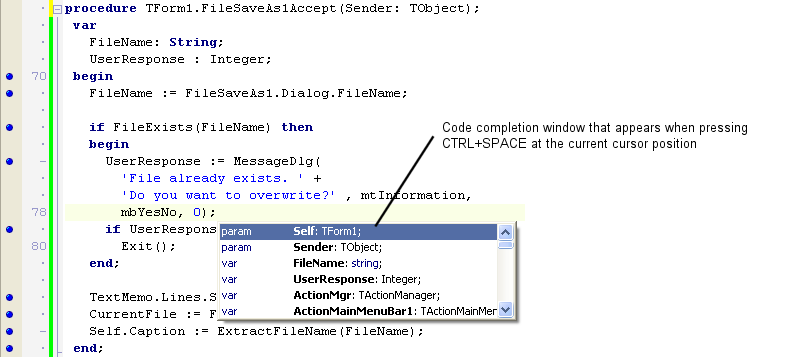
What do we mean by Code Insight? First, some background. If you’re familiar with Code Insight, skip ahead… Code Insight is our name for a set of IDE productivity features in the editor. For the purposes of this blog post, those features are: Code Completion: the dropdown list box that predicts what you want to type. Appears when you type a period (.) after an identifier, or when you press Ctrl+Space. Parameter Completion: the hint that appears showing the parameters for a method, including multiple variations for an overloaded method. Ctrl+Shift+Space inside method braces (). Find Declaration: right-click on an identifier and click Find Declaration, and it will take you to where that method, variable, type etc is defined. You can also hold Control down and move your mouse over the editor, and applicable identifiers will turn into hyperlinks you can click on to find their declaration, which is known as Code Browsing. Tooltip Insight: hover your mouse over a variable or type, and you will be shown information about it. Sometimes this includes XMLDoc, and is known as Help Insight. (We need to clarify names in our doc.) Error Insight: displays errors in your code before you compile. These are otherwise known as ‘red squigglies’, many people’s preferred terminology – the red zigzag lines under your code. Errors are also shown in the Errors node in the Structure view. These features have been available in Delphi for many years. Features like this are a key benefit to you when coding an IDE. Code completion especially saves a lot of typing, and error insight helps you make sure your code is working before you spend time compiling. Classic Code Insight As the language has grown and time has passed, these features have no longer always worked as well as we have wanted. The technology was cutting-edge when it was introduced, but there were definite improvements we could make today. It’s been common to see bug reports about spurious errors (ie errors reported in the editor or in the Structure view when the source code is actually perfectly correct code.) Or that the IDE worked in the main thread, so would not respond to keystrokes while it was working to show the code completion list. (You could only press Escape to cancel.) Sometimes, for gigantic projects, calculating the data for code completion could use a lot of memory in the IDE. In addition, the features were implemented with multiple code parsers: code completion and error insight each had a different understanding of the code. And finally, code insight was disabled while debugging, so if you wrote code while debugging you had no productivity assistance. We did not want this to continue. Our goals for 10.4 have been to: Make Code Insight asynchronous – that is, run on another thread or in another process (or both) so that the IDE is always responsive when you type even if it’s doing work in the background Reduce or even completely remove (you can see where this is going) the potential memory usage for code completion from the IDE Ensure Error Insight always gives correct results – that is, it should give exactly the errors the compiler would, and correct code should show no errors Help us move closer to having a single parser for Delphi source in the IDE, so that there is a ‘single source of truth’ or single understanding […]

Read More

Nou în RAD Studio 10.4 VCL Per-Control Styles

In the past, the VCL library allowed a developer to select one style (or no style) for the entire application. Starting with RAD Studio 10.4 VCL library will allow you to use multiple VCL styles at the same time in different forms of your applications, or even different controls of the same form. You can also mixed styles of elements (controls and form) and elements using the Windows default platform theme. This feature is controlled by a new StyleName property for the TControl class. This property takes as value the name of one of the styles active for the application and applies the style to the given control. If the property is empty, the parent control style is used: so if you set the property for a form, all controls in the form take the form style by default. A Quick Demo As the name implies, per-control styling allows a developer to apply different styles for controls and forms in the same application. To start, you need to add multiple styles to an application, and you can use all of them. This feature works only if one of the VCL Styles is active. First, add multiple styles to an app (hint, in RAD Studio 10.4 VCL you can use the new high-dpi styles, that’s for another blog post): Now set different styles names for different controls in a form, like in the following DFM file (I kept only key relevant properties here): object Form2: TForm2  StyleName = ‘Sky’  object Panel1: TPanel    StyleName = ‘Light’    object Button1: TButton…    object Button3: TButton      StyleName = ‘Sky’    end  end  object Button2: TButton    StyleName = ‘Windows’  end  object Button4: TButton    StyleName = ‘Luna’  end  object Button5: TButton    StyleName = ‘Aqua Graphite’  endend Notice that Button1 takes the hosting panel style, while Button2 resets the style to the form one. Finally, ‘Windows’ is a special purpose value, as described below. With this code, here is the UI of a form with 5 buttons using 5 different styles: A Few Rules for RAD Studio 10.4 VCL There are different approaches you can use to to adjust the style of the different forms and controls of a VCL application: 1. Adjust style list in project options (but you can also load styles at runtime). 2. Use the TControl.StyleName property to define the specific style for each control or each form. The StyleName value must be one of the names of the styles in the project options. A control can use the StyleName defined for its parent control, so you can set the StyleName property of a form to have specific style used by all controls on it. Additional cases: By default, TControl.StyleName is empty and control uses a default style. You can set StyleName as ‘Windows’ to disable applying any style for control or form. If you set a style name that is not among the loaded VCL styles, then the control will use default style. 3. You can define a specific style also for common dialogs. Use the property  TStyleManager.DialogsStyleName for that. By default, it is empty and common dialogs use the default style of the application. 4. You can define the application style as ‘Windows’. This means that if some control or form has an empty StyleName property, then it will always use ‘Windows’ style and VCL Style will be always […]

Read More

Oferta Pre-Lansare Embarcadero RAD Studio 10.4 !

Embarcadero RAD Studio 10.4 Sydney este cea mai recentă ediție a soluțiilor noastre cu funcționalități noi avansate care Vă vor ajuta mult în procesul de dezvoltare, testare și implemntare a aplicațiilor moderne și în limitele bugetului alocat. Deoarece sunteți client și membru al comunității de dezvoltatori, am lansat special pentru Dvs o ofertă promoțională pentru soluțiile RAD Studio, Delphi, and C++Builder. Embarcadero RAD Studio 10.4 Sydney include o mulțime de funcționalități și înbunătățiri în cele trei produse principale ale noastre (RAD Studio, Delphi și C ++ Builder), oferind VCL pentru aplicațiile Windows 10, FireMonkey pentru dezvoltarea Delphi pentru mai multe tipuri de dispozitive, îmbunătățiri ale productivității dezvoltatorilor la IDE și multe altele! Nu putem împărtăși până când toate detaliile, dar … Solicitați oferta promo: Acum este momentul potrivit pentru a face upgrade la Embarcadero RAD Studio 10.4! Vă gândiți la modernizarea soluțiilor existente? Platformele de programare continuă să se dezvolte. Tehnologiile la fel nu stau pe loc și permanent se dezvoltă. Aplicațiile Dvs create în trecut mai funcționează, dar cum vor sta în perioadele următoare? Sunteți pregătit pentru viitor? Nu vă lăsați depășit de noile tehnologii c! Lansăm oferta de pre-sales pentru RAD Studio 10.4! Actualizați-vă soluțiile existente sau procurați licențe noi acum la pret special și ve-ți primi ediția 10.4 imediat cum va fi lansată plus orice altă versiune nouă, lansată pe parcursul unui an! Noul Code Insight din Delphi 10.4 rezolvă o mulțime de probleme și face din utilizarea IDE o experiență mult mai plăcută și mai receptivă și pentru dvs. Nu mai vorbim de rezultatele suplimentare, care pot fi extrem de utile. Este planificată și continuarea lucrului pentru a merge mai departe prin obiectivele scrise mai sus. Cu toate acestea, în 10.4, noi și testatorii noștri beta am descoperit că este un plus excelent la IDE. În plus, am adăugat chiar două funcții noi: permițându-vă să explorați codul dvs. prin completarea codului și folosind Code Insight, inclusiv completarea codului și alte funcții Code Insight în timp ce depanați. RAD Studio The ultimate IDE with features both C++ and Delphi developers love: code, debug, test and fast design for cross-platform mobile and desktop deployment. Delphi IDE Trusted for over 24 years, our modern Delphi is the preferred choice of Object Pascal developers worldwide for creating cool apps across devices. C++ Builder IDE The most productive C++ development toolkit, including powerful IDE and frameworks for UI, connectivity, and much more. Build C++ applications 10x faster with less code.

Read More