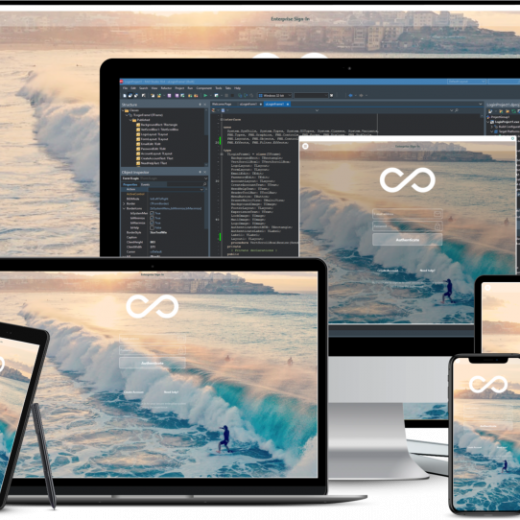
Just before the year closes, we’d like to share a new episode in the “How it works” series with Holger Flick. This series is created to show you how you can do more with Delphi and TMS components. First Holger introduces two new exciting components added to the TMS FNC WX Pack: the barcode and the QR code decoder components: and of course, the “How it works” video explains in detail how you can create a Delphi application that uses the QR code decoder component and use it to extract information from a QR code image file: TMS FNC WX Pack The TMS FNC WX Pack is all about leveraging existing, reliable, proven web technology in any type of Delphi app, be it a Windows VCL app, a cross-platform FireMonkey app or a TMS WEB Core web client application. It already comes with a HTML editor, a PDF viewer, an OCR component, a JSON formatter and a barcode or QR code generator. In our lab, the next series of breathtaking components are already in development that will join the TMS FNC WX Pack family in 2022! Watch the TMS FNC WX Pack introduction video again for more info. Learn more! Like to learn more about Delphi and TMS components? Consider also the books our colleague Holger Flick wrote for you. Get all the in-depth content on how to get more out of Delphi with TMS components while reading at your own pace. We made a convenient list of the books here from where you can add it to your basket in one-click. Be in touch! 2022 is nearby. Our team is extremely motivated to surprise you once more in the New Year with many exciting new developments. Let us know your wishes for 2022. We are eager to learn what you would like to see us doing in the New Year!
Cryptocurrencies like Bitcoin use enormous amounts of energy to secure their network. But why are cryptocurrencies so power-hungry and more importantly what are the alternatives? Much of the hardware used to perform the calculations uses highly specialized computers running Linux collaboratively in “farms” although there are many crypto “mining” apps which are Windows based or uses Windows program development even if their eventual targets are not Windows-based machines. Why is proof-of-work a problem for Bitcoin? Mining new coins take a lot of computing power because of the proof-of-work algorithm. The concept was first presented in 1993 to combat spam emails and was formally called “proof-of-work” in 1997. Nevertheless, the technique went primarily unused until Satoshi Nakamoto developed Bitcoin in 2009. He discovered that this mechanism could be used to reach harmony between many nodes on a network, and he utilized it as a way to secure the Bitcoin blockchain. Yet the proof-of-work algorithm works by having all nodes solve a cryptographic puzzle. This puzzle is solved by miners (the metaphor is drawn from the concept of them extracting their fortunes from hard physical work) and the first one to find the solution receives the ‘miner reward’. This has directed to a situation where individuals are building bigger and larger mining farms in order to share the effort in a “many hands make light work” team effort. The advent of lower cost hardware with a more affordable “bang to buck” ratio – more CPU power for a given financial outlay – coupled with a very broad expansion in the availability of single board mass-produced hardware such as the Raspberry Pi and RISC-powered boards has meant these kinds of mass-computing networks are achievable at a modest level of investment. Bitcoin miners alone use almost 54TWh of electricity, enough to power 5 million households in the US or even power the whole country of New Zealand Will blockchain contribute to global warming? Maybe. Blockchain calculations are shaping up to become a power-suck of worrying proportions. Even accounting for the lower power consumption of modern hardware the sheer computational effort involved and a trend toward coupling dozens, hundreds or even thousands of machines together to obtain the financial rewards which, due to its nature is increasingly hard to obtain and, in the case of Blockchain, harder means more CPU cycles and more CPU directly translates into a greater demand for electricity. According to Digiconomist, Bitcoin miners alone use almost 54TWh of electricity, enough to power 5 million households in the US or even power the whole country of New Zealand. But it does not halt there. It’s currently a simple equation: proof-of-work gives more bounties and thus greater rewards, to people with better and more plentiful equipment. The higher your hash rate (the number of calculations you can perform on the data), the higher the chance that you’ll get to create the next block and obtain the mining reward. To increase the chances even further, miners have come together in what’s called “mining pools”. With mining pools, they combine their hashing power and distribute the reward evenly across everyone in the pool. Proof-of-work is causing miners to use massive amounts of energy and it encourages the use of mining pools which makes the blockchain more centralized as opposed to decentralized. So, to solve these […]
In this article, we’ll show how to implement curve fitting with FNC math components presented in version 3.2 of TMS Analytics & Physics library, most importantly, with little to no code! Curve fitting (approximation) is a mathematical method of finding a math expression (function) that fits best to some discrete data (series of points). Commonly, we need the following three ingredients to implement the curve fitting: Discrete data (a series of points) to fit. A set of functions (basis functions) to construct the curve. A method of solving the fitting problem (optimization algorithm). Let’s go through the FNC components for these three elements. The first component is TFNCDataSource1D. The component provides data for curve fitting and has the following published properties: Data (TDataCollection1D) – a collection of points. Each collection item has two properties of real type: ‘V’ – the value of the variable; ‘F’ – the value of the function. DataCount (integer) – the number of points in the collection (read-only). With standard Delphi IDE tools for collection editing, we can add and delete points, edit values of the points in design time. There is a binding component to show the data on an FNC chart – TFNCData1DPlotter. It has two primary published properties: Data (TFNCDataSource1D) – a data source to show on the chart. Chart – a chart to show the data. When assigning an FNC chart to the Chart property in design time, the plotter component creates a series for the chart. You can tune the series’ properties to get the appropriate data representation. In the picture below, we showed an example of data, drawn with the data plotter. The second ingredient for curve fitting is the set of basis functions. We’ll use the TFNCLinearConstructedBasis1D component. This component provides the easiest way to get a set of functions for constructing the fitted curve. The main published properties of the component are the following Variable (TVariableProperty) – provides the name of the variable for the basis functions. Coefficient (TVariableProperty) – provides the name of the coefficient for the fitting problem. Kind (TBasisKind) – the type of predefined basis functions. Order (integer) – number of basis functions for approximation. Expression (string) – read-only math expression of the constructed function. Parameter (TParameterCollection) – a set of parameter values for parametric basis functions. With the Kind property, you can select the appropriate basis functions for building the fitted curve: polynomials, Taylor series, exponents, Fourier series, exponential functions. The Order property sets up the number of basis functions to build the curve. Here is an example of the component’s properties, shown in the Object Inspector. The last component we need to complete curve fitting is TFNCApproxFunction1D. This component joins a data source with a basis and implements the least-squares approximation algorithm. It has the following published properties: DataSource (TFNCDataSource1D) – a data source for approximation. Basis (TFNCBasis1D) – a basis for approximation. Formula (TBaseFormulaProperty) – read-only formula of the curve. Expression (string) – read-only math expression of the fitted curve. When you assign the data source and the basis properties, the component runs the approximation algorithm and evaluates the formula and the expression properties, as shown in the picture below. The TFNCApproxFunction1D is a descendant of the TFNCBaseFunction1D component. So, you can draw the curve on an FNC chart as described in […]
UI development is easier for web developers if they have useful code templates and components to get things done quickly. That is why many web developers are turning to Ext JS, which offers them everything they need. Ext JS is a features-rich and high-performing JavaScript framework developed by Sencha which offers a comprehensive set of components to build stunning web and mobile UIs. Ext JS customizable UI widgets such as calendars, grids, trees, lists, forms, menus, toolbars, windows, etc., let you build cross-platform web and mobile applications. Sencha provides a useful example of various Ext JS capabilities for beginners, and this article explains everything they want to know about Ext JS examples for beginners. How do I build an Admin Dashboard in Javascript? An Administrative Dashboard provides administrators central access to important information and tools that enable them quickly view everything they need at a glance. Ext JS provides a complete and feature-rich administrative application template for you to build a powerful admin dashboard. Users need to download the Ext JS GPL version and Sencha cmd to reuse this template. Users can quickly build the Admin Dashboard sample app and build on top of it customizing the template. How do I build an Executive Dashboard in Javascript? An Executive Dashboard displays company information, including business performance, in an organized manner for company executives. Ext JS provides a responsive executive dashboard template for you to build a user-friendly executive dashboard. Users can quickly build the Executive Dashboard sample app and build on top of it customizing the template. How do I build Javascript Grid Data Binding? Binding data is the process of connecting data to a component. The Grid Data Binding example shows how to bind additional details in a detailed view for the grid upon selecting it. When data we update data, it will update the component configs automatically. Two-way binding allows changes to the config to update associated data. How implement a live-search function for my grid? Live search is important for a table, especially if it contains a large amount of data. The live search grid example shows how you can use ‘LiveSearchGridPanel’ to search the data using a keyword or a character. You can also support searching with a regular expression and case-sensitive search. How do I lock the columns of my grid? Sometimes, you may want to lock specific columns, especially if there are several columns and you need to provide an easy scrolling experience. The Locking Grouping Summary example shows how you can easily move unlocked columns along the visible area. How do I show a calendar in my application? A calendar is a useful component of an application that you can easily show using Ext Js. It is a powerful component of Ext Js Kitchen Sink. The detailed calendar example shows daily, weekly, and monthly calendar views with events. Users can use the Ext Js calendar package, which consists of views based on time frames, And you can implement it with or without a sencha cmd. How to build a ticket application? Ext Js ticket application demonstrates how to build an issue tracking application using MVC and data binding concepts. This example application also shows how to log in and log out using sessions, displays graphics and pie charts of ticket statuses using data […]
What is Ethereum and how is it different to Bitcoin? Whether your focus is on native windows development or for mobile, cross platform targets, Ethereum is the community-run technology powering the cryptocurrency ether (ETH) and thousands of decentralized applications. Ethereum is widely called “the world computer” or “general-purpose blockchain”. Ethereum is an open-source platform written on smart contracts. It keeps smart contracts on blockchain and charges every time someone wants to alter something in the code by taking fees known as GAS. You can build anything with Ethereum, from websites to applications and games. Ethereum is different in many ways from Bitcoin, and you can do more with Ethereum. You can make any type of program in Ethereum because of its Turing complete feature. Moreover, Ethereum tracks the state of data stored on the blockchain. The data is in key-value pair which, means if the value is “Delphi” the key will be “c++builder”. This even runs the code and stores the data with the help of Ethereum Virtual Machine (EVM). Additionally, in Ethereum, the state changes when all the participants agree with each other to avoid fraud or misuse of the system. How can I start building Ethereum Apps with Delphi? First of all, Delphi is a development environment where you can build and compile native applications for Windows, iOS, macOS, Android, and Linux. Delphereum is a Delphi interface to the Ethereum blockchain that allows for the development of native dapps (decentralized applications). Delphereum supports every EVM-compatible network, including (but not limited to): Arbitrum Optimism RSK xDai Binance Smart Chain Polygon What is a smart contract? A smart contract is a calculation that takes place on a blockchain or distributed ledger. You can think of a smart contract as a microservice that operates trustless on the backend of your application. Smart contracts can have many applications, ranging from sports betting to online voting. But the true power of smart contracts is in managing assets that have value and are scarce. Once added to the blockchain, a smart contract becomes public and cannot be modified or removed. This assures your users that the rules are transparent and will never change. What is a dapp? DApp – dapp -> is an abbreviated form for decentralized application. A DApp has its backend code running on a decentralized peer-to-peer network. Contrast this with an app where the backend code is running on centralized servers. A DApp can have frontend code and user interfaces written in any language (just like an app) that can make calls to its backend. Furthermore, its frontend can be hosted on decentralized storage such as Swarm or IPFS. How to start developing DApps with Delphi and Delphereum? We have been serving you valuable posts and tutorials about Blockchain technology, and I would like you to check out some of them here. Then we have a set of tutorials that you can follow to learn how to: connect Delphi to a local (in-memory blockchain)? connect Delphi to the Ethereum main net? connect Delphi to smart contracts? create smart contracts with Delphi? create Ethereum-signed message signature in Delphi? transfer ether with Delphi? and more. You can find them from this tutorial: What is the best way to learn how to use Ethereum, Bitcoin and other cryptocurrencies in my apps? The best way to learn real-World case studies is to continue […]
Intro FNC was born in 2016 and with it, a lot of great opportunities and ideas. We started with TMS FNC Chart, followed by TMS FNC UI Pack only 4 months later! The typical components such as a grid, treeview, planner and many more are included as you would expect in a UI component set. In April 2020, with TMS FNC Maps, we introduced a brand new way to add and work with mapping/routing services in your application. Today we have a wide variety of visual and non-visual components and libraries to enhance your application. The latest addition to the FNC family, named TMS FNC WX Pack, provides access to a whole new world of JavaScript/HTML based libraries and components to Delphi. All of this would not be possible without a solid foundation, a component structure that is reliable as well as extensible. Solid Structure The architecture needed to be solid, robust as well as extensible. Our initial idea was to create a base component for each product separately, but not long after, we abandoned the idea and immediately thought out of the box and created TMS FNC Core. TMS FNC Core was the foundation we created starting with a custom control class and some utility functions. Over the years TMS FNC Core grew into a versatile base foundation for creating cross-platform and cross-framework custom controls. This includes VCL, FMX, LCL and WEB frameworks. Today we focus on a showcasing TMS FNC Core for VCL. Working on FNC components and the TMS FNC Core foundation on a daily basis and looking back at beginning made us realize that TMS FNC Core is much more than just a foundation. It’s actually capable of doing powerful things with little to no code. The following example demonstrates what TMS FNC Core alone is capable of. No need to install additional components, just download, install TMS FNC Core, plugin the code and experience the true power of FNC. Merry Christmas Out of all the features TMS FNC Core has to offer, we picked a couple of important ones: PDF export, SVG and asynchronous file download support. The code snippet below shows how to download an SVG, export it to PDF. Not more than 25 lines of code went into this sample, with a very nice and warm result, especially during this time of the year! uses VCL.TMSFNCCloudBase, VCL.TMSFNCTypes, VCL.TMSFNCPDFLib, VCL.TMSFNCGraphicsTypes; procedure TChristmasForm.GenerateChristmasWishes; begin TTMSFNCCloudBase.DownloadFileFromURL(‘https://tmssoftware.com/site/img/merry%20christmas.svg’, procedure(const ARequestResult: TTMSFNCCloudBaseRequestResult) var b: TTMSFNCBitmap; p: TTMSFNCPDFLib; begin p := TTMSFNCPDFLib.Create; b := TTMSFNCBitmap.CreateFromStream(ARequestResult.ResultStream); try p.HeaderSize := 100; p.HeaderFont.Size := 24; p.HeaderFont.Style := [TFontStyle.fsBold]; p.HeaderFont.Name := ‘Lucida Handwriting’; p.HeaderFont.Color := MakeGraphicsColor(156, 41, 41); p.Header := ‘tmssoftware.com wishes you a’; p.Footer := ”; p.BeginDocument(‘Christmas.pdf’); p.NewPage; p.Graphics.DrawImage(b, p.MediaBox); p.EndDocument(True); finally b.Free; p.Free; end; end); end; Download TMS FNC Core today, explore the capabilities!. Found something yourself that’s worth sharing? Please let us know, we are excited to find out what you have created, in which way you are using FNC. TMS and FNC wishes you all the best and a merry Christmas!
Have you ever wondered how web browsers can offer smart text options such as auto-fill and hover translate/definition? This is made possible through complex development tools, or IDE Software (Visual Studio, Vims, Eclipse, RAD Studio) tailoring features for each server (C/C++, Java, Python, etc.). This used to be a repetitive process, as each development tool would have to customize its programming language to be read by different servers, which have specific requirements. When Microsoft introduced the language server protocol (LSP) in 2016, it facilitated an open-code, standardized way to communicate between all development tools and servers. Today, developer companies like Red Hat are continuously adding to the protocol, and programming languages are offering their own LSP capabilities. What is an LSP? A language server is a text-based, standardized language library that uses its own procedure (protocol) through an infrastructure called JSON-RPC (JavaScript Object Notation – Remote Call Procedure). In this instance, JSON (an open-code file format) uses a procedure or method instead of an API (application programming interface) endpoint. With LSPs, developers can simply integrate these libraries to their editors and refer to existing language infrastructures instead of customizing their codes one server at a time. For editor builders, they only need a single protocol to support different languages. For language developers, they only need to implement their code in one server to be compatible with numerous editors. Why do we need LSPs? There are two main ways that LSPs have made the coding process easier. Centralized communication. Before LSPs, developers had to duplicate their efforts across major servers, which was time-consuming. With LSP support becoming a service, developers can now focus on integrating LSP into their editors/ integrated development environment (IDE) and expanding their capabilities. Enabled developers to use different editors instead of sticking to just one. Developers can experiment with different plugins and work directly from different IDEs. A word of caution, though. LSPs are still a work in progress, and not all programming languages are equal. Some languages don’t enjoy the same extensive server support as the more developed ones do. Some protocol extensions are also still server-specific. Still, this concern sits on the developers’ shoulders and not the LSPs. How can I use an LSP? A typical session goes like this. Suppose a user wants to add a ‘Go to Definition’ feature to a document. When a user opens a document in their IDE, the tool sends a notification to the language server. The tool keeps the file version in memory at this point (instead of in the file directory), which allows all edits to be synced between the tool and the server. Next, the server acknowledges and analyzes any changes that the user implements on the document. If there are any errors, the server will notify the tool. The user will then send a definition request with specific parameters. The server reflects this request immediately. Finally, when the user closes the document, the tool informs the server that the document is no longer in memory and has returned to its file location. In general, the editor requests are simplified and the programming language is neutral, which eliminates complexities and confusion. To further standardize LSPs, there are two major software development kit (SDK) libraries that programmers can refer to. First is the development tool SDK, which […]
If you write apps, whether it be native Windows development, or perhaps targeting a broader market encompassing mobile devices, cryptocurrency is an area of incandescent growth and potential opportunity. Like the white-hot-topic of AI, cryptocurrency is a new frontier, and it seems everybody wants to stake their claim. Cryptocurrency has evolved into a global sensation in recent years, although much is yet to be learned about this evolving technology. Numerous concerns and worries are stirring around technology and its capacity to disrupt traditional financial systems. Cryptocurrency innovators wish to claim that these new forms of monetary exchange are all financial ‘trustless’ systems that are not directly tied to any government or nation-state. But some claim that cryptocurrency, non-fungible tokens – NFTs, the buzz word of the moment, and Blockchain, the technology underpinning these wispish intangibles, are an independent and reliable system. According to Joseph A. Grundfest, an American academic, regardless of whether you think that’s a good or bad thing, it is not entirely accurate. Cryptocurrencies are still reliant on the underlying infrastructure powering cryptocurrencies like Bitcoin, much of which is located in China. So, the Chinese government could theoretically push changes to cryptocurrencies at a fundamental level by setting its will on the data miners who keep them operating. What is the story of NFTs and art? Right now, NFTs are dominating the tech news. News media loves to gorge on stories of life-changing amounts of money being paid for an NFT associated with a piece of art, particularly focusing on facts like the buyer has, in effect, got nothing tangible to show for their hard-earned cash. Combine that with the use of AI to produce original and unique paintings and artworks and you have an almost impossible to resist temptation for a journalist looking to fill out a blank page with some exciting headlines: “anonymous author pays a million dollars for an NFT of an abstract painting by an AI artist”. As a tech person, this use of Blockchain, to secure the details of the sale, might look frivolous when compared to the many different companies solving complex problems with Blockchain and AI. While some others are generating similar non-human “art pieces” using AI or one of the many open-source projects that use layers of images which they combine to generate dozens of variations of images for you to sell online, in the NFT market. It’s less of Bob Ross and more Robot Ross. What is an NFT? NFT stands for “Non-Fungible Token”. This means that you can interchange one asset, here in our case images or animated NFT. This is a unique digital asset representing objects like digital artworks, tweets, pictures, videos, and music. The NFT acts a little like a digital checksum – except it’s a checksum of a moment in time combined with an object. So, the NFT refers to a very specific image or group of images in a way which is incontrovertibly that object or objects. A bit like having a postal code for a train which always meant that someone sending a letter to that postal code would always end up reaching the train no matter where it was or when you sent the letter. It’s a weird thing worthy of the best Wachowski sister movie plot. Hard to understand until someone explains […]
In version 3.2 of the TMS Analytics & Physics library, we’ve introduced new FNC Math components. The components allow easy development of math applications with all the advantages of the Delphi IDE. The base concepts of the math components have been described in the previous article. In this article, we’ll introduce several advanced components for designing more complicated math applications. With the base components TFNCFunction1D, TFNCDerivative1D, and TFNCIntegral1D we can evaluate functions, derivatives, and integrals of math expressions. Let’s consider the following component: TFNCFunctionDerivative1D – introduces a symbolic derivative of an FNC function; allows evaluating the derivative for the specified variable value. The component provides the following published properties: Variable (TVariableProperty) – a variable specifying the argument of the function. D (TVariableProperty) – a variable specifying the differential. Functional (TFNCBaseFunction1D) – a differentiable FNC function. Formula (TFormulaProperty) – read-only formula denoting the resulting math expression of the derivative. As one can see, this component is like the TFNCDerivative1D, but the Functional property now is of TFNCBaseFunction1D type. This means that we can assign any appropriate function to the property. The component will trace the functional’s change and re-evaluate the derivative automatically. Let’s start developing an advanced FNC math application. Put a TFNCProvider on the form and create three parameters ‘A’, ‘B’, and ‘L’. Add new TFNCFunction1D and TFNCFunctionDerivative1D components. Assign required properties to the function as described in this article. Add an FNC Chart and two plotters for both components (the function and the derivative). Then connect the derivative component with the function, assigning its Functional property. Finally, input a simple math expression, say ‘5*sin(x)’, into the Formula property of the function. Our math application at the design time is shown in the picture below: Then we can add a text box, allowing the user to input a math expression, and a button with the following simple event handler: procedure TForm1.Button1Click(Sender: TObject);var f: string;begin f:= Edit1.Text; FNCFunction1D1.Formula.Formula:= f;end; The developed application provides functionality for drawing a user-defined function and its derivative on one chart. An example of the running application is shown in the following picture: Note that we created only one button with the event handler which assigns the formula to the function. When the formula is changed, the derivative is re-evaluated and the chart is updated automatically. Let’s move on and modify the application to evaluate also the second derivative of the function. It is possible due to the special structure of the FNC math components. As the TFNCFunctionDerivative1D class is a descendent of the TFNCBaseFunction1D, the derivative is considered to be an FNC function. Thus, we can just evaluate a derivative of any other derivative and get the second-order derivative of a function. Putting a new TFNCFunctionDerivative1D component (together with a plotter for the FNC chart) and assigning the functional property to the first derivative component, we get the fully functional application: Finally, let’s consider the TFNCFunctionIntegral1D component. It has the same properties as the TFNCFunctionDerivative1D class, but it evaluates the indefinite integral of a function. Now we can create a single application that provides the evaluation of a user-defined function, its derivatives of the first and the second order, and its integral. The source code of the demo project for the article can be downloaded from here. To develop your own FNC math application […]
Time flies and we are yet again at the end of the year. With the holidays coming up we thought it would be exciting to put our Miletus technology to the test and see what we can achieve in combination with a Raspberry Pi 4. Christmas is just around the corner so why not have a Christmas tree on a screen with some snowflakes and Jingle Bells playing in the background? Preparation With the plan set we need something to show the Christmas tree on. The screen of our choice is an Adafruit PiTFT Plus 320×240 2.8″ TFT. In theory any ILI9431 display should work with this project if it is correctly hooked up to the Raspberry Pi. We also need a Christmas tree. If we carefully examine the available specification, datasheet and a Python library provided by Adafruit, we can learn that the pixel format is set to 16 bit. This means each pixel’s color is stored in an RGB565 format. With our Christmas tree image converted and stored in a binary file we are ready to get started! With respect to software needed to create the project, all we need here is the latest TMS WEB Core v1.9.6.0 release. Let’s get coding First let’s make the SPI connection. Drop the TMiletusRaspberrySPI component onto the form and leave the default settings. In the form’s OnCreate event set the TMiletusRaspberrySPI.Frequency property (= SPI clock frequency) to 16 MHz. This determines how fast the data can be written, which is important if we want to show a 150 kB image at a reasonable speed. Then open the connection: procedure TForm1.MiletusFormCreate(Sender: TObject); begin MiletusRaspberrySPI1.Frequency := 16000000; MiletusRaspberrySPI1.Open; end; Next is screen initialization. We can do this as soon as the SPI connection is ready. By using the TMiletusRaspberrySPI.OnOpen event we can initialize the screen, load the image and after that draw the snowflakes. By using async methods and functions we can wait for each of step to finish before moving onto the next one. procedure TForm1.MiletusRaspberrySPI1Open(Sender: TObject); begin Await(JSValue, InitScreen); Await(JSValue, LoadChristmasTree); StartSnowing; end; InitScreen is sending a number of command and data combinations through SPI to the screen so it can be set up with the correct settings. It is based on values from the datasheet and the example library. For further information on these values please study the linked sources. LoadChristmasTree is responsible for loading the Christmas tree onto the screen. While it is possible to embed the binary image as part of the executable, there are a few reasons against it: First of all, it doesn’t make sense to send the whole image to the web application and from there back to the native shell application. Sending 150 Kb of data between these 2 layers on a small device like a Raspberry Pi can be time consuming. Besides, by making it available as a file it gives the flexibility to change it to a different Christmas tree without modifying or recompiling the application! function TForm1.LoadChristmasTree: TJSPromise; begin Await(Boolean, TMiletusRaspberryMemoryBuffer.LoadFromFile(‘./xmastree.bin’)); Await(JSValue, Block(0, 0, 239, 319, [])); Await(Integer, GPIOWrite(GPIO_DC_PIN, 1)); Await(Boolean, MiletusRaspberrySPI1.WriteMemBuffer); Result := EmptyPromise; end; We added a new class called TMiletusRaspberryMemoryBuffer in TMS WEB Core v1.9.6.0. This makes it possible to load a file directly from the local file system (or […]
Invormațiile pe cale Dvs le introduceți în prezentul formular nu se păstrează online, dar se vor transmite direct la destinație. Mai multe informații găsiți în Politica Noastră de Confidentialitate
We use cookies to ensure that we give you the best experience on our website. If you continue to use this site we will assume that you are happy with it.