Optimization

Detecting performance bottlenecks with Unity Frame Timing Manager

The Frame Timing Manager is a feature that provides frame-level time measurements like total frame CPU and GPU times. Compared to the general-purpose Unity Profiler and Profiler API, the Frame Timing Manager is designed for a very specific task, and therefore comes with a much lower performance overhead. The amount of information collected is carefully limited as it highlights only the most important frame stats. One main reason for leveraging the Frame Timing Manager is to investigate performance bottlenecks in deeper detail. This allows you to determine what curbs your application performance: Is it bound by the main thread or render thread on CPU, or is it GPU-bound? Based on your analysis, you can take further action to improve performance. The dynamic resolution feature supports fixing detected bottlenecks on the GPU side. You can then increase or reduce rendering resolution to dynamically control the amount of work on the GPU. During development, you can even visualize timing in an application HUD, which allows you to have a real-time, high-level mini Profiler built right in your application. This way, it’s always readily available to use. Lastly, you can use the Frame Timing Manager for release mode performance reporting. Based on collected information, you can send statistics to your servers regarding your application’s performance on different platforms for better overall decision-making.

Read More

Unity and .NET, what’s next?

.NET Standard 2.1 support in Unity 2021 LTS enables us to start modernizing the Unity runtime in a number of ways. We are currently working on two improvements. Improving the async/await programming model. Async/await is a fundamental programming approach to writing gameplay code that must wait for an asynchronous operation to complete without blocking the engine mainloop.  In 2011, before async/await was mainstream in .NET, Unity introduced asynchronous operations with iterator-based coroutines, but this approach is incompatible with async/await and can be less efficient. In the meantime, .NET Standard 2.1 has been improving the support of async/await in C# and .NET with the introduction of a more efficient handling of async/await operations via ValueTask, and by allowing your own task-like system via AsyncMethodBuilder.  We can now leverage these improvements, so we’re working on enabling the usage of async/await with existing asynchronous operations in Unity (such as waiting for the next frame or waiting for a UnityWebRequest completion). As a first step, we’re improving the support for canceling pending asynchronous tasks when a MonoBehavior is being destroyed or when exiting Play mode by using cancellation tokens. We have also been working closely with our biggest community contributors, such as the author of UniTask, to ensure that they will be able to leverage these new functionalities. Reducing memory allocations and copies by leveraging Span. Because Unity is a C++ engine with a C# Scripting layer, there’s a lot of data being exchanged between the two. This can be inefficient since it often requires either copying data back and forth or allocating new managed objects.  Span was introduced in C# 7.2 to improve such scenarios and is available by default in .NET Standard 2.1. In recent years, you might have heard or read about many significant performance improvements made to the .NET Runtime thanks to Span (see improvements details in .NET Core 2.1, .NET Core 3.0, .NET 6, .NET 6). We want to leverage its usage in Unity since this will help to reduce allocations and, consequently, Garbage Collection pauses while improving the overall performance of many APIs.

Read More

Customizing performance metrics in the Unity Profiler

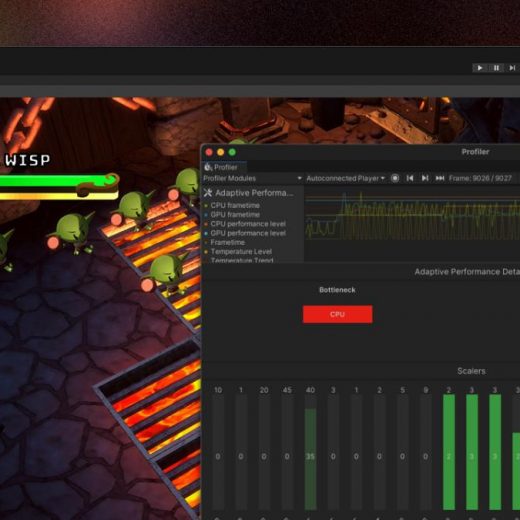
For more information, please see the Module Editor documentation. Profiler module API The Profiler module API allows you to add your own Profiler module to the Profiler window for all users of a project or package. When a Profiler module is defined in a project or package using this API, it automatically becomes available in the Profiler window for all users of that project or package. If you are an Asset Store publisher or a package developer, you can now distribute custom Profiler modules with your package. When a user installs your package, your Profiler modules will automatically become available in the Profiler window for your users. This enables you to expose your package’s performance metrics directly in the Profiler window. Several teams within Unity have already been using this API to distribute custom Profiler modules with their packages, including the Netcode for GameObjects, Adaptive Performance, and Mali System Metrics packages. How to use it To add a Profiler module using the Profiler module API, create a ProfilerModule script in your project or package, as shown below.

Read More

Customize your memory use with Unity 2021 LTS

In summer 2020, Unity provided support for Moon Studios when they were working to port Ori and the Will of the Wisp to Nintendo Switch. You can learn more about how we worked together to scale the project for this target platform in this case study. Moon Studios and Unity Accelerate Solutions (formerly Unity Professional Services) analyzed sections of code together, finding ways to tweak the particle systems and reduce memory usage. “When you’re targeting 60 fps on Nintendo Switch, you have to make sure every single aspect is optimized, including simulation, streaming, rendering, and graphics,” says studio founder Gennadiy Korol. Ori and the Will of the Wisps pushes the Nintendo Switch very hard in terms of memory use. The Accelerate Solutions team helped Moon make sure they were getting the best from these layers, focusing on native memory allocation.  Working with the team from Moon Studios, the Unity team measured the number of allocations from the different allocators. They also looked at the amount of memory allocated from each, which showed that the game was filling up some of the bucket allocators before even reaching the start of gameplay.   Increasing the size of the bucket allocator allowed extra room for small allocations that happen when playing the game. Allocating these small blocks from the bucket allocator gives the game a performance boost, helping it to hit the 60 fps target. The small allocations no longer come from the dynamic heap allocator, so this allocator contains just large blocks of memory. The allocator is less fragmented, which keeps the game running smoothly for longer.   Following the collaboration with Moon, the Accelerate Solutions team worked with the Optimization team, who developed the memory allocator customization feature that is now available in 2021 LTS.

Read More