What’s New for C++ Developers in Visual Studio 2022 17.7
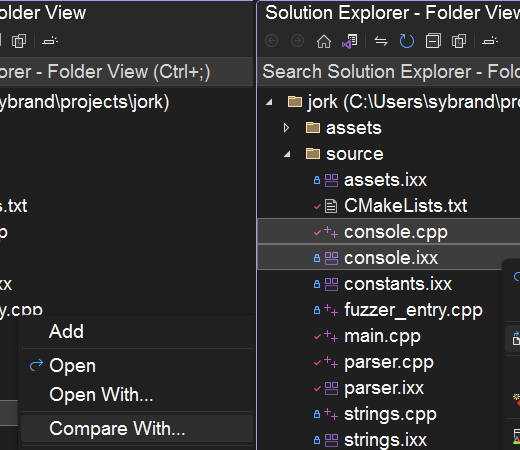
What’s New for C++ Developers in Visual Studio 2022 17.7 Sy Brand August 8th, 20233 2 We are happy to announce that Visual Studio 2022 version 17.7 is now generally available! This post summarizes the new features you can find in this release for C++. You can download Visual Studio 2022 from the Visual Studio downloads page or upgrade your existing installation by following the Update Visual Studio Learn page. Core Editor Comparing Files You no longer need to leave Visual Studio and rely on other tools to compare files. Now you can easily compare any file in Solution Explorer with other files by either: Right-clicking on a single file, selecting “Compare With…” from the context menu which will bring up File Explorer. Navigating to any file on disk and selecting it for comparison. Multi-selecting two files by holding down Ctrl then right-clicking and selecting “Compare Selected” from the context menu. Please share your feedback here. We’d love to hear your thoughts on this new experience. Copy and Trim Indentation If you have ever copied code from Visual Studio to another application (Outlook, Teams, Slack, etc.) and found that your code indentation has not been copied correctly, you will find that this new capability fixes that for you. Visual Studio now automatically fixes indentation for you when you copy code from Visual Studio and paste it in another application. Parallel Stack Filtering You can use the updated Parallel Stack filtering options that let you selectively display or hide specific threads or frames. This means you can easily concentrate on the threads and frames that are important to you, giving you a clearer picture. Additionally, you can now Drag Select frames from the parallel stack window, allowing you to perform operations like copy/paste, flag/unflag, or freeze/thaw for all the selected frames at once. F5 Speed We have optimized Program Database (PDB) files, resulting in improving debugging sessions and decreasing the project selection screen loading time for Unreal projects for example by 21% (~4 sec gain). Additionally, the F5 path is optimized, leading to a 5-10% improvement in the debugger’s startup time and process launch. All-in-One Search Responsiveness Several accuracy and performance enhancements are coming to All-in-One Search. For example, exact matches now show higher in the results list and results update more accurately in real time as you type your query. Try out the All-In-One Search experience by making sure it is enabled in Tools > Manage Preview Features > “New Visual Studio Search experience (restart required)” and using the Ctrl + T or the Ctrl + Q keyboard shortcut to launch it. If you have feedback to share with us about this feature, let us know here. Find in Files Search Time Find in Files search time has been significantly improved with various optimizations, resulting in a 2x speedup. Game Development C++ Build Insights Thanks to your feedback, we are happy to announce that Build Insights is now integrated with Visual Studio 2022! Build Insights provides you with valuable information needed when optimizing your C++ build times. Start your Build Insights .etl trace capture with a click of a button for your solution or projects. In Visual Studio 17.7, you can now see Included Files and Include Tree view. For advanced profiling, click the “Open in WPA” button to see the trace in Windows Performance Analyzer. After compilation, Build Insights […]