Lauren and Sam have a comprehensive skill set in strategy, design, and technology, and their extended reality (XR) studio, RefractAR, specializes in spatial activations. These two innovators created a whole car maintenance app with Unity MARS. 1. If you’re crunched for time, use image trackers for AR 2. Polycam makes it easy to scan and create digital twins 3. How to create your AR experience with Unity MARS Follow Lauren Follow Sam
Healthy oceans are essential for the survival of all life on Earth, so we need to protect them. We’re committed to ocean conservation as part of our ESG (environmental, social, and governance) efforts to build a more sustainable future and invest in our planet. Here are some exciting projects using Unity to celebrate the planet’s oceans, educate audiences, and encourage action: An Otter Planet by Habithéque is an in-progress PC game designed to teach players about water and help them understand its importance to all life on earth. In addition to raising awareness through play, An Otter Planet will raise money for charities to support water-related protection and revitalization efforts through in-game purchases and charitable donations. Raft, a PC game developed by Redbeet Interactive, highlights the incredible vastness of the open ocean. Players wake up adrift on a raft and then fight for survival by crafting, growing food, and avoiding shark attacks. Experiencing this game provides a new appreciation for the danger, stillness, and mystery of the oceans. The Hydrous is an innovative project that designs science-based augmented and virtual reality experiences to engage audiences with the wonders of ocean life. The creators’ goal is to provide “equitable access to ocean exploration,” which in turn builds understanding of beautiful and threatened marine ecosystems. — We believe that the world is a better place with more creators in it, and we’re excited to see the inspiring work being done to realize a sustainable, inclusive, and equitable world for all. Want to hear more inspiring creator stories? Sign up for Unity’s Social Impact newsletter for regular news and updates about our Social Impact work.
It is undeniable that technology is rapidly evolving. Those things that are once a concept are now being materialized. We are currently embracing a new digital age where artificial intelligence is no longer a product of various science fiction novels but a real-life technology. In this video, Jim McKeeth is joined by Embarcadero MVP Yilmaz Yoru to tackle everything about Machine Learning and Artificial Intelligence. We will learn how this technology evolved over time, the ide software, programming languages, and libraries that are good for AI and the future of this technology. Things you need to know about artificial intelligence and machine learning Generally, Artificial Intelligence refers to the intelligence exhibited by machines capable of carrying out tasks that usually require human intelligence. It refers to the simulation of human intelligence in machines that are programmed to think like humans and mimic their actions. The term may also be applied to any machine that exhibits traits associated with a human mind such as learning and problem-solving. Some of these mental capabilities and functions may also refer to as Artificial General Intelligence or better known as the Strong AI. Machine Learning, on the other hand, is a subset of AI and uses algorithms to learn from data, find patterns in data and make predictions about future events or outcomes. Today, Artificial Intelligence can be applied to many things like chatbots, virtual assistants, autonomous cars, and more. When it comes to Machine Learning and AI development, the first thing you must consider is to pick the right programming language depending on what kind of machine or software you are building. In this video, we will get a list of ideal programming languages that work well with AI and Machine Learning. Some of which include Delphi, C++, C++ Builder, Python, and Java to name a few. We will also learn about different libraries and resources you can use for AI Software development. This includes TensorFlow, OpenCV, Mitov Software Intelligence Lab, and more. Jim McKeeth will also provide demos showing the aforementioned libraries in action using Delphi. The video will also discuss AI Ethics, AI Singularity, Movies and Programs that use AI and Machine learning as main subjects, as well as the things we could expect from these technologies in the future. To learn more about Artificial Intelligence and Machine Learning, feel free to watch the webinar below.
“Mushroom Cloud is a project focused on accountability; one that values sharing and conserving resources, and strengthening networked systems through participation, communication, and advocacy.” – Nancy Baker Cahill The Mushroom Cloud NYC / RISE AR experience by artist Nancy Baker Cahill is a call for climate change action. The project acknowledges the impending crisis while offering hope that, through cooperative and constructive measures, a vibrant future can still be possible. During the Tribeca Festival, a custom, geo-located edition of this experience will be available to show audiences what a mushroom cloud explosion could be like, urging them to consider how we might model our collective survival on nature. The project is especially relevant to New York City – a city vulnerable to climate impacts given rising sea levels. Be sure to check out its world premiere on June 9.
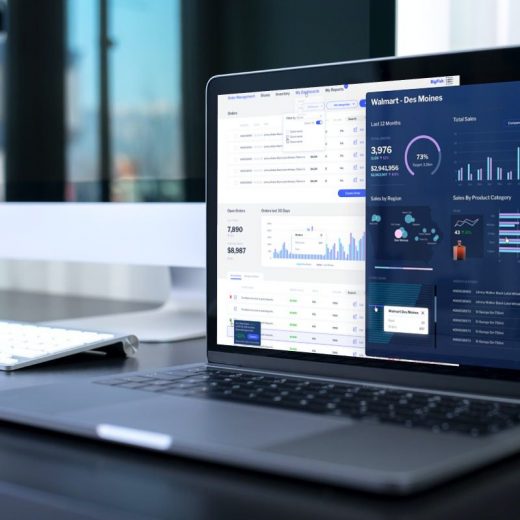
The world is becoming increasingly data-driven. Without data, businesses cannot succeed and expand. They may have a stream of data coming from different sources, but it is useless without analytics and reporting tools. Data is a critical asset for businesses as it helps them make informed business decisions. Plus, data usage drives the success of a business. Which depends on analytics, and the usage of reporting tools. Reporting tools make all the information easier to parse. Without analytics and reporting tools, informed business decisions are hard to imagine. This is where Yellowfin comes into play. Gartner surveyed CIOs for analytics and reporting tools. They asked for their best pick in business’s success. As a response, the highest 24% voted for data analytics. CIOs also believe that data analysis is important to act on data. Which returns invaluable insights. So, if an enterprise wants to succeed, it must keep up with the latest trends in data analytics. Don’t know where to look? No worries! We have prepared this guide solely for this purpose. Continue reading to learn about big things in data analytics and reporting tools. How have analytics and reporting tools advanced recently? 1. Contextual Analytics Contextual analytics is a chart embedded on the page with the data. It also includes picturing and the related actions for better insights. It embeds dashboards and analytics solutions into a software application’s core workflows. In addition, users get the benefits of analytics directly in the framework. Before contextual analytics, the users had to switch away from their working environments. They did so to investigate data or derive insight. But now, with contextual analytics, the data is delivered to the end-user directly. It is in the user interface and the transaction flow. With one click, users can get instant, guided, and dynamic insights. Which helps them to train and make decisions while working as usual. The contextual analytic’s goal is to maximize the business benefits. It does so by supporting or triggering actions users take within the app. 2. Augmented Analytics Augmented analytics uses enabling technologies like AI and machine learning. It helps with data preparation, insight explanation, and insight generation. Its primary purpose is to boost how users explore and analyze data in analytics and BI platforms. It augments the expert and citizen data scientists. It speeds up machine learning, data science, and AI model development. So, augmented analytics is transforming how businesses prepare data. It helps find insights and share the findings from those insights. It will be no surprise if data analytics becomes mainstream. It is one of the next big things in analytics and reporting tools. Thus, data and analytics leaders should not wait and incorporate it now. 3. Automated Analytics Automated analytics detect relevant anomalies, trends, and patterns. Once found, it delivers insights to users in real-time with no manual analysis. Enabling technologies like machine learning and AI are used to monitor working performance. They also help search large datasets and track user-defined metrics with desired business outcomes. As a result, it produces alerts of specified triggers and delivers analyzed findings. The main goal of automated analytics is to perform automated analysis. It offers benefits for both software vendors and end-users. It comes with features of fraud detecting and tracking changes in customer behavior. That helps in automated analytics. […]
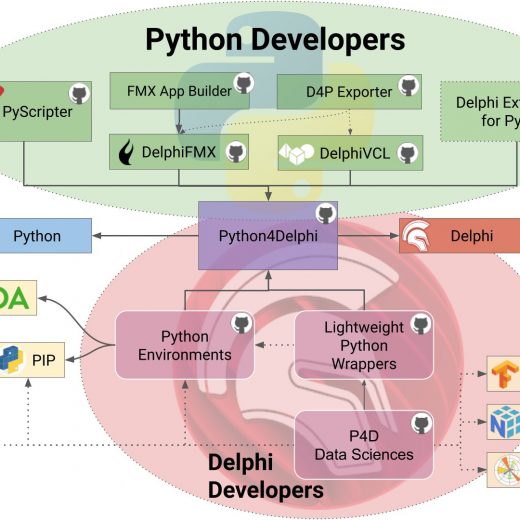
Last week we look at the Python developer side of the Embarcadero Python Ecosystem with DelphiFMX. This week are are looking at the Delphi (and potentially C++Builder) side of the ecosystem. Embarcadero Open Source Live Stream The next installment takes a look at the new Python Data Sciences Libraries and related projects that make it super easy write Delphi code against Python libraries and easily deploy on Windows, Linux, MacOS, and Android. Specific examples with the Python Natural Language Toolkit and PyTorch, the library that powers projects like Tesla Autopilot, Uber’s Pyro, Hugging Face’s Transformers. This is part of a series of regular live streams discussing the latest in Embarcadero open source projects. Jim McKeeth will be the host, and be joined by members of the community and developers involved in these open source projects, as well as members of Embarcadero and Idera’s Product Management. A great opportunity to see behind the scenes and help shape the future of Embarcadero’s Open Source projects. If you are interested in machine learning, artificial intelligence, or data sciences then you want to join this webinar! Thursday, Jun 9, 2022 10:00 AM CDT Come back to this blog post after the webinar for replay, slides, links and more. New Libraries for Delphi This is an early access sneak peak at these libraries we are still working on. Right now we are working on getting everything working with Delphi, but we plan and expect it to work with C++Builder eventually too. The new libraries we will look at include: Lightweight Python Wrappers – A library making it easy to quickly and easily wrap most any Python library for use in Delphi Python Environments – One of the areas of complication with Python is deploying and setting up Python and all the required libraries. These are components that allow you to quickly and easily setup everything you need for Python. Python Data Sciences Libraries – These make use of the above two libraries to give Delphi developers quick and easy access to some of the more popular Python data sciences libraries like PyTorch, NLTK, TensorFlow, NumPy, etc. All with pure Object Pascal. I really believe these libraries have the potentially to fundamentally change what it means to be a Delphi developer. You will definitely want to be here.
As many might know, FPC announced support for anonymous methods some days ago. This was one of the last pieces missing for us to be able to port TMS FlexCel to Lazarus and FPC. So we decided to give it a try, and after a couple of days fixing stuff, we could make it compile. It wasn’t simple, there were internal compiler errors, there is missing functionality that had to be rewritten, and we haven’t reached 100% of the code, but most is compiling. Of course, compiling it is one thing, but getting it to work is a different matter. When we tried, we couldn’t create a simple xls or xlsx file. After a couple more days, we could get first xlsx and then xls working. We needed to do some patching in fpc, and we needed to workaround some other stuff, but that’s the point where we are at right now. All of FlexCel code is compiling. It works in simple cases, but we haven’t tried our test suite yet. You can see here a little video of Lazarus in a M1 mac (but running as intel under rosetta) of me creating a simple xlsx file. And now comes the big question. Would you like us to spend more time on it so we add Lazarus support, or do we stop it now and focus in FlexCel for Delphi and FlexCel .NET as usual? While we now have simple apps working, we won’t launch “Lazarus support” unless we have all tests passing, and FlexCel tests are quite difficult to pass. I expect some extra weeks of work to make it all pass. At least for now, we would focus in supporting Windows, OSX and Linux. No plans for iOS or Android. Important: To release support for Lazarus, we will require using the Trunk release until the current trunk is promoted to stable. We would really be interested in your opinion. If you want to share it with us, please answer the poll below or let us know what you think in the comments.
Last time out, we had a good look at CodeMirror 5, a JavaScript text editor that, among many other things, can be used to edit native HTML. This time out, we’re going to tackle the general topic of editing HTML in TMS WEB Core projects using two very similar JS libraries that both provide a WYSIWYG HTML editing interface – Summernote and SunEditor. And if neither of those are to your liking, there’s also a section at the end about how to convert Markdown text into HTML, using Showdown. Three different ways to tackle the same problem. Motivation Why might you need a WYSIWYG HTML editor in the first place? There are at least a handful of places I can think of where it might (or has) come up in TMS WEB Core projects. RichEditor. As a replacement for any needs that have historically been addressed using typical Windows RichEdit controls. Places where you want users to enter information, but you also want them to be able to use different text colors, bold or italic text, lists, tables, images, links, and so on. While such RichEdit controls have included support for some or all of these kinds of features, a WYSIWYG HTML control can typically do all of this and more, and usually you’re turning off things rather than trying to add editing functionality. Forums. If you have an area within your project where users can discuss things, like in a forum-type environment, this is sometimes a useful thing to have. Markdown is also popular for this kind of thing, and is used to varying degrees in the TMS Support Center and on GitHub, keeping the UI as simple as possible. Documentation. For example, on a settings form, there might be a header at the top that describes some aspects about the settings that are specific to a client. This description is stored as an HTML object in the client’s database and is displayed, if available, instead of the description that might be used by default. Naturally, access to editing these descriptions would be restricted to appropriate people. Or even if it isn’t customer-specific, sometimes storing the documentation in a database like this makes it possible to update the documentation that might be static within the application, but without having to release a new code update to make changes. Landing Pages. Customized web pages that cater to particular customers or marketing events or advertising campaigns. These are just web pages that you track to see how much traffic is being generated by a particular campaign. Or maybe you use them to A/B test what gets more conversions for a particular product. Or something like that. By being able to edit HTML directly within the application, these pages can all be managed from within your application – no need to worry about file access or server configurations or anything like that. Other Content. Sometimes applications have a ‘news feed’ or an ‘about’ page or a ‘contact us page’ or maybe corporate profiles, that kind of thing. Having a built-in HTML editor makes it easy to keep this kind of content up-to-date and also secured in a way that would likely be more difficult if people were editing HTML files in some other application and then uploading them to your server, for […]
With the staggering increase in mobile phone users comes the need for developing high quality mobile apps. Mobile apps now also play an important and vital role for all businesses, whether small or large. Keeping the importance of mobile apps in view, a reliable and robust JavaScript framework for mobile apps is of utmost importance. When you start exploring the market, you’ll find many JavaScript libraries out there. To help you select the right JavaScript framework for developing web and mobile apps, we have compiled a comprehensive guide. Continue reading to discover why you should opt for Ext JS, the best JavaScript framework for mobile apps. What are Some Features of Ext JS, The Best JavaScript Framework for Mobile Apps? Ext JS is the best and the most comprehensive JavaScript framework for web and mobile apps. Sencha offers Ext JS with 140+ pre-tested and high-performing UI components to help developers with JavaScript app development. HTML5 calendar, grids, pivot grid, D3 adapter, trees, lists, forms, menus, toolbars, panels, windows, etc. You can easily integrate these components into your app while having the confidence that you don’t have to spend your time building and testing these professionally built components. These UI components and Ext JS JavaScript developer tools accelerate app development and reduce your time to market. Where is Sencha Touch? If you have been developing apps for mobile phones and other touch screen devices with Sencha Touch in the past, then you’ll be pleased to know that Sencha Touch has been merged with Ext JS. This is great news for all mobile app developers as now they have the best JavaScript framework for building data-intensive, cross platform web and mobile apps. You’ll be able to utilize all the awesome features provided by Ext JS to build your mobile apps and software for other touchscreen devices. Are There JavaScript Tools for Designing My Mobile App? Indeed yes! Sencha brings you state-of-the-art tools for designing, customizing, and building an app with JavaScript. There are pre-integrated tools like Sencha Themer and Stencils to support the entire design process. Sencha Themer allows you to style and create custom themes using graphical tools without writing a single line of code. You can also generate theme packages using dynamic stylesheets. Additionally, Sencha Themer includes a smart color palette that helps you apply different color schemes to different component states. There is also a palette that enables you to choose different colors from Material Design. To help you with font selection, Sencha Themer includes a font management option. With this feature, you can easily add web fonts from Google fonts. Does the Ext JS JavaScript Framework for Mobile Apps Support JavaScript Testing Tools? Again yes! At Sencha, quality is one of our top-most priorities. Hence, Sencha’s complete JavaScript mobile app framework also supports testing your apps for quality assurance. You can use Sencha Test to create unit and end-to-end tests quickly and easily. The best part is that you can execute these tests on multiple browsers simultaneously to ensure that your app runs seamlessly on all types of browsers. What is the Layout Manager in Ext JS, the Best JavaScript Framework for Mobile Apps? When developing apps for mobile devices, adjusting the user interface to render properly on small screens can turn out to be a nightmare for developers. This is no longer true […]
Data backed insights to help grow your user base and effectively monetize your game. It’s no simple task to attract a steady flow of new users to your game and monetize so you can keep funding your creations, but it is vital. While there are no guarantees or magic tricks, the formula to success is understanding what combination of development, user acquisition, and monetization strategies will work best for your game. Starting early and taking a data backed approach to understanding what strategies work best can save you from the inevitable trial and error when trying to achieve scale. In our first mobile insights report, we dive into growth and monetization trends to offer guidance on how to approach topics like subgenre choices, soft launches, ad creative, monetization mixes, ad implementation, and even peer benchmarks. Read on to learn about five insights from our report, backed by unique Unity data, that will help support the future of your creation. Plan early to improve chances of success Perfect your soft launch strategy for UA Sharpen your ad creatives Balance your IAA and IAP efforts Create placements that perform
Invormațiile pe cale Dvs le introduceți în prezentul formular nu se păstrează online, dar se vor transmite direct la destinație. Mai multe informații găsiți în Politica Noastră de Confidentialitate
We use cookies to ensure that we give you the best experience on our website. If you continue to use this site we will assume that you are happy with it.