From the blog

6 Books About Delphi You Should Read

Reading is an essential skill for Windows application development. Development is a nebulous and constantly expanding subject and I’ve noticed that the most successful coders, project managers and designers are often readers with a voracious appetite for consuming books on everything they possibly can to keep feeding a hunger for knowledge. Unlike a waistline, expanding your mind is rarely seen as a negative attribute and over-indulging produces nothing but good results! Learning a new programming language can be a hard task, but if you get hold of a good book, spend time, and have the commitment, then learning becomes easier and delightful. Practice and self-tuition is important but books and videos help use the benefits of other’s experiences to enrich our own without the pain of getting it wrong and spending years acquiring the knowledge. Technology is in constant growth and could be considered a fast-paced competitive market. Every day new frameworks and tools are created, and it is easy to get lost in the sea of new information. Because of this speed, many rely on quick tutorials which lead from point A to point B without figuring out the way yourself. That is why it is essential to read coding books that explain every single detail that helps to build a true foundation. Windows operating system has been dominating the desktop software world and with the new version of Windows 11 with an elegant user interface, we are seeing new Windows 10 and 11 supported applications in the Microsoft Store. If you would like to find out which books and resources would help you to start your Windows desktop app development career, keep on reading! You will find the best 6 books about IDE tools for Windows 10 and even you can you these tools to create native and cross-platform applications. 1. Object Pascal Handbook for Delphi.4 (The New Edition) The Object Pascal Handbook for Delphi 10.4 is the complete guide to the programming language of Delphi. Why Delphi? Because with Delphi you can create cross-platform native applications easily and the programming language syntax is also suitable for everyone, it is like writing a poem in English. If you would like to know more about why you need to choose Delphi, check out these articles now! If you would like to know more about why you need to choose Delphi, check out these articles now! This book is written by Marco Cantu, who is well known Delphi guru and author of dozens of Delphi books, and he is one of the Product Managers for RAD Studio at Embarcadero Technologies where Delphi is evolving. With this book, you can get all the foundations of the language and give you a full idea about the Delphi programming language which you will utilize to create native Windows applications. Link: https://www.marcocantu.com/objectpascalhandbook/ 2. Coding in Delphi Coding in Delphi is a programming book by Nick Hodges that covers a variety of powerful Delphi programming features and techniques including: Generics Interfaces Exception handling Anonymous methods Collections RTTI Enumerations Attributes Dependency Injection Unit Testing By learning these features of the programming language, you can write efficient code and make things faster and more reliable. Moreover, these technologies help you grow as an engineer. Link: https://leanpub.com/codingindelphi 3. Expert Delphi: Robust and fast cross-platform application development This book […]
Read More

Add custom controls to your map with TMS FNC Maps for Delphi

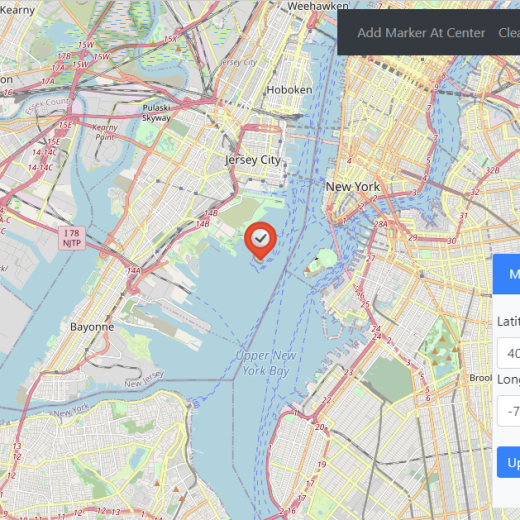
ElementContainers is a major new feature in TMS FNC Maps v3.0. With ElementContainers you can add custom controls on top of the map. These custom controls consist of HTML and CSS elements. Interaction with the map and the application can be added by using Actions. At runtime the content of the ElementContainers can be updated dynamically through JavaScript. ElementContainers are independent of the mapping service which means they will look and function identically regardless of your preferred mapping service. A preview is automatically available at design-time to make editing the HTML/CSS elements as straightforward as possible. In this blog post I’ll demonstrate how easy it is to add a custom interactive zoom control to the map. The Basics Position the container anywhere on the map with the Position and Margin properties. We’ll place the container in the bottom left corner of the map: set Position to poBottomLeft. Add an item to the Actions collection of the ElementContainer to interact with the map. Select the ID from the element to interact with from the HTMLElementID dropdown list. In this case pick “customRange1” to interact with the slider control. Set Event to heCustom and CustomEvent to input to catch the input event of the slider control. Set EventReturnValue to rvValue to retrieve the updated value of the slider control. Assign the ElementAction’s OnExecute event to add an event handler. The updated slider control value is returned as a string in the AEventData.CustomData property. We can use this value to update the map’s zoom level with the code below: procedure TForm1.TMSFNCMaps1ElementContainers0Actions0Execute(Sender: TObject; AEventData: TTMSFNCMapsEventData); var f: Double; v: string; begin f := 0; v := StringReplace(AEventData.CustomData, ‘”‘, ”, [rfReplaceAll]); if TryStrToFloatDot(v, f) then TMSFNCMaps1.SetZoomLevel(f); end; Assign the TTMSFNCMaps’s OnZoomChanged event to interact with the ElementContainer. When the map’s zoom level changes, get the new zoom level and update the label and slider control in the ElementContainer. procedure TForm1.TMSFNCMaps1ZoomChanged(Sender: TObject; AEventData: TTMSFNCMapsEventData); begin TMSFNCMaps1.GetZoomLevel; end; procedure TForm1.TMSFNCMaps1GetZoomLevel(Sender: TObject; AZoomLevel: Double); begin TMSFNCMaps1.ExecuteJavaScript(‘document.getElementById(“customRange1”).value = ‘ + FloatToStrDot(AZoomLevel)); TMSFNCMaps1.ExecuteJavaScript(‘document.getElementById(“customZoom1″).innerText = ‘ + FloatToStrDot(Round(AZoomLevel))); end; The custom control is now ready to be used. The Styling Using Bootstrap is a straightforward way to improve the visuals of HTML elements. With a few adjustments Bootstrap styling can be added to ElementContainers. Include the Bootstrap CSS library via the HeadLinks collection.Add an item to the HeadLinks collection; set Kind to mlkLink, URL to “https://maxcdn.bootstrapcdn.com/bootstrap/4.0.0/css/bootstrap.min.css” and Rel to “stylesheet”. Add Bootstrap HTML classes to the ElementContainer’s HTML. Change the HTML value to: Zoom Level 12 Then set HTMLElementClassName to “card” and UseDefaulStyle to “False”. Suddenly the custom control looks a lot prettier. Notice that the ElementContainer’s content with Bootstrap styling is fully visible at design-time as well. Because ElementContainers are completely independent from the mapping service, the result looks exactly the same even when switching to a different service. The screenshot below shows the same ElementContainer with Service set to msHere. The Code Of course, the same result can also be achieved in code. procedure TForm1.FormCreate(Sender: TObject); var ElementContainer: TTMSFNCMapsElementContainer; ElementAction: TTMSFNCMapsElementAction; html: TStringList; begin TMSFNCMaps1.ClearElementContainers; TMSFNCMaps1.ClearHeadLinks; TMSFNCMaps1.BeginUpdate; TMSFNCMaps1.AddHeadLink(‘https://maxcdn.bootstrapcdn.com/bootstrap/4.0.0/css/bootstrap.min.css’, mlkLink, ‘stylesheet’); html := TStringList.Create; html.Add(” + ‘Zoom Level ‘ + ’12’ +’ ‘ +’ ‘ +’ ‘ +”); ElementContainer := TMSFNCMaps1.AddElementContainer(html); ElementContainer.HTMLElementClassName := ‘card’; ElementContainer.Position := poBottomRight; ElementContainer.Margins.Bottom := 15; ElementContainer.UseDefaultStyle := False; ElementAction := ElementContainer.AddAction(‘customRange1’, heCustom); ElementAction.CustomEvent := ‘input’; […]

Read More

8 Go-To Resources About UI Components

A well-designed user interface is essential for any software from mobile to desktop and web application. The user interface provides the gateway for end-users to interact with software. It’s impossible to provide a great user experience without a good user interface, regardless of how robust your back-end performance and functionality are. Therefore, designing an interface with proper UI components is key to creating a simple and straightforward user experience. In this blog post, we will look at different UI component resources for creating different kinds of interfaces. Where to get inspired for your next project? You will need some ideas to get inspired regardless of the type of interface. Dribble is a dedicated community for creative professionals. There you can explore new designs and ideas, buy pre-made components, themes, and fonts by other designers, and even hire people to create your ideal interface. Dribble has a dedicated section for UI components with designs for any application. It can be used to get some ideas about creating the interface for your next project. https://dribbble.com/tags/ui_components How to Find the Perfect Font? Finding the ideal font for your interface is a tedious task while finding a font with a proper commercial license can be even harder. Even though paid fonts may do the trick, they can quickly become prohibitively expensive. Font Squirrel provides a solution to this issue by providing users with a curated list of freeware fonts licensed for commercial use. On top of that, Font Squirrel provides functionality to convert your existing fronts to web-optimized versions, as well as the ability to identify fonts using an image. It allows users to quickly find the exact font type by uploading an image with the font and processing it through Font Squirrel. https://www.fontsquirrel.com/ How to Facilitate JS Charts in your Interface? JavaScript enables users to develop dynamically updating content on their websites. D3.js allows users to create charts and graphs without relying on proprietary frameworks and fully utilize the capabilities of modern browsers. However, it can be complex to properly implement this functionality. D3.js graph gallery provides users with varying examples of different types of chart implementations with various functionality. Thus, users can easily use these examples as the base to create and embed charts in their applications. https://www.d3-graph-gallery.com/index.html Where to Build and Test Individual UI Components? With various frameworks and libraries available for building user interfaces, users will have to work with different frameworks and libraries for different projects. Therefore, they will have to create different UI components that work with different frameworks. The open-source project Storybook takes a unique approach to accomplish this need by providing users with a development environment to create and test UI components. The best part of this approach is that it is compatible with a wide range of frameworks such as Vue, React, Angular to specialized frameworks like Marko, Mithril, and Preact. https://github.com/storybookjs/storybook/ Where to Get Pre-Build CSS-based UI Components? Creating UI components from scratch will not be a feasible solution to cope with fast development schedules. Furthermore, it will become a time-consuming task when coupled with the need to manage both HTML and CSS files with each change to the interface. Tailwindcss is a utility-first CSS framework designed to facilitate rapid UI development.  This framework eliminates the need to create custom CSS for each UI […]

Read More

What You Need To Know About The Metaverse

Hello C++ and Delphi Developers, Today we have some great article picks about the MetaVerse. The Metaverse is a digital world software combined with data that allows users to simulate and experiment with elements of real life blended with a virtual life. These digital worlds can be built in 3D and can be experienced by the user in an immersive first-person view which makes the user feel like they inhabit that virtual digital world. If you want to develop a metaverse in 3D then I believe C++/Delphi are the only viable choices. Both allow you to develop multi-device apps that control all the things you need in your device with the highest possible efficiency and speed. Here below we’ve gathered together a great collection of posts that can help you to build your own Metaverse in C++. Of course, some people believe that the ‘real world’ itself is actually a simulation. We’re going to take a gamble and carry on believing it’s not and keep posting here for you while we sip on our cup of Soylent Green. 😄 What can C++ Builder do for The Metaverse? C++ Builder has a powerful IDE that can be used to develop Metaverse apps with 2D or 3D environments. With its strong capability on the sensor devices such as camera, accelerometer, motion sensors, gyroscope, voice input, and similar professional applications C++ Builder and Delphi both make this easy. LearnCPlusPlus.org is packed full of great articles for professionals and beginners alike. The posts vary from articles suitable for people who are just starting to learn C++ – basics like string handling, pointers, loops, and all those fundamental building blocks of this rich and powerful programming language – to much more in-depth and advanced subjects like artificial neural networks and AI, along with the math behind it. Our focus is on the C++ language, particularly modern C++, and will work with almost any environment and IDE software you can choose although, of course, we believe RAD Studio C++ Builder is the best option! If you are new to RAD Studio, we think these posts may help you as much as a rapid introduction to programming in C++, all the way to the most robust, modern, and latest techniques for those more experienced with the language. For those who are perhaps wanting to expand their knowledge with the most up-to-date features, routines, and methodologies this is a great little boost (pun intended) to your C++ knowledge. The new RAD Studio 11, C++ Builder 11, Delphi 11 are released with great new features and we are developing and testing new examples for you with the latest RADS 11 that means.LearnCPlusPlus.org examples are working well with the latest C++ Builder. You can see more of our C++ posts on this blog by clicking the following dynamic search link: https://blogs.embarcadero.com/?s=C%2B%2B Here are the posts. They focus on C++ but most can be applied in Delphi too: What is The Metaverse and how can we interact with it? These posts are designed to give you more information and to be easy to understand the modern and professional ways that we use in C++. Here are the topics, What Is The Metaverse And What Does It All Mean? How To Make Your Own Metaverse Using C++ How To Make Use Of The Gyroscope Sensor in C++? What Is An Accelerometer And How To […]

Read More

What Is The Anatomy Of A Great Windows Compiler?

While many believe that programmers or coders interact directly with computers or machines through code, it isn’t entirely true. Computers understand what we refer to as machine language- a set of instructions in binary combinations, the zero’s and ones. On the other hand, we code in one high-level language or another. Therefore, to get the computer to execute our written instructions, our program code, we must pass the source code through a machine language translator, i.e., a compiler. The Windows compiler actions (indeed not just Windows compilers) consist of multiple stages, summarized into; running the pre-processor followed by the compilation phase, the Assembling phase, and the linking phase.  In 1952, Grace Hopper developed the first-ever compiler to convert the A-O programming language to machine language. Since then, we’ve had more high-level languages and even more compilers. Whether you’re looking to get started with a new programming language or you want to build your next application in languages like C++, the anatomy of a great Windows compiler is the best place to start. In this article, we’ll discuss the features of a great compiler.  Why is Fast Compilation Essential? For starters, asides from a perfectly working code, nothing makes a developer happier than productivity. And one major development concern over the years has been compiling a lot of code fast. Many compilers in the market today brag about their compilation speed but offer very little in the end. Practically any decent compiler can compile a few lines of code relatively fast, but when it comes to those large projects with millions of lines of code, the reverse is the case.  Generally, two factors dictate compilation speed; Code size; the larger your code, the longer it takes. Level of toolchain optimization refers to your complete set of tools, including your compiler. The first factor and part 1 of the second factor are kind of obvious. Let’s talk about the second factor part b- compiler optimization. A great Windows compiler optimizes or improves the code to make it require less resources to compile, therefore speeding up compilation. A popular compiler known for its fast compilation is the Delphi compiler. According to its Wikipedia page, “Delphi is known for its fast compilation speed, native code, and developer productivity.”   Why Does Small Executable Size Matter? There are numerous unnecessarily bloated applications out there that many just assume are the norm and have to use larger hard disks. Not to mention the increase in end-user requirement tied to this bloat. In a world where efficiency is the name of the game, you can’t afford to compile large executables and then seek new techniques to reduce its size. In this case, a great Windows compiler should produce small executable sizes, just like Delphi. Should a Windows Compiler Support Automation? Automation is taking the world by storm. While the Covid-19 pandemic is credited with accelerating automation trends, this technology was slowly becoming dominant way before the pandemic. Today, automation plays a vital role in increasing developer productivity and efficiency and reducing project completion time. Most programmers today want to automate any process that they have to repeat. Therefore, it is only expected that a great compiler supports automation. Again, our case study for this article, Delphi, supports automation. Why is Good Error Reporting/Handling Essential? Error reporting and handling […]

Read More

Building The Future With Delphi #Delphi27th

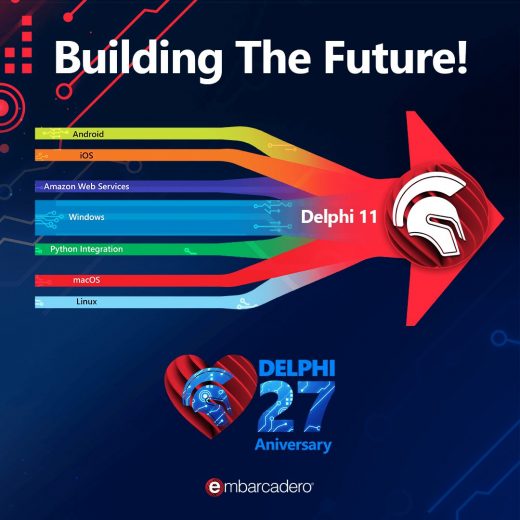
Bill Clinton was President, Windows 3.1 was king, and CompuServe was still a thing. The R&D team at Borland Software Corporation which included Anders Hejlsberg, Gary Whizin, Chuck Jazdzewski, Dave Scofield, Allen Bauer, Hank Cox, Marc Cousineau, and Ray Kaestner released Delphi and changed the software development world forever. In 1995 Delphi was lauded as the next generation Windows development tool, combining the most intuitive visual design environment with the unrivaled performance of a world-class optimizing native code compiler. “Delphi” started out as a beta codename for a closely guarded skunkworks project at Borland: a next-generation visual development environment for Windows based on Borland’s Object Pascal programming language. ” – Danny Thorpe Fast forward 27 years and Delphi is still building the future with support for many more platforms than just Windows including Android, iOS, macOS, Linux, and HTML5*. Powerful integrations via the broader developer ecosystem with C++, Python, C#, Java, Lua, and cloud solutions such as Amazon Web Services and Azure. Check out hundreds of different projects in the Showcase featuring Delphi projects reaching hundreds of millions of users. Not on the latest version of Delphi? Check out all of the latest features in Delphi 11 including High-DPI and 4k+ screens, provisioning for Windows 11, Android 30 API and the macOS 64-bit ARM M1 processor. Single Code BaseCreate apps for all major platforms with less coding effort. Write once, compile everywhere. Windows 11Modernize VCL apps for Windows 11 with up-to-date user interface controls, WinRT APIs, and HighDPI-related features Remote DesktopCollaborate more effectively with remote teams using improved remote desktop support for VCL and IDE High DPI & 4KHigh-DPI support in the IDE, with full support for the latest 4k+ monitors, and cleaner and sharper fonts and icons throughout. Improved FMX High-DPI support for Windows and Desktop with a visibly superior desktop UI iOS and macOSmacOS 64bit ARM compiler and toolchain that can build universal binaries including Intel/ARM versions for AppStore submissions AndroidSupport for the latest Android 30 API and latest Billing APIs, and migration to use the AndroidX libraries. Android support for multiple classes.dex files, simplifying integration of external Android dependencies RAD ServerReduces the complexities of rapidly building and deploying a multi-tier turn-key enterprise REST API application server with Swagger support. Accessible DataConnect to over 20 databases natively with FireDAC’s high speed direct access, including InterBase, SQLite, MySQL, SQL Server, Oracle, PostgreSQL, DB2, SQL Anywhere, Advantage DB, Firebird, Access, Informix, MongoDB and more Faster CodingSmarter code navigation when refactoring. Auto code completion with Tab key. LSP awareness of Include files. Auto restart of LSP server. Class helper support. Array suggestions when assigning arrays ProductivityVCL Styles with design-time support: Prototype stylish UIs even faster by seeing immediately at design-time how your styled forms and controls will look when running. LinuxDevelop both server and FireMonkey GUI applications for Linux Cloud AwareDelphi has an HTTP and REST client library available on all platforms, to invoke REST services and even specific AWS and Azure components ExtensionsDevelop and expand the IDE with your own components and IDE plugins, or find ready to use add-ons from our rich third-party ecosystem User ExperienceCompletely rebuilt Welcome Page with a native look and feel, and a UI that fits the IDE, and customizable layout and content Join us for the 27th Anniversary webinar!     *HTML5 support provided […]

Read More

5 Tools Every Windows Developer Should Be Using Right Now

If you are serious about Windows app development you should really should know these five superb tools which can help you get the absolute best out of your great ideas.  How can Delphi 11 Alexandria make Windows app development faster and easier? Delphi 11 Alexandria is the latest version of the Delphi IDE and provides native app development 5x faster compared to other development tools. Moreover, your apps built with Delphi can be both specific to only Windows itself or multi-platform. You can easily modernize apps to support Windows 11 with up-to-date responsive controls, styles, and Windows Store support. High DPI & 4K iOS and macOS Windows and Linux Android and IoT Cloud Aware Enterprise Grade Database Access Create GUI Apps 5x Faster Create Services Based Systems with RAD Server Have you tried C++ Builder? C++ Builder – Design beautiful, intuitive user interfaces with award-winning and cross-platform frameworks on Windows and iOS. Provide a platform-native experience to your users while designing the interfaces only once, cutting development time by half or more. Modern C++ 17 – Featuring a Clang-enhanced compiler, Dinkumware STL, easy access to Boost, and many more. Cloud Aware Tools – Extensive HTTP and a REST client library and even specific AWS and Azure components Rapid Development – Award-winning visual design to help you to create native cross-platform and responsive user interfaces Do you need to edit HUGE files in an editor which opens in seconds and doesn’t lag? Our third tool is one of the market-leading text editors with the most flexible, powerful, and secure text editor out there called UltraEdit. Dynamic code auto-completion with IntelliTips UltraEdit provides code-aware and context-aware auto-complete suggestions. See class members, function tips, and more for most modern programming languages…and configure as much or as little to suit your needs. Best of all – it just works, out of the box. No risky third-party plugins or esoteric config editing is required.   Multi-caret/multi-select UltraEdit features the most powerful and intuitive multi-caret editing and multi-selection capabilities in the business. Once your cursors or selections are where you want them to be, you can copy, cut, paste, select and delete just the same as you normally would. Column mode When editing horizontally just isn’t quite good enough, Column Mode is there for you. Use Column Mode to intuitively edit along the Y-axis anywhere in your document. It’s just one of the many powerful ways UltraEdit helps you edit tabular data or code files. Developer / programmer Unsurpassed power, performance, startup, & file load Customizable, configurable, beautiful themes OS integration (command line, shell extension) Blazing fast find / replace and find in files / replace in files Fully integrated file compare, instant diff operations Secure, trusted, proven, dependable, stable Digitally signed installers and libraries Easy/silent deployment with MSI installers Professional support and in-house call center Multi-platform: Windows, Mac, and Linux Check out the official web page to learn more about UltraEdit. Did you know you can get a totally free C++ IDE? Embarcadero Dev-C++ is a new and improved fork of Bloodshed Dev-C++ and Orwell Dev-C++. It is a full-featured Integrated Development Environment (IDE) and code editor for the C/C++ programming language.   It uses the Mingw port of GCC (GNU Compiler Collection) as its compiler. Embarcadero Dev-C++ can also be used in combination with Cygwin […]

Read More

12 Go-To Resources About The Best Javascript Framework

What Are Some Hidden Gems in Chrome Developer Tools? As a software developer building applications with web technology, I naturally spend lots of time in my browser. For many years web developers struggled to build cross-browser applications because many browsers (notably older versions of Internet Explorer) failed to offer even minimal debugging tools — but thankfully today every browser ships with helpful developer tools and support modern standards. These can be especially useful when working with the best javascript framework. I use Google Chrome as my primary browser simply because its set of developer tools offers more features than the competition. I often joke that Chrome Developer Tools has so many features that they ran out of space to show them, so I wanted to share a few hidden gems I’ve found. Read the full article about the Google Chrome developer tools hidden gems. How does Ext JS Outperform Grid Competitors on Key Performance Metrics? The overall volume of generated data has grown exponentially over the past couple of decades. As a result, modern JavaScript data grid components that manage the display and analysis of these massive data volumes have evolved. Today, there are many data grid offerings in the market that tout enhanced capabilities to display and manage analysis. But how many of them can withstand the true test of performance as it relates to “Big Data”? To answer this question, we got into the trenches and ran performance tests comparing Ext JS data grid to other popular market offerings and outlined our results in this post. There have been several JS Grid performance claims (each valid in their own way), but many lack the demonstration of real use case scenarios — specifically pertaining to large datasets. This performance evaluation was based on how an end-user would actually use the grid in the field and we put the most popular data grids to test. Read the full article about the Ext JS Javascript grid library performance. What Is The How and Why of the MVVM Pattern in Ext JS? A well written application structure and code can tell a story. While code writing is a way to efficiently communicate with the target device, writing it in an appropriately chosen design pattern is crucial, as it enables developers to effectively collaborate and communicate with the technical framework suited for the project. One such tried and tested pattern that has met these needs is the industry standard MVC (Model, View, Controller) pattern. MVC pattern serves the purpose of abstracting the main concerns of a user facing application: its data (Model), its presentation (View) and any  logic that connects the two (Controller) away from each other to be addressed in isolation — while still being interdependent in a loosely coupled manner. This way, any changes made in one can be made without undue complications being brought to the other(s) and compromising the application as a whole. Read the full article about the how and why of the MVVM pattern. How Do I Handle Asynchronous JavaScript: Promises? JavaScript is single threaded, causing code to execute from top to bottom, so two bits of code cannot run at the same time. For example, you might download a JSON file from an (external) server and you’d have to wait until you retrieve that file. Instead of blocking the thread, there are ways you can […]

Read More

6 Books About IDE Tools for Windows 10 You Should Read

Reading is an essential skill for Windows application development. Development is a nebulous and constantly expanding subject and I’ve noticed that the most successful coders, project managers and designers are often readers with a voracious appetite for consuming books on everything they possibly can to keep feeding a hunger for knowledge. Unlike a waistline, expanding your mind is rarely seen as a negative attribute and over-indulging produces nothing but good results! Learning a new programming language can be a hard task, but if you get hold of a good book, spend time, and have the commitment, then learning becomes easier and delightful. Practice and self-tuition is important but books and videos help use the benefits of other’s experiences to enrich our own without the pain of getting it wrong and spending years acquiring the knowledge. Technology is in constant growth and could be considered a fast-paced competitive market. Every day new frameworks and tools are created, and it is easy to get lost in the sea of new information. Because of this speed, many rely on quick tutorials which lead from point A to point B without figuring out the way yourself. That is why it is essential to read coding books that explain every single detail that helps to build a true foundation. Windows operating system has been dominating the desktop software world and with the new version of Windows 11 with an elegant user interface, we are seeing new Windows 10 and 11 supported applications in the Microsoft Store. If you would like to find out which books and resources would help you to start your Windows desktop app development career, keep on reading! You will find the best 6 books about IDE tools for Windows 10 and even you can you these tools to create native and cross-platform applications. 1. Object Pascal Handbook for Delphi.4 (The New Edition) The Object Pascal Handbook for Delphi 10.4 is the complete guide to the programming language of Delphi. Why Delphi? Because with Delphi you can create cross-platform native applications easily and the programming language syntax is also suitable for everyone, it is like writing a poem in English. If you would like to know more about why you need to choose Delphi, check out these articles now! If you would like to know more about why you need to choose Delphi, check out these articles now! This book is written by Marco Cantu, who is well known Delphi guru and author of dozens of Delphi books, and he is one of the Product Managers for RAD Studio at Embarcadero Technologies where Delphi is evolving. With this book, you can get all the foundations of the language and give you a full idea about the Delphi programming language which you will utilize to create native Windows applications. Link: https://www.marcocantu.com/objectpascalhandbook/ 2. Coding in Delphi Coding in Delphi is a programming book by Nick Hodges that covers a variety of powerful Delphi programming features and techniques including: Generics Interfaces Exception handling Anonymous methods Collections RTTI Enumerations Attributes Dependency Injection Unit Testing By learning these features of the programming language, you can write efficient code and make things faster and more reliable. Moreover, these technologies help you grow as an engineer. Link: https://leanpub.com/codingindelphi 3. Expert Delphi: Robust and fast cross-platform application development This book […]

Read More

Building the Future – Delphi’s 27th Anniversary – #Delphi27th

The 14th of February is just around the corner, and while for many that means chocolates and flowers, we know the true meaning: Delphi’s birthday! The theme of Delphi’s 27th anniversary is Building the Future! It is always great to tell the story of how you discovered Delphi, but let’s look to the future. How do you see Delphi making the world a better place? What Delphi related technologies continue to change the way you program? We are hosting a webinar with Kyle Wheeler, Marco Cantu, David Millington, and Ian Barker, where we share the ways Delphi continues to shape the future of software development. The free webinar is Feb 14, 2022 10:00 AM CST. I’ll be sure to review the comments on this post before the webinar, so if you have a story, demo, library, tip, etc. that you would like featured, please leave it as a comment here. Then join the webinar and our live Q&A. We will see you online!

Read More